
Manage Flash Cookies with Better Privacy

I have written an article about Flash Cookies last year and it turned out that several users did not know they existed and were grateful that they were now able to take care of them. Flash Cookies are not stored in the usual location where the other cookies are stored but in %APPDATA%\Macromedia\Flash Player on a computer running Microsoft Windows, ~/.macromedia in Linux and ~/Library/Preferences/Macromedia/Flash Player in Mac OS X.
Users can delete the cookies in that directory regularly or on a website. There is no direct way in Firefox to delete those cookies. That is, until now. The Firefox extension Better Privacy is a cookie manager for LSO Flash Objects and DOM Storage Objects. Flash Cookies (Local Shared Objects) are placed on the computer by a Flash application like the Youtube Video Player.
These cookies can be set to never expire which is obviously an excellent opportunity to track and analyze users. Another difference between flash and normal cookies is the size limitation. Normal cookies cannot exceed 4KB while Flash Cookies have a default size of 100 Kilobyte but the range is between 0 and Unlimited Kilobytes!
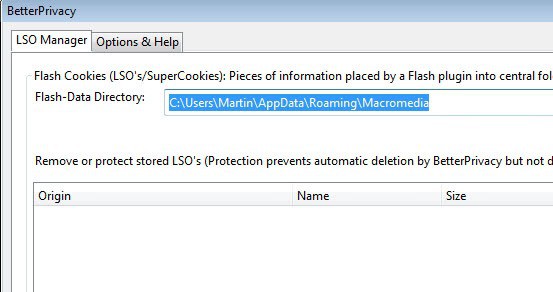
Better Privacy deletes Flash Cookies and DOM Storage cookies by deleting them on every startup. This setting can be changed to prevent the deletion of flash cookies that are needed. Several browser games make use of Flash cookies to save the progress of the player. The alternative option is to delete them manually in the options that are provided by the add-on.
When you run the add-on after installation, by selecting Firefox > Add-ons > Better Privacy > Options, you are presented with a list of cookies currently saved to your system. Here you can remove one, multiple or all Flash cookies right away from the system so that they can't be used anymore by the applications that set them on it. Note that Flash cookies sometimes are used for things such as game saves and that clearing the cookies will remove those saves from the computer, so be careful before you delete them.
You can add cookies to a protected lists so that they are not deleted automatically. The options provide you with preferences to delete Flash cookies on start or exist of the browser, or by timer instead.
Advertisement
















CCleaner as often as possible – that’s what I recommend. One cleaning point for it all!
Martin,
i have deleted everything under #sharedojects, however there are still stuff similar in Application DataMacromediaFlash Playermacromedia.comsupportflashplayersys, please kindly advice, Thanks.
it’s the #sharedobjects folder
there are 2 folder in %APPDATA%MacromediaFlash Player which is #sharedojects and micomedia.com, should i delete both of them ? please kindly advice, thanks.
I knew about their Windows hiding spot, but not this ext. Most appreciated!
Thanks. Just added it to FF.
Same as BillyG. Moreover, using UnH Solutions’ “IE Privacy Keeper” these Flash cookies were already handled.
But it’s true that these “super cookies”, trans-browser functional, are one more of those nasty hidden-because-unrevealed data holders, one more, once again.
Nice pointing them out!
I tend to just visit macromedia site and delete them there,good advice though as you said most people don’t know they exist.