
Open accidentally closed programs again

I think it happens to everyone every now and then that we close a program window that we had no intention of closing. Maybe we just missed the right target, or were simply to fast and could not stop what we set in motion in time.
Whenever that happens, you have to open the program again to continue working with it. While this may not be a problem at times, it can be nerve-wrecking at other times, for instance if you have to repeat a complicated procedure to get to the position or location you were in before the window was closed.
The world is unfair we all know that but there is hope. Gone in 60 seconds is a sweat little program that prevents that programs are closed accidentally. This is done by not closing them directly but by delaying the shutdown for 60 seconds in which the shutdown can be stopped and the program recovered.
The applications disappear and are accessible from the lightning icon in the system tray which belongs to the Gone in 60 seconds application. The application will appear in the state that you accidentally closed it in which means that the data that you might have entered is still there and not lost.
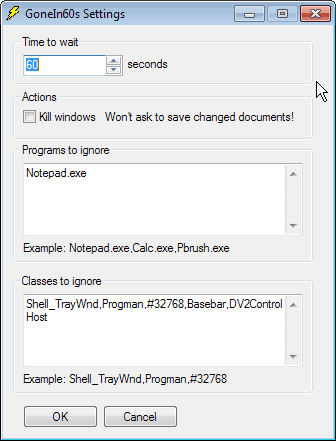
A whitelist lets you close certain applications directly either by process name or by class name. Gone in 60s is a lightweight application from Donation Coder . Those guys rock, check them out !
So how does it work? When you close an application window using the x icon or press Alt-F4, the program appears to be closed just like usually.
Gone in 60 seconds remembers the program on the other hand, so that you can restore it in that time. This is done by clicking on the program's system tray icon and selecting it from the list of closed applications.
Remember that it will only be displayed there for 60 seconds, and that it won't be possible to restore it after one minute has passed.
You can double-click on the system icon to restore all program windows that have been closed on the system in the last 60 seconds.
Advertisement

















Now that’s a great little find! I have a very busy desktop with a ton of windows open and often find myself cursing when I misclick and zap the wrong thing by a few pixels.
Been using this myself for some time now, very handy tool thats got me out of a few jams.
Huh. Pretty cool little blurb about it. Thankfully I’m pretty deliberate on what I close and what I keep open, but good to know none the less.