
Change the Default Windows Explorer Folder

The Windows Explorer default folder is the folder that is shown when Windows Explorer is started on your PC.
This is the My Documents folder if you use Windows XP, the Documents folder if you happen to use Windows Vista, or the Libraries if you use Windows 7 or later.
While most users might find it comfortable that those are the default folders others prefer to work with different folders and largely ignore the My Documents, Documents or Libraries folder.
If you use another folder more often than the default folder, you may want to consider changing the default folder to it as it can save you quite a bit of time doing so as you won't have to switch to it every time you open Windows Explorer on your system.
I happen to be one of them and found a way to change the default Windows Explorer folder. To do that you have to open the Windows Explorer Properties and the easiest way to access those is by opening the Start Menu, All Programs, Accessories and right-clicking on the Windows Explorer entry there.
If you are using Windows 7 or newer, you find Windows Explorer on the taskbar as well so that you can perform the operation on it without having to browse the start menu to do so. You need to right-click on the Windows Explorer icon and then again on Windows Explorer displayed here.
Select Properties from the menu that pops up which should display the windows Explorer Properties.
Select the Shortcut tab if it is not selected yet and locate the Target field in this menu. It should display %SystemRoot%\explorer.exe. Append /n, /e, path to it so that you get a string that looks like this: %SystemRoot%\explorer.exe /n, /e, path with path being the hard drive and folder that you want to display as the default one in Windows Explorer. (e:\ for instance)
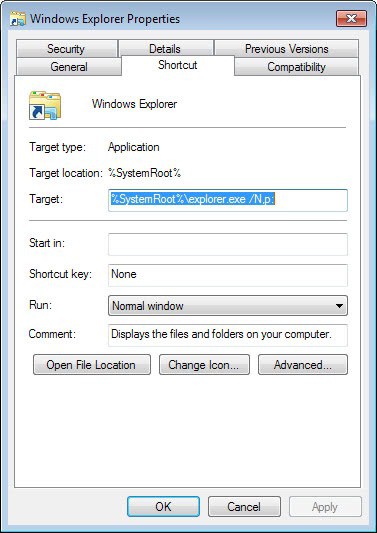
The target field could look like this then: %SystemRoot%\explorer.exe /n, /e, e:\ if you want drive e to be the root folder when Windows Explorer gets opened.
Update: If you are using Windows 7 or newer, try the following syntax instead:
%SystemRoot%\explorer.exe /N, e: to display drive e when you load Windows Explorer.
You can test the changes right away. If everything was set the right way Windows Explorer should now display the folder that you have added in the Target field instead of the default folder.
If something does not work, go back to the target field and make sure everything was set up correctly here.
Update: Here are select system folders that you can make the default folder if you are using Windows 7 or newer.
- My Documents: %SystemRoot%\explorer.exe /N,::{450D8FBA-AD25-11D0-98A8-0800361B1103}
- My Computer: %SystemRoot%\explorer.exe /E,::{20D04FE0-3AEA-1069-A2D8-08002B30309D}














All of these solutions result in an extra instance of the explorer.exe process each time the modified shortcut is used, and they accumulate until you logoff.
A simpler and better solution is simply to replace all of the “Windows Explorer.lnk” shortcuts throughout the system with an ordinary folder shortcut named “Windows Explorer.lnk” that points to whatever folder you’ve chosen.
Here’s a little procedure that does this for Windows 7 and 8, where the replacement shortcut points to the %USERPROFILE% folder. The standard admonition should you try this is to first make a restore point as a precaution.
http://reliancepc.com/menu/tips/Downloads/ReplaceDefaultExplorerShortcuts.zip
Once unzipped, you can use 7zip to look inside the resulting ReplaceDefaultExplorerShortcuts.exe (which is a 7z SFX) and see what it does and that nothing nefarious is inside. BTW, you’ll have to run ReplaceDefaultExplorerShortcuts.exe from an Administrative account, and it will ask for elevated privilege.
Works, but does anyone have a way to select the default directory when you right click on the start menu and select Explore from there… Because this does not affect that… If you have an answer, please email me… Been trying to get this right for years…
Guess most have moved on, but it buged me too
from someones post is the detail I pasted as a guide
The last line works for C;\
When you right-click the Start button to open Windows Explorer, the default selection is a deeply buried user directory under C:\Documents and Settings. My organization is networked to a central file server that stores all our files. We wanted users to default to the server rather than their local computers when they used Windows Explorer.
So, we edited the HKEY_CLASSES_ROOT\Folder\shell\explore\ddeexec registry subkey. If you change this subkey’s default value to [ExploreFolder(“yourNetworkDrive”, yourNetworkDrive, %S)], you force Windows Explorer to start at the drive you specify. Replace yourNetworkDrive with the drive you want. In my case, the drive is mapped as S: on all workstations, so the string on my system is: [ExploreFolder(“S:\”, S:\, %S)]. To present a single-pane Windows Explorer view, you can change ExploreFolder to ViewFolder.
I created a .reg file to automatically change the default Windows Explorer directory. Listing 1 shows this file. You need to change the two S: entries in the file to match your network’s mapping (leave the %S entry as is).
[ExploreFolder(“C:\”, C:\,%S)]
Don’t fight with Explorer, replace it. Somewhere in the range of free A43 and xplorer² and pricey but highly geared Directory Opus is a better product, easier made to behave as one desires.