
Configure Firefox Printing Options

Firefox automatically adds a print header and footer when printing websites which is something that most users may not want.
By default, page title and URL as well as the page number and time / date are added to each page that gets printed. It is not that obvious but it is possible to customize the printout.
One option that may appeal to many users is to disable the header (Title and URL) and footer (page number and time / date) completely. The locations left, center and right can be customized for the header and footer of every printed page.
It is possible to set those locations to blank if you do not want to add information about the page in the printout or configure it to contain any of the following variables: Title, URL, Page #, Page # of #, Date/Time and custom.
Any kind of text can be added in a custom field if you choose that one, the rest should be self explanatory. Besides configuring header and footer options it is possible to configure page margins, orientation, scale and if you want to print background images as well.

So how do you configure the print options in detail in Firefox?
The first thing you do is tap on the Alt-key to bring up the menu bar. Here you select File > Page Setup from the options.
This opens the Page Setup page which displays the same window that you see above. Here is the current version of it (the one you see above dates back six years).
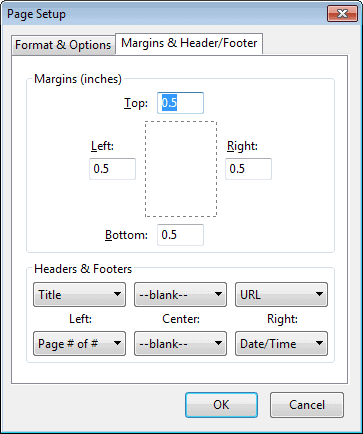
The Margins & Header/Footer tab is the important tab here. Not only can you disable the title and url display in the header or footer of the printout, it is furthermore possible to add information in case you may want that.
If you do not want title or url displayed on the printout, set all three header & footer menus to blank. This takes care of those information.
You can alternatively add custom information, for instance your name or company, or confidential to the printout.
Useful Printing extensions
You can install the following print-related extensions to improve Firefox's print options further:
- Print Hint discovers Print Friendly versions of web pages for you.
- Printfriendly removes elements on web pages such as ads or navigational elements that you usually do not want on the printout.
- Quick Print adds print and print preview options to Firefox's mouse context menu.


















I found an answer here: http://support.mozilla.com/en-US/questions/694950#answer-15676 regarding how to configure for ubuntu (manually)
have the same problem as James Paige (Firefox 3.6.13 on Ubuntu 10.10)
…except when I choose Page Setup from the File menu, I get an extremely simple popup with absolutely none of those options. It just lets me choose printer, paper size, portrait/landscape and flipping.
None of the options for margins and headers and footers are present.
(Firefox 3.6.12 on Ubuntu Linux)
Thanks for this.
PS: Page Setup options can be found under the File menu.
It might seem obvious, but it would help if you said where these options can be found.