
Change the Windows File Sort Order

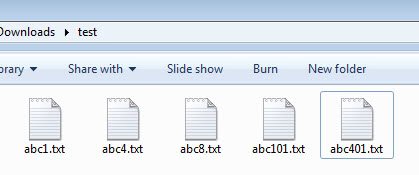
Windows XP (Update: all client versions of Windows share this sort order) has a very confusing way of listing files in directories. Let me give you a small explanation. How would Windows XP sort the files abc1, abc101, abc4, abc401, abc8?
No, it is not like I have ordered them in the last sentence. The default order for those files would be abc1, abc4, abc8, abc101 and abc401. The reason behind this is that Windows XP considers the numbers to be just that which means that 101 is a larger number than 4 or 8.
The logical way of sorting files would be in my opinion to see numerals in those filenames as individual characters as well. This would sort the file names in a natural way like shown above. Windows 2000 has this default sort order and it is possible to enable it in Windows XP as well.
The setting can be edited as usual in the Windows Registry. Open the Registry editor by pressing Windows and R at the same time. This opens the run box of the system.
Type regedit and tap on the enter key afterwards. You may receive an UAC prompt if you are running Windows Vista or newer versions of the Windows operating system. If you do, accept it.
Use the folder structure on the left to navigate to the following key in the Registry:
HKEY_LOCAL_MACHINE\Software\Microsoft\Windows\Currentversion\Policies\Explorer
Right-click on Explorer and select New > Dword from the context menu. Name the new key NoStrCmpLogical. Double-click the key afterwards and changes its value to 1. This changes the default sort order to the Windows 2000 way. If you want to go back to the XP way of sorting files and folders in Windows explorer change it to 0 or delete the key.
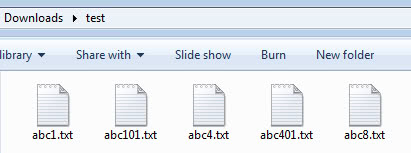
Windows 2000: abc1, abc101, abc4, abc401, abc8
Windows XP: abc1, abc4, abc8, abc101, abc401
Please note that you need to restart explorer.exe, sign out and on again, or restart the computer before the changes become visible. The trick works in all recent versions of Windows.














Used for Win7 64-bit… works perfectly. Thank you, thank you, thank you!
So much for intuitive sort order – files 10-test.txt and 10a-test.txt, which order would YOU sort them in? Now go check what order Windows sorts them in…
It is not there. on my computer the only things under polices are
NonEnum, Ratings, and System. I am using windows xp pro if that makes a difference and I was hoping to get this working but I am unable to follow these instructions.
THANK YOU!!! I was trying to print a group of JPGs out to a pdf file in sequence
This worked for me. It definitely made life easier when trying to sync with my Panasonic camcorder.
Thx Sanctimonious Ape ;)
Santimonious Ape, I accidentally deleted the second comment of you belonging in this thread. It was early in the morning and I thought it was a dupe of the comment in the other post.
I recognized later that it belonged to this one. Sorry for that but I had no way to recover it.
Please be careful with those accusations the next time.
I can see deleting my previous comment if I had somehow been offensive, but other than perhaps causing you some minor embarrassment I cannot see how the action was justified. My comment could have been very useful to Benóný above.
To Benóný: Martin likes to do things “The Hard Way” (TM), and so would rather go through the registry to adjust things. Granted, it is – as he has (sort of) stated elsewhere – a good way to get to learn how the system ticks, but many of us just want to fix the problem and move on. He apparently deleted a post I made here which pointed out a much simpler way to do it, but evidently he doesn’t care for freedom of speech or alternatives being provided to “His Way” (and all that implies).
If by some miracle he manages to get over himself enough to allow this post through, then allow me to point you to M$’ PowerToys collection, which includes the essential “TweakUI” program. TweakUI allows you to adjust the sort order by going to the “Explorer” section and toggling the “Use intuitive filename sorting” checkbox. Get TweakUI here:
http://www.microsoft.com/windowsxp/downloads/powertoys/xppowertoys.mspx
hmm.. still this isn’t working for me *-) I tried LOCAL_MACHINE ,CURRENT_USER and USER and once all at the same time and it still isn’t showing any difference *-)
btw, my pc sorts the 2000 way, maybe I XdN Tweaker or something like that is causing this.
ah, yes I see :)
USER is for the single user while MACHINE is for all users
I’m pretty sure it’s not HKEY_LOCAL_MACHINE, but HKEY_USER\Software\Microsoft\Windows\Currentversion\Policies\Explorer