If you do check your computer for large files that use lots of disk space chance is that you will come upon a file called hiberfil.sys on your main Windows drive eventually which usually has a size of several Gigabytes but may also cross the 10 Gigabytes mark on some systems.
ADVERTISEMENT
The file is hidden by default but you can change that in the Explorer folder options so that it is displayed.
Some third-party programs display it directly, but if you browse Windows Explorer or another file manager, you may not spot it until you make the change and display operating system files by default.
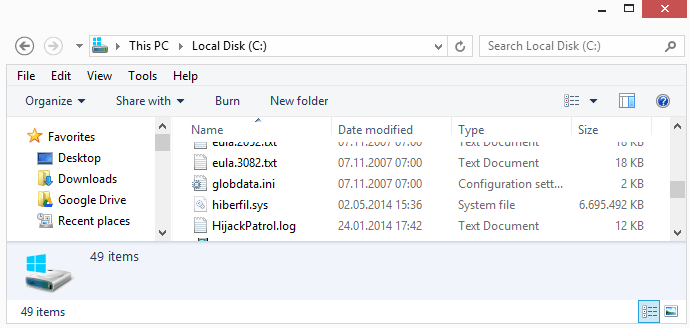
The hiberfil.sys file has a size of several Gigabytes on modern computer systems. On a test system with 8GB of memory running Windows 8 it used about 6.6 Gigabytes of hard drive space. The size depends on the memory that is in use.
Depending on how much memory a system has and how much is in use, hiberfil.sys may be quite large. This has become more of an issue lately again with the rise of Solid State Drives of which many don't offer too-large storage capacities compared to platter-based drives.
Quick questions and answers
What is hiberfil.sys?
Hiberfil.sys is a file that the Windows operating system creates when users select to Hibernate the PC running Windows.
Why is hiberfil.sys so large?
Windows takes a snapshot of the system memory and stores it on the hard drive. The hiberfil.sys file can never be larger than the installed RAM but it can have a size of several Gigabytes.
What is the benefit of using it?
Windows loads the file on the next start so that users may resume their session.
Hiberfil.sys explained
The file itself is used to hibernate the system. Whenever you use Hibernate on your computer, Windows takes a snapshot of the current memory and saves it to disk. This includes the running programs, open documents, windows that are open and everything else of importance.
The main idea behind the feature is to speed up the loading of the session on next start. It was originally designed for mobile PCs such as laptops but can also be used on desktop PCs.
The file may be as large as the total amount of RAM installed on the computer, but is usually less on modern systems thanks to compression used by those newer versions of Windows.
The file is large and while it has its uses especially on mobile devices, you may want to consider disabling the feature especially if you are using a desktop PC and don't make use of it regularly or at all.
The best way to delete hiberfil.sys is to disable the Hibernation feature so that so that the hiberfil.sys file is not created at all and Hibernation is now longer an option on the system.
The feature is enabled in most notebooks sold and can be easily deactivated but before we tell you how to do so, we need to mention the consequences that disabling hibernation may have.
Consequences
If you disable Hibernate, the functionality is no longer available. You can switch to any other power state though, which means that shutdown and sleep mode are working just like before.
The only other effect is that you free up several Gigabytes of storage space on your hard drive as hiberfil.sys gets deleted in the process.
Disable Hibernate feature on supported versions of Windows
When you disable Hibernate, the hiberfil.sys file will be automatically deleted. To do this on all supported versions of Windows, do the following:
Tap on the Windows key to bring up the Start menu on your version of Windows.
Type cmd.exe, hold down Ctrl and Shift, and click on the result. Alternative: right-click on cmd.exe and select run as administrator.
This opens an elevated command prompt. Verify this by looking at the title of the window: it should being with Administrator.
Type powercfg -h off.
Note that you don't get a confirmation that Hibernate has been turned off on the system.
This turns off Hibernate on the system and will delete the large hiberfil,sys file on the PC as well freeing up space in the process.
If you need Hibernation simply run the same steps outlined above but use powercfg -h on instead as the command as it turns on the feature again.
You will notice that Hibernate is no longer an option when you select shutdown on your system, but that should not be a problem if you never used it anyway or can live without it. It is always possible to restore the functionality using the -on parameter
Change the size of hiberfil.sys
System administrators may set a maximum size for the file on Windows. It is possible to reduce the size by up to 50% but doing so may lead to issues if the used memory is larger than the selected size.
Use the command powercfg -h -size 50 to limit the size to 50% of the installed RAM. You can use any percentage number from 50 to 100 to set the size but can't go below 50 or above 100.
Again, it is usually not a good idea to limit the size of the file as it may lead to all kinds of issues.
Compression
Modern computer systems come with more memory usually and this led to an increase in the size of the hibernation file on Windows PCs. To avoid hiberfil.sys files with a size of 16 or 32 Gigabytes, Microsoft introduced compression to keep the size as low as possible but without sacrificing system startup speed.
Keep in mind though that Vista and XP do not support that new feature, and that you might see a very large Hibernation file as a consequence.
Summary
Article Name
How to delete the large hiberfil.sys file on Windows
Description
The hiberfil.sys file is one of the largest files on a Windows system. This guide walks you through the steps of deleting the file, and explains the consequences of doing so.
Can’t we just adjuest the size of hiber.sys at all? I need my system to be hibernated every now and then. hiber.sys is taking 2GB of my HDD space. there should be a way around for it.



















skas since it depends on the amount of RAM installed on your computer you cannot change that value.
Can’t we just adjuest the size of hiber.sys at all? I need my system to be hibernated every now and then. hiber.sys is taking 2GB of my HDD space. there should be a way around for it.
Thanks you so much… I have been looking for a way to clear up some extra HD space for my pc. This did the trick!
In my computer (or Windows XP russian edition) have not “Power options” and hibernate tabs. Your help not work