
Fast Access to Firefox Extension Options

Many Firefox extensions that you install can be configured by accessing the Tools > Add-ons menu and clicking on the Options button next to the extension that you want to configure. This is not an elegant way if you have to change options frequently. That is probably the same thought that James R. Skinner had who developed the Firefox extension 'Options Menu'.
Options Menu adds all extension options in Tools directly and supplies a toolbar button as well which can be added to the toolbar. The toolbar button is probably the better choice for users who access the options regularly. Clicking the button displays a list of all Firefox extensions that can be configured.
Update: The add-on has not been updated since 2009 which makes it incompatible with recent versions of the Firefox web browser. There is however an alternative available that is receiving regular updates.
Extension Options Menu provides more or less the same functionality that Options Menu offered back in the days. You need to customize the Firefox browser after installation to move the icon that it adds to it to one of the browser toolbars.
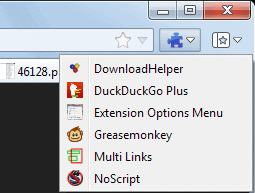
The easiest way to do so is the following:
- Press the Alt-key on the keyboard to bring up the menu toolbar in Firefox.
- Select View > Toolbars > Customize from the selection.
- Locate the Extension Options Menu icon in the customize window and drag and drop it to a location that you want it to be accessible in.
A click on it displays a list of all installed extensions, and a click on one of the add-ons listed here opens its preferences right away.
You can alternatively access the menu by tapping on Alt and selecting Tools > Extension options from the menu, or from the browser's titlebar menu.
Using the extension saves you a couple of clicks that you would have to make to access the preferences of one of your installed extensions. It is a useful shortcut for Firefox users who change preferences of one or multiple extensions of the browser a lot.
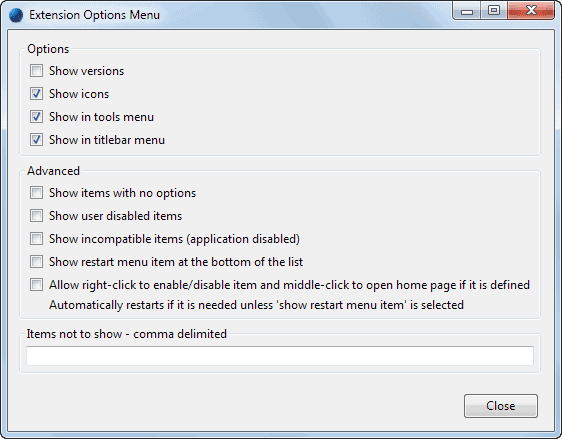
The extension itself makes available a couple of interesting options. You can hide extensions from the dialog so that they are not shown anymore, select to show disabled extensions as well, and also to choose extensions with no options.
Advertisement

















Oh, Please. Just add the “All-in-One” Side Bar Extension and you will have all the quick access to your Firefox Extensions you will ever want and so, so much more. It adds the same quick access to your Themes, Recent downloads, Bookmarks, Recent History, Web site Source Code and Browser Information and Extensive Information on the loaded Web Page. ” AND” All under one consistent easy user interface and if that’s not all, multiple ways to have your side bar be controlled – appear and disappear, plus manual or automatic functionality Oh, Please!!!!! – if you never add another Firefox Extension THIS IS THE ONE!!!