
Check if you Firefox speed tweaks are still active

I recently read an article about Firefox tweaks that would speed up page loading time by changing several settings in the about:config dialog. I knew those tweaks existed but decided to take a look if my settings were different from the ones mentioned in the article.
I found out - to my big surprise - that I was running Firefox with the default settings and not the tweaked settings. I had the feeling that Firefox was running slower than before after the latest update but I was not able to determine the cause, until now that is.
I suggest you take a look at the following settings as well and see if you are using Firefox with tweaked settings or the default ones. If the latter is the case I suppose you change the settings to the same values that I changed them to, again.
The settings must have gotten reset somehow. I'm not entirely sure if this happened during an update to a new version, through the use of an extension, or other means.
Firefox Speed Tweaks
You need to open Firefox's advanced preferences dialog first:
- Type about:config in the browser's address bar and hit the enter key afterwards.
- Confirm that you will be careful if this is your first time here.
- Type the name network.http.pipelining into the search form on top.
- The default value is set to false.
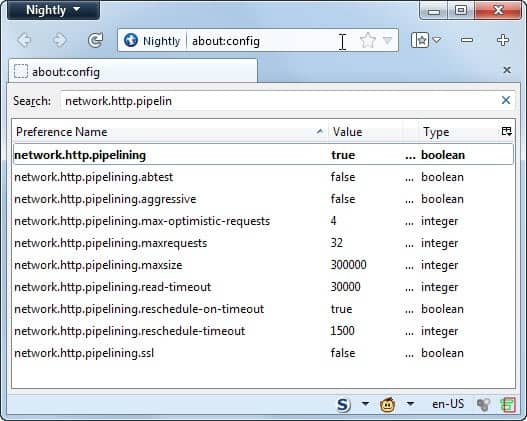
Optimized settings have the preference set to true. Double-click it to do so. Note that while this may speed up the performance in the browser, it may cause loading issues on some servers. It is best to check this out for a while to see if you are running into issues. If you are, set the preference to false again.
After that search for browser.turbo.enabled. If no result comes up you don't have that setting yet. Right-click the blank space and select New > Boolean from the menu. Name it browser.turbo.enabled and set it to true.
If you happen to make a mistake, e.g. create a String with the name browser.turbo.enabled, you can correct it by navigating to your Firefox profile folder to edit the prefs.js file by hand. Just search for the line and delete it. Close Firefox before you edit the file as the changes won't stick if you have it running in the background.
If you are connecting to a proxy server that tunnels your traffic, then you need to modify the Network.http.proxy.pipelining preference instead. Just double-click it to set it to true.
Advertisement
















Martin puts his heart and soul into this service. If you have so little regard for what he has to say, why do you watch for things that you disagree with?
Why not respect the man for what he does? If you disagree, I’m sure there are more constructive ways to add value to the mix.
Setting maxrequests higher then 8 will not slow you down, the reason is it will default to 8 if set higher even if it says 30.
Browser.turbo.enabled Is empty, It does nothing, it used to be a feature that would help open the browser faster, but for whatever reason, it became outdated and unnecessary. Creating it and/or Enabling it does nothing.
I’m so sick of people who don’t know what they are talking about displaying wrong info about this everywhere. This is a message to the internet… Get your facts strait or don’t bother.
Concur that setting higher than 8 in network.http.pipelining.maxrequests does indeed do the opposite and slow down access to sites instead so have it at 8 now and all back to normal.
Yeah, setting it higher than 8 doesn’t do anything: http://egonitron.com/2007/05/25/the-truth-about-the-firefox-pipelining-trick/
Unless you’re using a really old version of Mozilla Suite (now Seamonkey), browser.turbo.enabled has no effect. On Mozilla it preloads some libraries when windows boot so the application itself seems to launch a bit quicker.
Firefox preloader / quickstart for windows:
https://sourceforge.net/projects/ffpreloader/
I concur,
All this FFox settings tweaking just strains servers.
There’s no use in using anything higher than 8 in network.http.pipelining.maxrequests. See http://kb.mozillazine.org/Network.http.pipelining.maxrequests#Possible_values_and_their_effects