
Got Space, Display Detailed Drive Storage Information

Windows users who want to find out how much free space they have left on local hard drives, mapped drives, removable drives and substituted drives will notice that Windows Explorer is less than ideal for the job. The default system file manager displays a drive's capacity and free space in Gigabytes in the Computer menu.
Hard drives and network locations are separated in Windows Explorer, which is handy most of the time, but not if you want a quick drive space overview.
And Gigabyte listing may sometimes be problematic, as you may need Megabyte or even Kilobyte listings sometimes (does the 2074 Megabyte file fit on the drive that is showing 2 Gigabytes of free space?)
Got Space is a portable software program for Windows that displays detailed drive storage information in the program's main window.
The program lists all drives, their capacity, space used, free space and percentage of free space in the interface. The program scales between Gigabyte, Megabyte and Kilobyte automatically.
The drive type is listed in the interface as well, with options to hide select types of drives in the program options.
Totals lists the total number of available storage, free and used space, as well as the percentage of free space on all connected drives.
Got Space hides floppy and optical drives from the drive listing by default. The Show/Hide Drives section of the sections has options to enable the listing. Here it is furthermore possible to hide network drives and removable drives.
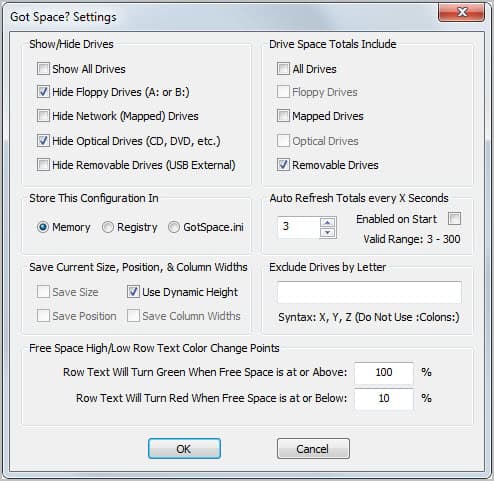
Indicators are available that display drive with a certain amount of free space in green (default 100%) and drive with a low amount in red (default 10%). These thresholds can be changed in the program settings.
The settings are also the place to exclude drives from being included in the drive listing, to change the storage location of the configuration file (by default memory), and to change the auto refresh interval.
The Tool menu displays options to map and disconnect network drives, create subst drives and to open the operating system's disk management console.
Got Space is a useful portable software for the Windows operating system. It is compatible with 32-bit and 64-bit editions.
Advertisement

















SpaceSniffer as well!
The best tools for this are :
Portable WinDirStat
Portable GetFolderSize