
Firefox To Get Redesigned New Tab Page

When you open a new tab in the Firefox browser you end up with a blank page starring back at you.
Other browsers like Opera or Google Chrome display popular sites or bookmarks on the new tab page to provide users with quick access to often used web services and features.
A recent Mozillawiki entry highlights plans to integrate a redesigned new tab page in the Firefox 9 web browser.
The aim of the new tab page is to "help users complete their next task". The team has identified several requirements which the new tab page has to meet. This includes to load the information instantly, to offer configuration options and to "not embarrass the user".
For the simplest version, the team has the following requirements:
- Show a grid of top 9-16 sites when opening a new tab
- Responsiveness of new tab shouldn't appreciably decrease
- It should be possible to remove sites that show up in the list
- It should be possible to rearrange the list
- It should be possible to manually add a new site to the list
- When opening a new tab using keyboard shortcuts, we should visually de-emphasize the grid. (Current direction: desaturate colors to black & white, fade in colors if mouse is being used)
The latest design dates back to May 2011. It features a search form, web apps, top sites, Firefox quick links, weather and news.
Update I picked the wrong new tab page design. Below is the correct image. You can get more information here on this page:

Part of the layout looks very similar to how Google had implemented the new tab page before. The question is this: Does it make sense to display that many information on the new tab page? The answer depends on the customization options of the page. It would not really matter if users can remove features that they do not want to use. At least some of the elements of the mockup come with an X icon to remove or hide the feature from the page layout.
Mozilla has actually been working on a new tab concept for quite some time. Aza Raskin for instance posted a new tab specification for Firefox 3.1 or a prototype add-on that was released by Mozilla around the same time.
Firefox users furthermore have a plethora of add-ons at their disposal to turn the blank new tab page into a feature rich page. Popular add-ons include Speed Dial, Fast Dial or New Tab King.
It might make sense from a development perspective to look at those add-ons to see what is high in demand and what is not. The most important aspect for me is the ability to keep a blank tab page if I want it that way. (via)
What's your take on this upcoming feature?
Update: The new tab page looks like the following in recent versions of the Firefox browser (used Firefox 39 to take the screenshot).
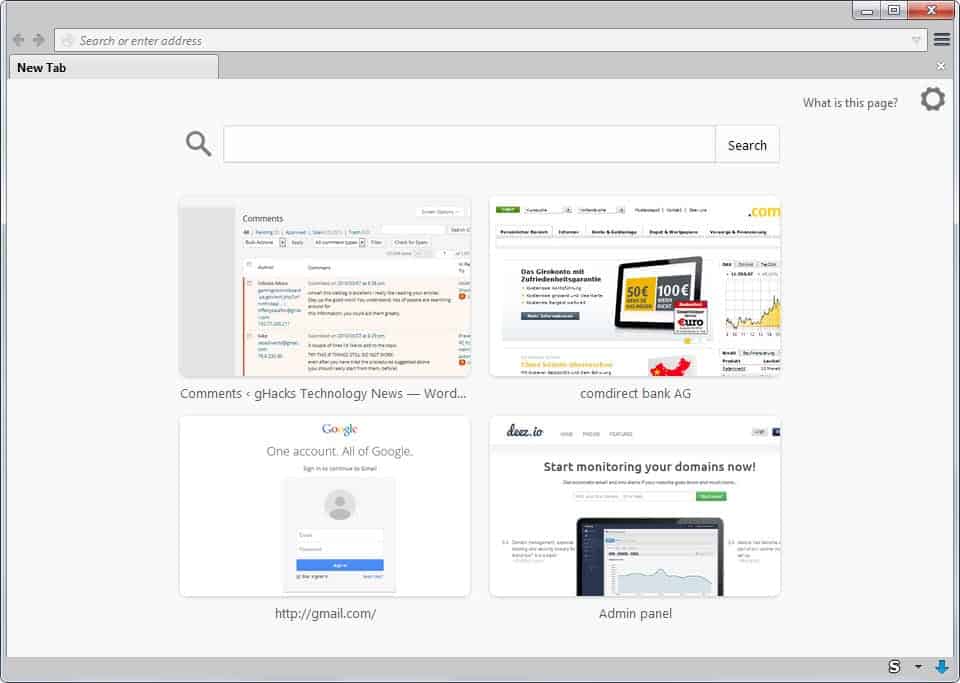
It features a search at the top and a selection of sites represented by thumbnails below that. It is possible to remove sites from the
Advertisement

















I use Fast Dial for my Home page. What I like about Fast Dial that none of the other alternatives have, is the ability to have tranparent backgrounds in the dials for icons. Here’s my setup: http://i.imgur.com/WzI7f.jpg
I use Firefox and Opera, but today i came to work thinking in concentrate only in Firefox, and the principal thing i gonna miss from Opera is the Speed Dial. I know Firefox had some Add-ons wich do this, but i will need to do a research. Now, is everything here. So thank you.
A “New Tab” page other than blank is pertinent, I think, as long as it stays simple, unless it be an add-on. I use at this time an add-on which moreover IS simple (less than 60KB) and as such could contribute to what a Firefox built-in “New Tab” could be, could look like. The add-on is faster, smaller, much simpler than its competitors; I’m referring to “Super Start” ( https://addons.mozilla.org/en-US/firefox/addon/super-start/ ), slightly more than basic, far less than bloated.
I also open to a blank page with a new tab and the browser it opens immediately.
I really dislike the bi-weekly firefox version releases.
I have Firefox launch opening to a blank page for speed.
I use a script I use to display a custom image and
the performance hit is nill and I like it that way.
I will be passing on this new blank page even
should I need to hack it to what I use now.
This is Home Page picture, New Tab Page mockup is this:
http://people.mozilla.com/~faaborg/files/20110610-homeTabNewTab/newTab-i1.png
It is very simple and no clutter with tiles, so I think performance hit will be very minute.
You are correct. Edited the post. Thanks.
No need to Thanks. You are my favourite blog writer…
Ha! As I predicted, they are starting to scrape the bottom of the barrel looking for things to add to each new rapid release. This is a waste of resources.
I rather like the blank new tab page. The main reason I switched back to Firefox from Chrome is because opening a new tab in Chrome requires lots of memory, especially I always open tabs like crazy (50, 100, or more). The new tab page in Chrome therefore opens very slow. In contrast, Firefox opens a new tab page under the same condition without any slowdown (with BarTab extension installed).
I’m using and I’ll use some kind of Speed Dial anyway
you write an article about the new tab page but show a picture off the home page (witch isn’t implemented yet)
You are right, corrected.
If they can store this data in the cloud and have some sort of login thing to use in Mozilla anywhere it would be even cooler:)
You can actually do this via Firefox history Sync.