
SUPERAntiSpyware Professional Review

SUPERAntiSpyware is a software application for Windows that can detect and remove malicious software and other unwanted software and bits of data from the system. This includes spyware, trojans, worms, rootkits and other forms of malware that may land on the system.
It is made available as a limited free version and a professional version. Both versions offer the ability to quickly scan all hard drives and memory for issues to remove those found.
The free version can be used to run scans manually, while the Professional version adds real-time detection and other features which improve security significantly.
The program is best used in addition to resident antivirus software, and you should not run into any compatibility issues while running it and other security software on your system
Installation
The installation of SUPERAntiSpyware Professional is straightforward. The installer does not include any unwanted software and you can choose to install the program for the current user or all users of the system.
SUPERAntiSpyware Professional Review
Note: We have used version 5.7.1008
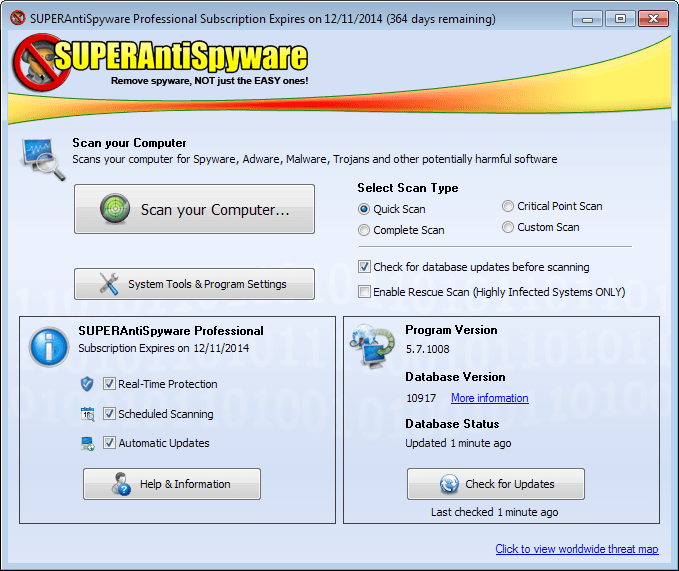
The main interface of the application provides you with the means to run various system scans. Supported are the usual quick, custom and full scans, as well as a critical point scan which analyzes high profile targets of malware on the system.
Here you also find information about the program and database version of the application, and when the database was last updated.
If you are running SUPERAntiSpyware Professional, you will also see when your subscription expires, and which Pro modules are enabled.
Last but not least, you find a link to the program's tools and settings here as well.
A quick scan or critical point scan should not take longer than one or two minutes on most systems. A complete or custom scan on the other hand may take some time. If you select complete scan, you can still select the scan locations and make other modifications to the parameters before it is started.
Scan Options
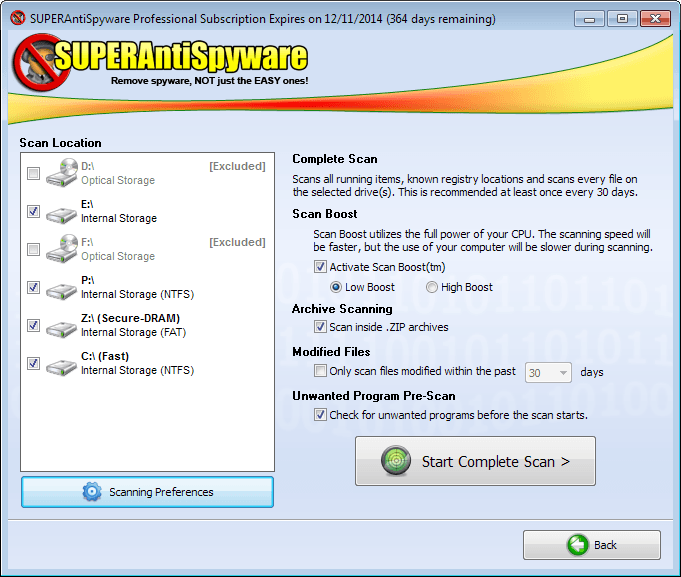
- Select the storage locations that you want scanned.
- Scan Boost can be enabled to speed up the scanning. It will use more processor cycles if you enable the option.
- Whether archive files (only zip) should be scanned.
- Modifies files scan, to only scan files modified with a certain date range.
- To scan for unwanted programs.
In addition to that, you can open the scanning preferences which display a large list of scanning related options.The program will for instance only scan files that are smaller than 4 Megabytes, and will also ignore non-executable files.
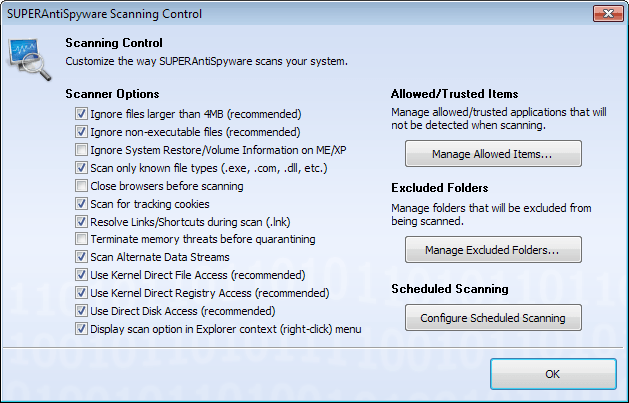
Here you can also add items to the trusted items list, and exclude folders from the scan.
The Custom Scan on the other hand offers a different set of scanning options. You can select to scan the memory, Registry, Startup locations and cookies, and add folders (drives too) to the scan.
Benchmarks: A complete scan with low boost priority took 36 minutes to complete on a system with a single 128 Gigabyte packed Solid State Drive. A quick scan on the other hand completed on the same PC in less than 2 minutes.
Threats are displayed immediately while the scan progresses. You find them listed in categories such as Adware.Tracking.Cookie for example, and can click on the plus icon in front to look up all file names and paths of threats that have been found.
The report after the scan divides items into threat categories, with critical threats displayed at the very top of the scan results.
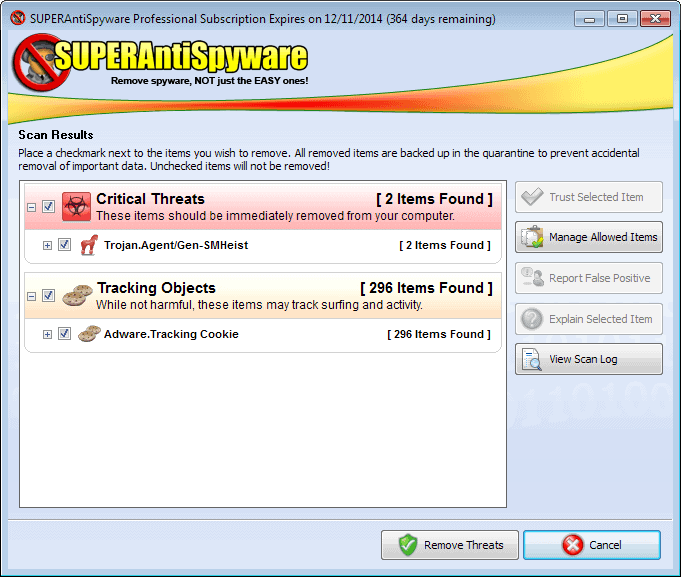
Here you can remove all, some or none of the items found during the scan. False positives can be marked as trusted, so that they won't be detected again in future scans.
Another option to deal with false positives is to report them to the developer of SUPERAntiSpyware.
System Tools and Preferences
The application ships with a set of tools that you can make use of. The majority of tools are related to malware in one form or the other. The tools are divided into control panel tools which provide access to scan related preferences and program features, and system tools, which are additional helpful programs.
- Quarantine to view and restore files and data that has been quarantined.
- Task Scheduler to schedule scans and updates.
- Scan logs to access detailed logs of past scans.
- Real-time detections to access the history of the feature (listing why, which and when items have been blocked by it).
- Persistent file removal to delete detected files permanently.
- Repairs to fix Registry errors and damage caused by malware.
- SUPERDelete to remove files that cannot be deleted by normal means.
- Uninstall Unwanted Programs to remove so called PUP software from the system (like browser toolbars).
- Submit Samples to transfer samples of potentially malicious software to the developer.
The addition of these repair tools makes sense, as they can help you restore functionality that was either removed completely by malware, or at least damaged in one way or the other.
Especially the Repairs are worth a closer look. You can use them to re-enable features such as the Task Manager, System Tray or Run on the start menu, to fix broken Internet connections, or remove screen savers.
While it does ship with options to reset the home page of Internet Explorer, it is limited to that browser which is unfortunate.
You find the program preferences in the menu as well. You may want to go through them at least once as they include several interesting options.
It is possible to configure the program to start a specified scan right on start, enable HiJack Protection to prevent the changing of Internet Explorer's home page, and whether you want to install program updates automatically.
SUPERAntiSpyware Free vs. Professional
SUPERAntiSpyware Free supports the scanning, detection and removal of threats on Windows systems. It also supports the option to add trusted items and folders to the program that won't be scanned by it.
The professional version of the software adds several important features to it.
First, it supports real-time blocking which means that it can detect threats while they happen, and not only during scans like the free version offers.
In addition to that, it supports automatic updates, gets updates more frequently, protects your Registry against browser hijackers and other threats, and will scan your system on start in over 50 critical points to make sure nothing has slipped by its defenses previously.
Verdict
SUPERAntiSpyware is an easy to use program that is best used in addition to other security software that you run on your system.
While its malware detection may not be good enough if run alone, it does add an additional layer of protection on systems that run other antivirus software. And since it has been designed for that very case, you won't experience any issues doing so.
The tools that ship with the program, especially the Repair tools, are helpful, as they can restore functionality on the system that was altered by malware.
Advertisement













Why? Why does a review of anti-malware that is FIVE YEARS OLD– with equally old comments, topped off with a question from 2014, answered by author August 2017– appear your current webpage? Confused. My (duk.go) search was for reviews of SuperAntiSpyware. I ASSUMED the results would be recent reviews- at least those near the top, like yours. Do I have to include a date range as a search term? Or am I misguided, thinking time-sensitive items like anti-malware product reviews should be archived as the products themselves become obsolete? Suggestion: I just went to another result, from Softpedia,& there’s NO date on their review or any of the other items on that pg.I had to delve into some of the links in the article to find their excited hyperbole was from 2014. I’m starting to think this AV product N’EXISTE PLUS–right? / As usual, none of the search items in the list itself have DATES on them. Now why is that? Would that not save all of us a lot of bother? I guess I just answered my own question. /Suggestion: In future, top of such an article, add note, e.g. Dear hapless seeker: any further reading is solely at your leisure or as an archaeological undertaking: this product doesn’t exist anymore.
I purchased SUPER Anti Spyware Professional last year. The price was one half because I wasn’t going to renew. A quick scan always found 500 to 600 malware and a complete scan would yield over 700. I renewed two weeks ago for the full price and now finds a dozen or less. My browsing habits haven’t changed but the scan results have, Does SUPER Anti Spyware Professional find malware that is not there?
Past
I purchased SUPER Anti Spyware Professional last year. The price was one half because I wasn’t going to renew. A quick scan always found 500 to 600 malware and a complete scan would yield over 700. I renewed two weeks ago for the full price and now finds a dozen or less. My browsing habits haven’t changed but the scan results have, Does SUPER Anti Spyware Professional find malware that is not there?
Past
Depends on what it finds. If it includes cookies for instance, the count can go really up.
This tool is for free or i must buy for money ?
I use the free version as on demand scan, so if the pro. version is better than the free i want to win one .Please count me in.
Merry Christmas.
I’ve been using the pro version for years now and the extra differences are definitely worth paying for. The program and defs are updated regularly which gives me piece of mind. Think I paid about $20 for this for a lifetime license. I do have malwarebytes installed too just as another line of defence but SuperAntispyware Pro is just as solid and reliable imho.
I have been using the free version regularly wondering if the Pro version is much better.
Thank you and Merry Christmas
Thank you for the pro version of a freeware I have used for years.
To be honest, I wasn’t even trying or expecting to win, though it was a great suprise.
Thank you SAS and Martin
-Xmetalfanx
I have used SAS for years. I bought the pro version long ago. However, my husband could sure use his own copy!
would love a license for this awesome program!!
Was just reading reviews about this today. This would make an appreciated addition to security software. Tks for the chance.
thanks for sharing this and count me in for the license :)
count me in, Martin!
Awesome Christmas gift.
Best anti malware solution in the market.
Want it!
previous winner awhile back, loved it. fingers crossed and hoping to win again.
Count me in.
Looks great.
Thanks
Oh MY dang! This sounds exactly like what I have been searching for to help ME fix my 74yr old mother’s 2nd generation Windows Media laptop, running XP.(and trying to explain to her why exactly she should either spend hundreds of dollars on a new laptop, pay for the Windows 8 update, or 7, or at least get the poor pitiful PC cleaned and checked out, is a mute point.) So, my beloved Mother, who is the kind that saves condiments to squeeze into almost empty bottles of what-have-u and washes out aluminum foil to REUSE, nominates me for this task. I absolutely Love everything about Tech and can’t learn enough about it, however, I am pretty new to it all as of last October, so I have been struggling with fixing this decade old computer with ALL of its previous owners data.(Mom only uses it for her email and to get the “Prayer Chain” ready for her church. So I was not surprised when I ran Malwarebytes and it found 3 Trojans and 2 viruses. She’s had the computer herself since 2009 and I also find out she has no clue What WiFi is, so of course that’s never been secured either. There are So many programs running at start up and I just know there are tons of wrong configurations and connection problems that I haven’t found out about yet. My problem has been not wanting to just let something fix it but to learn about it as I go…and this SuperAntiSpyware program sounds like it’s got plenty of details to help me with that! Everyone on here has said how great the free one is, so I will definitely try that! I love u guys site and have been subscribing to ur email for awhile now…y’all have helped me out a ton on many occasions. Thanks so much!! And I hope u guys have a Merry Christmas! Much ♥ and respect…Julie
I like it, 5 staras
I started out using the free version years ago and a couple of years ago I signed up for the Pro versions for our desktops & laptops. The pro version provides a lot more functionality to help protect your PC and I will keep using the Pro versions. The program does a good job of finding malware and preventing infections in addition to several other programs that I use either as full versions that operate in real-time or as free versions that I manually scan about once a month. I definitely recommend SuperAntiSpyware Pro. Thanks for the giveaway, as I could use another Pro license for another laptop,
I have been useing the free version for over two years now and has it saved me at different times it is some I use every day to scan for malware and spyware got caught a few times with file items that could have been nasty but Super Antispyware found and removed them. I would love to have a copy of the full version to see the differances. Thanks for the oppertunity to enter the draw.
Please count me in. Great program and great giveaway. Thanks
Please count me in. I need this :)
Marvelous, absolutely marvelous!
I would like to try SAS pro version with the repair function and the real time blocking.
Thanks
Throwing my hat in the ring! Er, something like that. ;)
Thanks for the chance.
Everybody needs software like this, count me in for the contest.
I am using SAS free version.
Thanks for the giveaway.
I have tried this program before and think it’s great. Would love to buy it. I am a disabled veteran I have to watch my spending on a limited income. I have no spyware program installed and have been looking around for a free one I trust. I love your program.
Great program. Thanks for the offer. No chance of winning though:)
Thanks Martin, another informative review and generous giveaway.
hello SIR,
Count me in this giveaway , i need this software. I have used iobit malware fighter pro and malwarebyte anti malware freeware but sometimes it undetects trojan and virus. S.A.S has got good reviews in the CNET. So, i want to try this.please remember me
its good choice .
Je tente ma chance
Count me in, Thanks.
Merry Christmas !
thanks
Love the website thank you for the chance.
This is one of the best. It never let me down.
I love this software.
thank for the giveaway please count me in too!
thanks for the chance…
hvala puno, thank you verry much,
muchos gracias
I am in, thanks in advance :)
I’m in thanks
I use the offline scanner and would like to have Real Time Protection. Thanks.
This (free version or Pro) is the only malware scanner I go out of my way to recommend other then Malwarebytes… NEITHER ARE anti-virus replacements though they are a great addition to your anti-virus for protection
-xmetalfanx
I have used the free version of this software, but I’d like to try the professional edition out…
Looks like an amazingly handy program. Please count me in for this giveaway. I want a license!
thx for the review…
I would like to win a license to complement my AV to protect against any threats. Thanks.
Awesome giveaway. Count me in
A definite addition to your arsenal of weapons against malware, spyware, trojans, etc. In todays defense against cyber attacks, one can never be to safe and could use all the help made available. This is a needed must have piece of software.
Great giveaway, thanks.
A one year valid licenses of SUPERAntiSpyware Pro would be excellent.
Good luck to everyone.
Vietnamrum
Been using free version for years.
Excellent Product
Please count me in
I use this with Emsisoft emergency kit.
I would love to give the paid version a try as i’ve had good luck with the free version
Love SuperAntiSpiWare, it works well with Nortons to keep my system spyware free!
I have had this for a yr. and let it expire, I ran it then “HitmanPro” and Super behind it or vice -verse and they always found something else. I’m still waiting for the 3 machine offer. Put me in the drawing. thanks
I have used the free version for years, great program.
Thx for the chance to win the pro version, good luck all.
please count me in too. thank martin!
I want SUPER thank you.
I really need this software to clean up my computer as a Christmas gift
Haven’t tried the professional version – although I’m well aware that many professional technicians swear by it – but the freeware v. has long been part of my non-real time AV supplements (Malwarebyte’s MBAM/Safer Networking’s Spybot Search & Destroy/Support.com’s SUPERAntiSpyware being the Big Three of first-echelon malware troubleshooting, imho). Another informative article, thanks!
Thanks for the giveaway.
Man I’d forgotten about this program, remember liking it though.
Thanks. I would like to try this.
Been using the free version, would be great to try the pro version
Would love a pro license :-)
Coolness – Bring it on :D
I think i tried this many years ago so considering i am only running AVG at the moment it wouldn’t hurt.
Thanks for the giveaways.
Please count me in. I really need it.!
For me there is no better than Malwarebytes. Can I have a copy anyway?
Would love to finally try the Pro Version..
Excellent software. It often catches malware that Malwarebytes misses. Count me in.
Please count me in. I really need it.!
Great giveaway. Count me in!
A pro version would be nice to have. Do toss my name into the hat. Thanks to you, Martin and SAS.
I want Pro because the Free i am using it now!
Great giveaway, thanks Martin!!
Even the FREE version is very good, but having the additional cool feature to protect the Windows Registry in real time against browser hijackers is definitelly a big plus.
Please count me in!
i am using the free version of superantispyware i would like to have & use the pro version for free for awhile it just got updated to 5.7 a few days ago i have been using it for free for a few years along side malwarebtyes & a antivirus too of course hope i win a copy of this new version of superantispyware great anti malware too to stop & remove any malware other security software i use miss or cannot find
Count me in
Good stuff!
Have been using pro version for three years now, would not be without it. Thanks Martin.
Hi there
Thank you Martin and SAS for managing this great giveaway.
I’m currently using SAS free v 5.6.1042, I see you tested the latest v 5.7.1008, just released.
I find Superantispyware free very effective and fast.
Please count me in.
Cheers
This is the good antispyware for the pc.Thanks you
Please count me
Anti spam is always useful.
For anyone who hasn’t tried it, this is a useful program. I’m running MalwareByte’s Antimalware as well as Microsoft Security Essentials and I periodically also scan my system using SuperAntiSpyware. I appreciate the fact that this program has been designed to be able to work in conjunction with other anti-virus / anti-spyware programs. I’d appreciate being entered into the draw for one of the 1 year licenses for the pro version. Thanks
Merry Christmas to all, and to all a good byte!
Thanks for the great giveaway.Count me in
Thanks for the review.
This sounds like an excellent solution to my problem.
I’m looking for a good anti-malware program that I can use to efficiently clean up my in-laws computer this weekend? I’m willing to pay for the software, if it saves me time. My in-laws and parents aren’t the most computer savvy, and end up clicking on toolbars and picking up crapware as they surf. Every few months, they complain to me when their system bogs down. I head over and spend two hours of my weekend uninstalling a dozen pieces of shovelware through the Windows Control Panel and rebooting over and over.
Thanks for the review and your great feed in general.
Please enter me in this contest… Thanks !
essential bit of kit.
on the free version the only fault (if you can call it that) is not giving that much info to the “not-that-tech-savvy user” on the remove unwanted programs option.. Yes it will name item and help you remove, highlighting registry keys involved, but not, for example, clearly say date installed or the likely parent software it came with (e.g. other programmes installed on that date) which might be a handy thing to know to avoid getting it again. A small point to mention but something that could improve it a bit I think.
Thanks for the review, Martin. Please… Count me in!
Cheers;
Lello.
SuperAntiSpyware Pro is the best antispyware tool which will always keep your system safe by detecting and remove those malicious softwares and unwanted softwares and is on realtime basis.
Please count me in this Giveaway.
Many Thanks to Martin for arranging and organizing this Special Giveaway.
Love to try it also.. Can’t wait to install it on my pc already..
I use the free version and provides a nice peace of mind. Would like to have the Pro version. Please count me in!
Thanks and Merry Christmas
Would love a chance to try the Pro version. The free version has always been solid.
Please count me
thanks for great giveaway .
count me in too .
Count me in! Thanks!
yes, would like to try this product!!
I like what I see here. I would like to put this software to the test.
Wow, another Christmas Giveaway! Thx Martin.
Speaking of which, I have 2 questions.
How many contests are we allowed to enter / win?
I noticed on the first screen shot that there is a subscription expires countdown on the window title bar. Is the free version or the pro version limited to 1 year. What exactly do we win?
I use SpywareBlaster since 2011 and would like to test a new program in order to keep my pc away from all kind of malware.
Good luck to all
I don’t know much about this antispyware solution and want to test its productivity as reviewed above and see what more it can do when an antivirus suite and windows defender can’t , provided , if I win one license.
Please count me in.
Siddhartha.
Thanks for the review and giveaway.
please count me in!
Great giveaway, count me in, please.
Best regards!
Count me in 2.
I have use the free version of this software
Count me in
I sure could use a good anti-spyware application
Good security software. Thanks.
I have used the free version often. Would love the pro version.
Had not heard of this program before now. Looks interesting. Good review. I must check it out. A Pro licence would be greatly appreciated.
Thanks.
Tom.
I have used the free version of super for several years and found it very reliable. Would love to have the Pro version.
Thanks for this Awesome Giveaway.
Please kindly to count me in..
Good security software. Thanks.
I would love to try the pro version not used one of these programs before
Using SAS for a longtime. Count me in please :)
Super Christmas Giveaway!
Count me in
thanks
I hope I win. Thanks ghacks!
Sad that they no longer have portable version.
BTW.I love water so I has to be a fish.
hxxps://www.youtube.com/watch?v=2uZQnhvf49o
I have tried the freeware version and would like to try shareware version it is good software. Cheers.
By far the worst anti spyware software ever. I don’t need it
Definitely one of those pieces of software that brings piece of mind to
people who use it.
I have never used and have been curious about using such software. Thanks for the great review.
thank for the giveaway.
been using this for a while and it definitely worth the money spend.
thank you
I use the free version because I can’t afford to buy the pro version. Money is tight when you are disabled.
thank for this comprehensive review very informative.
would love to grab a license and test this great software myself.
great software to help me protect my pc. thank you and please include me in this too.
thank for the giveaway please count me in too!
Count me in Martin, thanks.
Yes please – my computer is running like a dog and no longer have time to manually sort it out!
Thank you very much
Please count me in. I really need it.!
I am interested in a pro version. The free version has done wonders!
Good security software. Thanks.
I will be interested in comparing this to other tools, particularly Malwarebytes.
SuperAntiSpyware IS Super period.
Martin, I think you’re reading your readers’ minds! LOL! https://plus.google.com/+KarlGephart/posts/HSSiw1HAWZP
Great article explaining the application and the free vs. pro. I have been using the free version for a few weeks now. I would love to be upgraded to a pro version and have fulltime protection. Thank you!
Yes, the feee version is good but the Pro Version is so much more useful.
Thanks Martin for the awesome Christmas gift.Best anti malware solution in the market. Loving the products
Love it.
Thanks
My brother-in-law swears by the free version so a free version of the professional version sounds awesome ( for me that is ,not him ! ) and a welcome addition to run alongside Windows Defender.
I’ve been using the free version for quite some time and I really enjoy it. It’s found things that other have missed. I use it along side Avast, malwarebytes and spywareblaster. It’s never failed me yet.
Excellent.
Agreed