
Disable Recent Documents Listing in Windows

I reviewed the Nirsoft application Recent Files View yesterday which highlights recently used files on Windows machines. This resulted in an "aha-effect" and got me a bit concerned about potential privacy issues that could arise of this.
Windows is keeping a record of files that have been previously opened on it, to be precise of the 15 most recent files that have been opened and stores them as shortcuts in the hidden folder Recent [My Recent Documents] in the user profile.
Maybe you feel the same way I do about this "feature" and don't need or want it on your system. It may be useful at times, for instance when you need to re-open documents that you have opened recently and while that speeds up the process of opening them again, it is equally possible to simply open them using the file browser instead.
I managed to find a way to disable recent document listings completely on Windows which has the effect that Windows is not recording the most recent files that are opened. I first tried to disable it in the Group Policy Editor but it was only possible to reduce it to 1 record which was not sufficient.
I discovered a Registry key however that disables the Recent Documents completely. To access it you need to open the Registry Editor by pressing Windows R, typing regedit and hitting enter. You may need to accept a UAC prompt depending on which version of Windows you are running and the system's security settings.
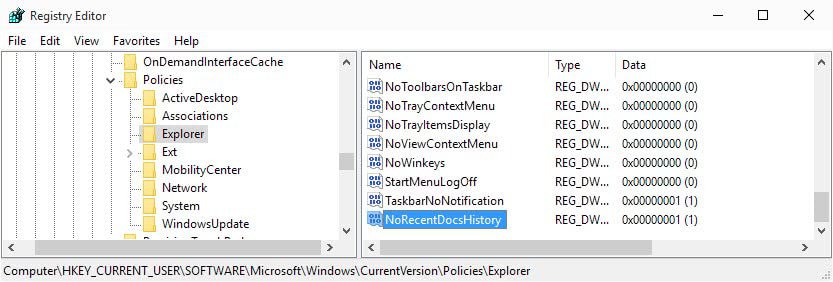
Now navigate to the key HKEY_CURRENT_USER\Software\Microsoft\Windows\CurrentVersion\Policies\Explorer and right-click on the right pane or on Explorer.. Select New > Dword (32-bit Value) and name it NoRecentDocsHistory. Change the value of that setting to 1 to disable the feature completely on the system.
I did use Recent Files View to verify that Windows is not storing any information about recently opened documents anymore and I suggest you do the same to make sure it is working correctly.

















thanks
Thank you for this hack; it worked like a charm! Maybe I’m paranoid, but I’ve hated that recent documents list ever since I got Windows 8 last year and haven’t found a way to turn it off until I read this article.
tweak ui is great, and its free.
Another (and probably easier) way of accomplishing this is with Microsoft’s Tweak UI PowerToy. Simply uncheck “Maintain Document History” in the “Explorer” section.