
Disable Recent Documents Listing in Registry

Windows is keeping track of programs you opened recently and uses two locations on the system to store those information.
The first location saves the 15 most recently opened documents that are stored by the user account and I already wrote an article on how to disable the recent documents listing in Windows to prevent this from happening if you don't need the functionality.
There is however another place that stores the most recent documents. This one is located in the Registry and it stores way more information. The Registry key is called OpenSaveMRU and stores a history of files that have been opened in a common dialog box with all information stored in sub-keys.
The * sub-key contains a list of all files while the keys with file extensions contain only information about files that have been opened that have that extension.
The only way that I discovered to remove those information is to clear all sub-keys of this Registry strain. There is probably a more elegant way to do this, maybe a hidden Registry setting that disables it but I was not able to discover it yet.
You can open the Windows Registry to take a look at the key. To do that press Windows R, type regedit and hit enter. Now navigate to the key HKEY_CURRENT_USER\Software\Microsoft\Windows\CurrentVersion\Explorer\ComDlg32 and left-click on the key OpenSaveMRU.
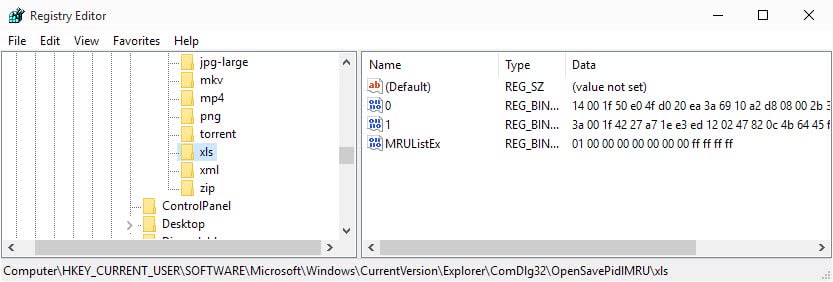
Note: The key is called OpenSavePidMRU in newer versions of Windows. While the key name changed, the actual way you delete the information did not.
The easiest way is to use a Registry file that clears all the sub-keys autoamtically. I did create and upload the Registry script for you. Just download the registry script and double-click it (or execute it with regedit /s edit.reg). You could also save it and take a look at it before you execute it which is always a good precaution. It seems that the sub-keys will not be regenerated after a restart.
Programs like CCleaner can delete the information as well. You find the option listed under "Windows Explorer" in CCleaner. There you can select to delete "recent documents" and "Other Explorer MRUs".















Here’s a little trick to find out exactly where Windows places information in your registry in case the registry key name is different on your machine, like it was in mine…
1. Rename a JPG file to a very unique name… Like “WhereDoesWindowsListThings.jpg”, as an example.
2. Open the file in Photo Editor or something similar and then close it.
3. Open the Registry Editor and search for that exact file name.
You’ll find where the keys are without finding dozens of other entries with similar names.
After that you can just open the keys and delete the data or write a small script to do it for you from a desktop shortcut.
am so lost i have 2 of the same thing in the recent documents,how can i delite just one so will not have so many?
Thanks for the tip, but that registry key didn’t have the list. But this one did:
HKEY_CURRENT_USER\Software\Microsoft\Office\12.0\Word\File MRU
seen on another web site:
to clear the list (checked with regedit)
* right click on the Taskbar and pick Properties
* click the Start Menu tab
* click Customize… button
* click the Advanced tab
* uncheck “List my most recently opened documents” and use the Clear List button