
Mailto Email Links do not open in Internet Explorer

Just a quick fix to a computer problem that I encountered in the last days on an old computer system of a friend who was using Internet Explorer 6. Nothing happened when he clicked on mailto email links on websites and he did not know why this happened.
The expected behavior is to open the mail program that has been set as the protocol handler for these mailto: links.
He helped himself by copying the email address and pasting it into the email program manually. He asked me if I knew a way to make the mailto links work in Internet Explorer and I told him that I would take a look.
He did not like my first suggestion to change the browser which meant that I had to take a closer look at the reason to find out a solution that would help him out.
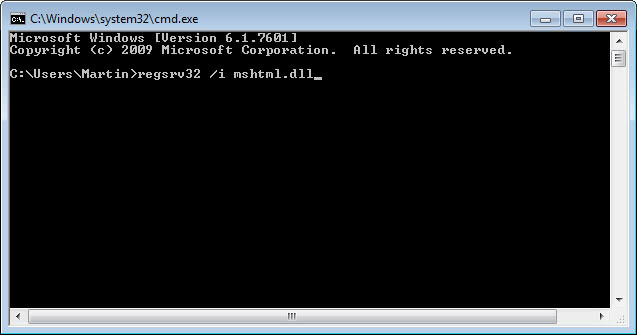
I did find the solution on the Troubleshooting Windows website. The suggestion was to open the run box and enter "regsvr32 /i mshtml.dll" first and after hitting return "regsvr32 /i shdocvw.dll". It magically worked thereafter without problems. Not sure if this is a general solution though.
Update: There is an easier option in newer versions of Windows that I would like to describe in the following sentences.
- Open the Control Panel in Windows Vista or Windows 7 with a click on the start button and then Control Panel.
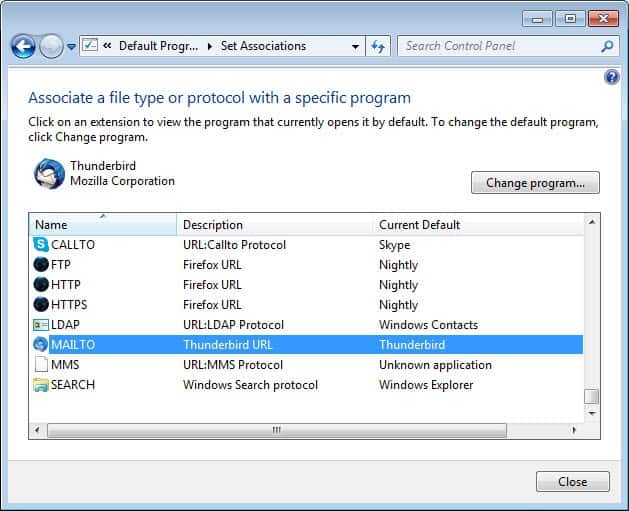
- Here you select Programs, and on the next page "Make a file type always open in a specific program".
- Scroll all the way down to the Mailto protocol and double-click it.
- Here you can pick the new program that you want to associate with the mailto protocol.
- If you are using Windows 8, do the following.
- Tap on the Windows-key if you are not on the start screen.
- Enter default programs and click on the result.
- Now select "Associate a file type or protocol with a program" and link a new program to the mailto protocol.














With Internet Explorer, the forward links work well. The RETURN link does not.
The links work in all other browsers.