
Perform Online Searches from any application or document

Lets say you got this nice little word document from a friend or colleague and stumble upon a word or words -like obiter dictum - that you do not know. How would you normally look it up ? You either pick up a dictionary or fire up your browser and search on the Internet for a definition of the word. This does not slow you down that much if it is only one word but what if there are more of them ? It could really slow you down unless you find a better way to lookup those words.
A far superior way would be to use a software like Transfz which can be accessed through a simply keyboard hotkey from any application or document on your computer. The hotkey opens a menu with several standard sites that you can use to lookup the word. Sites include Google, Yahoo, Wikipedia and even Youtube even though that is probably not the best location to do so.
It is furthermore possible to add custom sites to the menu which means that you can add your favorite web service to the list as well. Instead of pressing a hotkey to open the menu you can also assign hotkeys to search engines speeding up the process just a bit more that way.
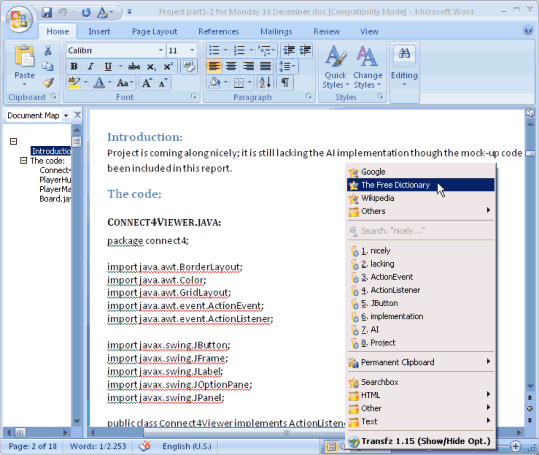
Transfz extends the clipboard as well giving you access to the latest 5-30 phrases that have been copied to it. It has some text manipulation options as well such as converting upper and lower case chars, replacing phrases and lots more. This is a great freeware for anyone who is working with texts.
You launch the main menu with the Ctrl-D shortcut, or the searchbox with Alt-D. The main menu lists options to research selected text using one of the available search engines, the search box gives you the option to research any item that you enter on the Internet instead.
The global menu displays the most recent clipboard entries and the text manipulation options that I talked earlier about as well. Both shortcuts seem to work quite well in the majority of programs you run on your system.
Advertisement















If this works as displayed, this could single handedly be the greatest free application of all time.
I’m using for that purpose {and some more} very rare clipboard extender Charu3. But it wasn’t updated since Jan 2005, so it’s nice to know that someone creates apps of such kind.
This looks great – just what i was looking for!I’ll check it out asap.
Now, Martin, is there any way to get Word 2003 to open documents in tabs? I can barely look at it and it’s the only thing left that really bothers me on my computer.