
Wise Registry Cleaner

Wise Registry Cleaner is probably the most comfortable registry cleaner that I have installed on my system. The free software has a size of roughly one megabyte and the installation takes only a couple of seconds. The application reminds you to create a backup of your registry before you proceed which can be done right from the reminder window.
It is highly recommended to create a backup before you start to use the application, as you can restore it in case something goes wrong during the clean up.
After this has been done a scan can be started by clicking on the scan button in the toolbar. The main window will be populated with the results displaying information about the keys, values, data and categories the program has identified. The registry cleaner rates every entry with "safe to fix" or "Not fully safe to fix" and checks only the ones that it has rated as safe so that you won't remove potentially unsafe items when you hit on the clean button after the scan.
Checked entries can be removed by clicking on Fix. Before you do that you can check or uncheck entries that have been found. Alternatively, it is possible to undo fixes to revert back to the original state. The scanner found 1360 problems of which 1212 were rated as safe to fix and only 148 as not fully safe to fix on a test system running Windows XP.
I decided to remove only the safe to fix entries. A restart of the computer after the cleaning did not reveal any issues with programs installed on it or the operating system itself.
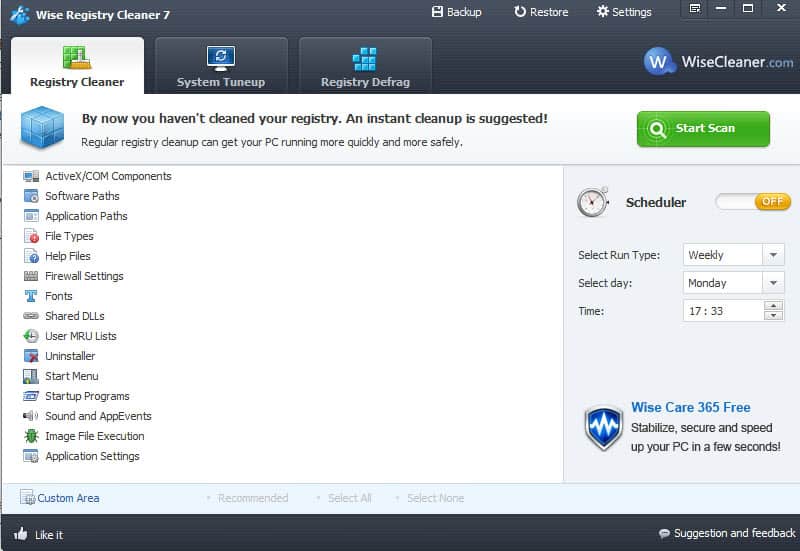
Update: The latest version of Wise Registry Cleaner comes as a setup and portable version. The interface looks slightly different now, and you will notice that new features are listed in tabs in the main interface. Besides cleaning the Registry, you can now also make use of system tuneup and Registry defrag modules that the developers have integrated into the application.
What more? You can now also schedule scans of the Registry, for instance once per week to take care of issues automatically. The program won't remind you to backup your Registry before you click on the start cleaning button, so make sure you create a manual backup first before you start the cleanup. The same is true for the Registry defragmentation, so make sure you backup first before you run that operation as well.
Advertisement
















Actually, recently I’ve found another way to speed up my poor PC, the software “tuneup360”. It’s very easy to handle and of course very powerful, my friends and I all use it now, maybe you can have a try.
Actually most times there is no need to rebuild or reinstalled your PC windows system, what you need is Tuneup360. You just need to click one big “fix now†button and get your computer fixed at once.
How does Wise compare to other (freeware / shareware / payware) registry cleaners for Vista? Does it present the resulting determinations in a nice format (with things like problem level) like Registry Mechanic?
How does the new version (3.1 / May 16, 2008) compare with the previous version?
Joe I did not use benchmark tools to test if there are speed improvements for instance. I just think it is a good idea to get rid of old entries in the registry even if there is no obvious benefit.
You did not spot problems – but did you spot any improvements or changes in the performance of your pc?