
Close'n Forget Removes Active Sites From Firefox's History

You sometimes may want to erase traces of web pages that you have visited in the past. This is especially useful on multi-user systems where every user is sharing the same account and profile, but also for privacy conscious users who want to protect their privacy from third parties (for instance during US border controls or theft).
While it is possible to use programs like CCleaner for that, its all or nothing approach may suite everyone's needs. Another possibility would be the private browsing mode, but that too has disadvantages like having to switch between normal and private browsing mode whenever necessary.
The free Firefox add-on Close'n forget adds a third possibility to the browser. The extension by default removes all cookies of the active tab. This alone may be useful in some situations, but it is not removing all traces of the website from the browser.
Users should pay a visit to the extension's options where they can improve the functionality. Here they can enable the removal of the current site and the removal of all pages viewed in a tab from the web browser's history. It is in addition possible to remove cookies from all subdomains of the root domain as well.
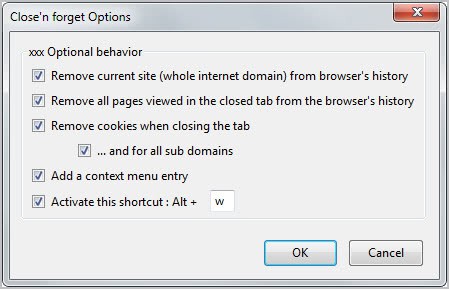
When you run the command then, the add-on will not only remove cookies but also the browsing history from the browser.
Firefox users have three options to run the cleanup. They can right-click on the page and select the close and erase cookies for the current site option from the context menu, or use the keyboard shortcut Ctrl-w to do the same.
It is alternatively possible to add one or two add-on buttons to a Firefox toolbar. This is done by clicking on Firefox > Options > Toolbar Layout, and dragging and dropping the buttons to a browser toolbar. The first button clears the cookies and browsing history of the active tab, the second does that for all tabs open in the current window.
The tab will be closed automatically, and all traces will be removed from the cookies storage and browser history.
The developer notes that the extension sometimes cannot clear the browsing history completely. This is the reason why the feature is disabled by default. You can verify that everything has been cleared by visiting the history page of the browser.
Firefox users who are interested in the extension can download and install it from the Mozilla Firefox Add-ons repository.
Advertisement

















Hoi Martin with the Firefox add-on AskForSanitize 2.1 you can also predefine what you want F AskForSanitize to clean. There are 8 different menus where you can choose from Like cookies, cache, brouwsing & download history, active logins, etc.
Doesn’t Firefox’s built-in “Forget About This Site” do the same thing?
If you use Session Manager addon then you’re in trouble… because it still remember “those” pages…
I forget to ask to you does this Firefox add-on Close’n a better job than the Firefox add-on AskForSanitize 2.1 ?
Well those are different add-ons. Ask For Sanitize removes everything, while this one only select entries. I have no idea if it clears Flash Cookies, sorry.
Does this Firefox add-on Close’n forget also wipes the flash cookies from main drive? That would be awesome!