
How To Hide Facebook Questions on Facebook.com

One of the more annoying things on Facebook.com as of late is a relatively new feature called Facebook Questions. It basically allows anyone on Facebook to create polls.
These polls then appear not only on your own Facebook wall, but also on the news feed of your friends, which can be pretty annoying when a lot of friends create new questions regularly, or like to answer them.
Some Facebook users like to hide Facebook Questions because of that. Facebook itself has no option to do disable the polls feature, which means it is up to userscripts and browser add-ons to do just that.
Update: Facebook seems to have pulled the questions option at least from brand pages in 2012 and announced the removal in 2013 officially. According to the announcement, users should simply post a question and get answers in the comment section about it.
Here is a collection of tools to block polls from appearing on your Facebook news feed.
Userscripts to hide Facebook Questions
The Facebook Questions Remover userscript hides all Facebook questions occurrences on Facebook, regardless of where they appear. Google Chrome users can install the userscript right away, Firefox users need to install an extension like Greasemonkey or Scriptish first before they can install and use the userscript.
The extension removes not only the questions and polls, but also the links on Facebook to create questions and polls in first place. The script may be compatible with other browsers, including Opera and Internet Explorer.
Update: It has not been updated since 2011 and appears to be no longer working because of this.
Google Chrome extensions
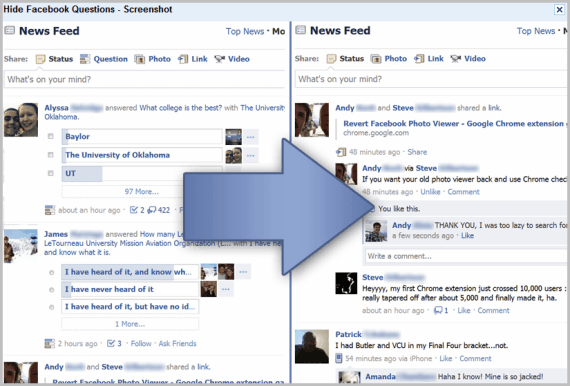
The Hide Facebook Questions Google Chrome extension hides all questions on Facebook.com, so that they do not appear in a user's news feed nor on other pages. [link]
Alternatives: Kill Facebook Questions, also for Chrome
Firefox extensions
Facebook Purity for the Firefox web browser may look like overkill to some, as it offers a lot more than just hiding questions on Facebook. You can use it to turn Facebook upside down, make all kinds of changes. That said, it can be used to hide questions effectively everywhere on Facebook. [link]
Facebook Purity is actually available for Chrome, Opera and Safari as well, making it almost universally usable.
Alternatives: Feed Filter is another Firefox extension to manage what appears on your news feed on Facebook. You can use it to hide lots of stuff, including "asked a question" and "answered a question" news.
Multi-browser options
Better Facebook is an extension that is available for virtually every web browser with the exception of Microsoft's Internet Explorer. It is definitely overkill if you only use it to disable questions on Facebook, but if you have other annoyances then this one may be the best option for you.
The tools above should provide all Facebook users with enough options to hide questions and polls on Facebook. If you know of another tool let me know in the comments.
Advertisement
















i shall always miss of you.
http://www.fbpurity.com/ is all you need. It hides not only questions but every other feature FB has.
Thanks for the link to my “Hide Facebook Questions” extension! I’m saddened to say that the extension was taken down today by Google, cause Facebook claimed trademark infringement. (Though I was careful to read their terms before publishing my extension, apparently they weren’t very clear.) I’ve removed “Facebook” from the name and it’s pending approval, so I hope it is back up soon! Thanks for your support!