
Change Web Form Colors In Firefox

Firefox uses default black on white colors for every web form on the Internet. What many users do not know is that it is possible to change the web form colors in the web browser which is helpful to make them more eye friendly.
This can be useful if you have modified the Firefox theme for example or have issues with the default color format. Black text on white background can be difficult to read or be too bright at times, especially at night.
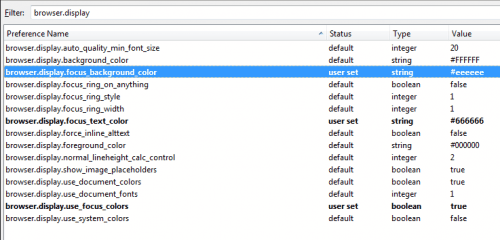
The color settings are available as about:config parameters. Firefox users who want to change them need to type about:config in the address bar, hit enter, confirm they are careful if the warning page comes up, and enter browser.display in the search on top. This displays the relevant parameters in the listing.
Colors are represented by hex codes, a good overview of available colors and their corresponding hex codes is available at the Color Wheel website.
browser.display.background_color defines the standard background color of all web forms that are displayed in the web browser. The default color is white (#ffffff)
browser.display.focus_background_color defines the background color for the active web form on Internet pages. The default value is green, the parameter is inactive however and needs to be activated by setting browser.display.use_focus_colors to true.
browser.display.focus_text_color defines the font color of the focused form, the form with the cursor in it.
Please note that the changes become active immediately. A good way to test them is to use the filter form on top of the about:config page as it reflects the change right away.
Attention: You may make web forms unusable this way if you select colors that are nearly identical as you may not be able to read text you write anymore.

Changing web form colors in Firefox is a great option for users who are not happy with the standard colors. It could be an option to make the colors easier on the eye or fit with the browser's theme.


















Thanks for this useful bit about form background colors, I am implementing it right now!