
Change the Session Store Interval in Firefox

The Firefox web browser saves active session data every fifteen seconds by default.
This means that you will never lose more than what you have done in the past fifteen seconds when Firefox crashes or closes unexpectedly.It can be useful to recover a comment that you were just writing or a blog article on a site like mine.
While some of those services may offer their own recovery options in case of a crash or unexpected closing of the browser tab, it is good to have a browser failsafe as well.While ten seconds works for most users, some may want to change the session store interval in Firefox, for instance to make sure that they lose less when the browser crashes by reducing it or by increasing the time between session stores to reduce the impact the feature has on browser performance.
The parameter that allows you to change the Firefox session store interval is available on the browser's about:config page.
- Type about:config in the browser's address bar and hit enter.
- If this is your first time you may get a warning prompt that you need to accept to continue.
- Use the search at the top to find browser.sessionstore.interval. It is usually sufficient to type the name only partially as results are updated automatically while you type.
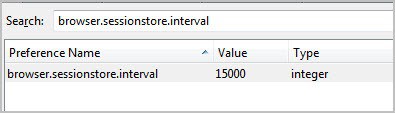
The interval is set to milliseconds which is a bit uncomfortable as you have to convert that value to seconds to better understand it. So, divide the number by 1000 to get it in seconds, and if you have number in seconds, multiply it by 1000 to get the value that you need to enter as the new value.
5000 for instance means that sessions are saved every 5 seconds while 30000 would mean that they are only stored every 30 seconds.
Double-click on the preference name to change its value. You can also right-click on the row and select the modify option to change it. There you also find the reset option which comes in handy if you want to restore the default value.
You may need to experiment with values to find the best one for your work situation. If Firefox crashes rarely, you may want to change the interval to 30 or even 60 seconds instead as it may improve resource usage.If the browser crashes often, you may want to reduce the session store interval to ten or even five seconds instead.


















Is there some way that enables me to save the “Restore Session” windows or page which contains many pages and tabs that i was launching ?
simply : can I save those “Restore Session” to open and browse later ?
I tried to save many ones in Bookmarks, but it only remember the last one !
If there is anyway please tell me about and i would appreciate that a lot.
and thanks for the information here in this article.
Martin are you able to make use of the Firefox’s session restore feature? In the startup options if i choose “load my windows and tabs from last time”, i don’t get those when i load Firefox next time. Do you also experience the same?