
Scroll smoothly in Firefox

If you are using Internet Explorer and Firefox you may have noticed that scrolling in Firefox is not as smooth as it is in Internet Explorer.
Now I do not know why this is the case but I found a solution for it.
As you may know I have a notebook that I use when traveling and I rely heavily on the touchpad as I don't carry a mouse around with me when I'm traveling.
As you can imagine, scrolling with the touchpad is a pain if the scrolling is not smooth as you end up scrolling too much or not enough and need to adjust it regularly.
The Firefox extension Smooth Wheel comes to the rescue and gives users of the browser options to configure the scrolling behavior of Firefox.
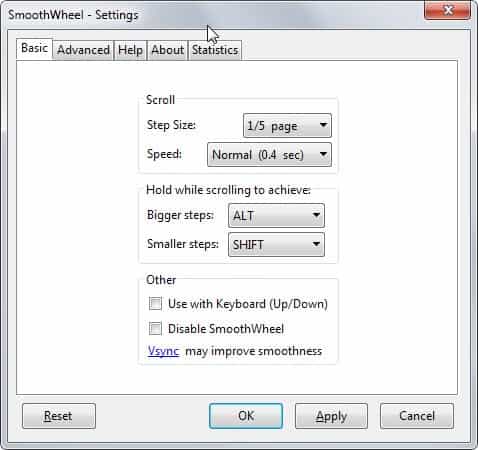
The first thing you may want to do after installation is to open the add-on's settings to configure the scrolling behavior.
The basic page lists the most important parameters step size and speed. You can play around with those to find the right values that you feel comfortable with. It is for instance possible to speed up the scrolling or slow it down, and to increase or decrease the steps with the latter setting referring to the page size that is scrolled.
Another interesting feature is the ability to configure hotkeys to scroll more or less. The default hotkeys are Alt for bigger steps and Shift for smaller steps.
Lots of advanced parameters can be set like the speed, scroll size, fps limit and adaptive intervals and steps.
It took me a while before I found the correct settings for my computer but I have to admit that scrolling websites is now much smoother and better than before. If you have the same kind of troubles try the Smooth Wheel extension, it will definitely ease your pain.



















Thanks Martin, the default wheel scroll was pissing me off.
Been using Smoothwheel for years now – I CANNOT surf without it. Being able to READ the page while it is moving is so much better. I hate using any browser that uses jerk-o-vision now :)
great extension, thank you! is there an extension to display sites like in safari browser? (very smooth fonts like on a Mac)