
Increase Responsiveness of Firefox

I experienced some performance related issues in Firefox for the last two months. Firefox was unresponsive when it was loading websites which was hard to tolerate and almost made me switch completely to Opera.
I could not link this unresponsiveness to changes that I made to Firefox - be it config changes or add-ons that I installed or uninstalled during that time.
Running a clean profile or Safe Mode caused the same issue in the web browser which meant that it must have been an internal setting or bug that was causing this.
Today I found the solution mentioned on the How To Geek's blog. He mentioned a setting on the browser's about:config page that was specifying the interval between high and load frequency interrupt modes.
Firefox changes modes depending on a user's activity on a website. High Interrupt Mode interrupts the website parser more frequently for better responsiveness of Firefox while Low Frequency Mode loads the website faster but makes it less responsive for the time being.
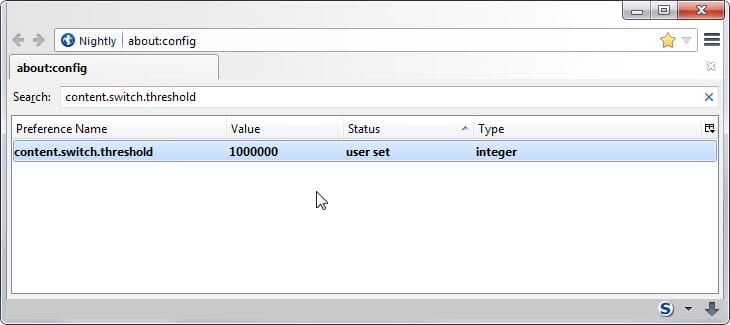
Type about:config in the address bar of Firefox and filter for the string Content.switch.threshold. If the key does not exist create a New > Integer with the name content.switch.threshold and the value 1000000. The default value for the key is 750000 which caused the problem in first place.
The related keys content.notify.ontimer and content.interrupt.parsing must be set to TRUE, the preference does not have an effect otherwise. The value 1000000 sets the threshold value to 1 second which makes Firefox more responsive but increases load time slightly.
Update: They key does not exist by default in the browser which means that you need to create it. It is unclear if recent versions of Firefox still support the key or if it is no longer being used.
Bugzilla does not reveal information about it. My suggestion is to only use it if you are noticing responsiveness issues in the web browser during page load time.
You can change the value of the key back to 750000 if the new setting does not resolve the issues that you are experiencing.


















Sarana yes you should add those two values and set them to true. It should work without setting them but to be on the safe side set them.
Seems I also have neither content.notify.ontimer nor content.interrupt.parsing in my about:config settings. I suppose creating those will assure that those values are set to true?
Thanks