
Burn Image Files with ImgBurn

If you are looking for a versatile CD and DVD burning software that can be freely downloaded and that is supporting most known image formats you should take a closer look at ImgBurn. The program can either write a disc to an image file, build an image from files and folders or burn an image file from your hard drive to a new blank disc.
ImgBurn supports, among others, the image formats iso, bin, nrg, mds and img which should be enough to burn most image formats that you encounter in your life. More exotic formats are also supported as well, as are all operating systems from Microsoft from Windows 95 to Windows 8.

I personally like ImgBurn because of it's small size (only 1.5 megabytes), its ease of use, and the support for all of the mentioned formats. Advanced users will appreciate support for advanced features such as booktypes and bitsettings that ImgBurn offers.
It also offers the ability to queue images which is a feature that is missing in many popular CD and DVD burning programs such as Nero.
ImgBurn has been my image burning software for the last five years or so. While it may not be as easy to use as some other programs, it makes more than up for it with its impressive feature set. A good starting point for new users is the official forum, where tutorials for many of the available operations are listed.
Imgburn is without doubt one of the best free disc burning applications for the windows operating system.
- Supported disk formats: BIN, CCD, CDI, CUE, DI, DVD, GI, IMG, ISO, MDS, NRG and PDI.
- Supported audio formats: AAC, APE, FLAC, M4A, MP3, MP4, MPC, OGG, PCM, WAV, WMA and WV.
You can use the program to build DVD Video discs from a Video_TS folder, HD DVD video discs, and Blu-Ray video discs as well.
Update: Pay attention to the installation process of ImgBurn as it may install adware if you are not careful and uncheck those options during the installation.
The program loads a wizard on start by default that you can use to pick your next project.
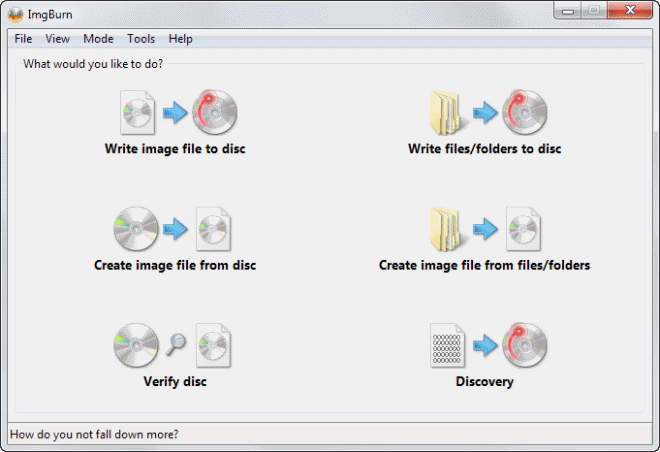
- Write image file to disc - This lets you pick a disc image file, e.g. an iso or bin file, and burn it to a recordable disc.
- Write files/ folders to disc - Add files and folders from your hard drive to a disc.
- Create image file from disc - This creates a copy of the CD, DVD or Blu-Ray that is currently in the drive.
- Create image file from files/folders - Creates an image file from data found on your system.
- Verify disc - Make sure that burned discs are working properly and that all files can be read.
- Discover - Test the quality of the burns your drive is producing.
Verdict
ImgBurn is one of the most comprehensive disc burning applications for Windows. It is not as easy to use as other programs, but makes up for it in functionality.
Advertisement
















