
Sunrise, Sunset, Twilight, Moonrise and Moonset Times

Even if you are living in a big city like me, you sometimes need to know the time the sun or moon rises and sets.
Maybe you want to photograph the sun or moon at a specific time, go fishing or believe in something that requires you to know the exact times.
Or, you simply want to be prepared for the full moon everyone is going crazy periods. Whatever it is, the Firefox add-on Sun Cult makes it dead easy to tell.
The extension supports both sun and moon times, and in particular sunrise, sunset, twilight, moonrise and moonset times.
Your first task after downloading and installing the extension and restarting the web browser is to add a specific location to the extension.
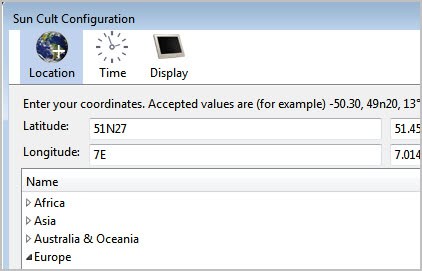
The extension ships with a continent > country > city lists. If you are lucky, your city or a big city nearby is listed in the configuration menu. You only need to select the city in this case to make it the city you get the sun and moon times information from.
If you cannot find your city or town in the list, you need to add latitude and longitude coordinates manually. You can use a service like GPS Coordinates to get those coordinates. Just enter them on the Sun Cult configuration screen and click ok to complete the configuration.
You can alternatively switch to Time to configure the time zone and format settings, as well as sunrise, sunset and twilight times. The Display tab finally determines the type of information and their placement in the Firefox browser.
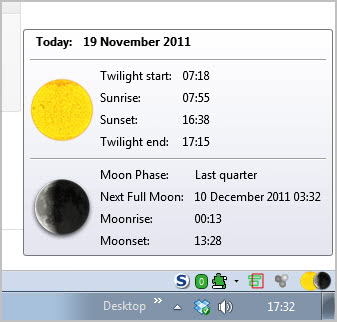
The extension by default displays Twilight start, Twilight end, Sunrise and Sunset, as well as Moonrise, Moonset, the Moon Phase and the next full moon.
Additional times that are not displayed by default are Sunrise and Sunset azimuth, high noon, next new moon and Moonrise and Moonset azimuth. All information can be enabled or disabled selectively so that only those of interested are displayed to you in the web browser.
It is also possible to change the location of the information from the status bar to another location like another toolbar.
Firefox users can download and install Sun Cult from the official Mozilla Firefox add-on repository.




















It certainly is a nice add-on but what does it have to do with a browser ? As an application, great, but as I see it an add-on to make sens must either be related to the browser’s functionality either get its data from the browser. For instance should this add-on get its coordinates from the center of a map service that I would understand its relevance. Otherwise, why not a one-a- day joke, cooking recipes or a “Hello World” on every page ? :)