
4 Applications That You Do Not Know (But Should)

Most computer users are happy with what they got. They use the same set of computer programs day in day out without spending a thought on the thousands of software programs that might be better suited for their needs, or programs that may improve how they use the computer.
The majority are using the same programs. Winamp for music, Firefox for web browsing, Windows Media Player for videos, iTunes for managing the music collection, Gmail for email and so on.
The following article reviews four applications that you probably never heard about before that might replace installed applications once you do, or improve your computer experience in other ways.
The four programs in question are the eye pleasing F.Lux application, the speed controlling and temperature monitoring software Speedfan, the DVD drive naming program Drive Namer, and the copy program Deltacopy.
4 Â Applications That You Do Not Know (But Should)

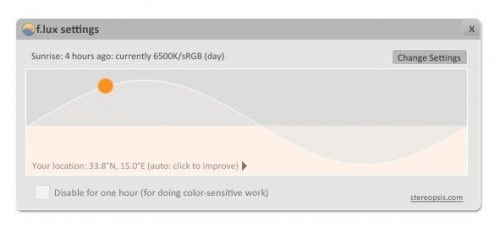
I reviewed the Flux solution a while ago and it is actually one of the few applications that run all the time on my main computer system. Flux changes the brightness color temperature of the computer display automatically.
It uses a 24 hour graph to visualize the changes. The color temperature will be normal throughout the day and be lowered automatically as the day passes to adjust to the real world. You will love this application if you have to look at (to) bright computer screens especially in the evening and at night.
The main gain from this is that you may sleep better, and that the screen does not appear to be as bright as it it would be normally.
2. Speedfan
Speedfan is an interesting application to monitor system temperatures and control fan speeds. Users run usually in two scenarios.
The first group thinks that their computer system makes too much noise while the second has to fight high temperatures that can lead to crashes and data loss.
Speedfan can help both groups. It can lower the fan speed of connected computer fans automatically to reduce the overall noise level of the computer system. It can also warn the user if temperatures are reached that can cause damage and problems.
3. Drive Namer

Drive Namer is an excellent application to add names to optical drives such as DVD or CD drives. Windows is blocking the name changing on those drives by default which gets confusing if more than one optical drive is installed or virtual drives are used.
All of the drives will be named DVD Drive or CD Drive. Drive Namer can change that name to something practical that helps identifying the drive at first glance.
4. Deltacopy
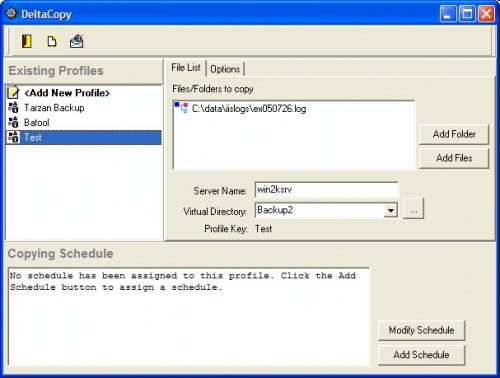
Windows Backup Software Deltacopy is a sophisticated backup program that uses a client server approach which makes it ideal for computers located in a network.




















I don’t like f.luz. it just slows down my pc. It uses a lot of RAM. This is the first time i heard about speedfan, it looks cool!
I am glad that you like F.lux as much as I do. I have been using for several months now.
I am very much impress by speed fan. They really work for me. However my old motherboard unable to give all those functionality due to some of its problem. I really like other posts as well. Good try to mention some techie sites. Hope you will mention about it’s updated status in next post
I have indeed used speed fan before and I was quite impressed. I don’t use it now because the default drivers I have already give me most of that functionality, yet it’s still a very useful program.
Regardless, still a highly recommended program for those that don’t otherwise have software to already do that stuff for them.
Pretty good post. I just found your site and wanted to say
that I have really enjoyed reading your blog posts. Any way
I’ll be subscribing to your feed and I hope you post again soon!
totally useless
Hey
at first moment reading and thinking about them I felt they were not what could help me. But after giving it a try I feel this is something which helps me operating my machine.
Good applications
Sonal Maheshwari
USourceIT
As for F.lux
At first I don’t appreciate this idea. I always liked the contrast and bright colors, never wanted to reduce color temperature. But it worked! My eyes really feel better. Now I reduced color temperature in the monitor settings too.
So – thanks!!
really awesome post ,, keep touch wid my site too if possible.. thank you for shring,, keep update ..
give me a back link ,, if u like..
Umm… This is seriously the four apps you name that every computer user should know about? Not a notepad replacement, or explorer add-on, but something that adjusts fan-speed? Really? … Wow.
Also, most users aren’t using Firefox or Winamp or gmail. They use IE, OE & WMP because that’s what’s installed on their machine.
Totally agree with you Phil. The article doesn’t live up to its premises.
Know about DeltaCopy and Speedfan. May I suggest an unknown device manager on steroids, DeviceRemover………
http://www.pro-it-education.de/software/deviceremover/
@John L
SpeedFan is toy for techies and indeed has rather clunky settings. :) Here is another post of mine that tries to explain fan control setup.
http://www.rarst.net/software/temperature-noise-management-speedfan/
Can’t claim it does perfectly, but still try it and tell me if any issuues remain unclear. :)
I like the idea of Speedfan but have never found anyone who appears to know how to use it. Almost every article appears to give different information on how to use it making me wonder if people are just guessing. I have tried it three times over the years, my motherboard is supported but I cannot find out to what items it is referring to and no adjustment has any effect so I end up uninstalling it every time. There appears to be a gap in the market for a product of this type that is much easier to use and, in my case, actually works.
John I agree that Speedfan displays many information in a way that only computer geeks understand. Not all information presented are needed however to work with the program. Some values should be self explanatory, like HD0, HD1, Core 0 while others are more difficulty to decipher like Temp1, Temp2, Temp3, Temp. A click on configure will reveal additional information about each value. You can use this information to identify hard drives and the Temp values.
Rarst wrote a nice article about Speedfan here at Ghacks as well http://www.ghacks.net/2008/08/07/analyzing-drive-health-with-speedfan/
Great post, That F.lux program will come in handy.
FLUX classified as malicious software.
All those comments labeled “This comment was originally posted on Twitter” are worthless.
Why do you need to show them? At least segregate them from the useful comments!
I found F.lux attempting to phone home. I blocked it from doing so and my XP install started to become non-responsive / semi-responsive. Sort of like when your computer begins to overheat. I never did capture the packets to see what it was doing, but just uninstalled it. And I’ve decided to pass on trying it out in Linux.
On driver namer – what’s wrong with showing disc label as name what Windows does by default? Works fine for me.
Or worked. Don’t use discs much lately except LiveCDs. :)
I have two virtual drives and one DVD drive and always manage to click on the wrong drive letter :)
As others have mentioned F.lux doesn’t change brightness, but I did find a program that does (just not automatically) DarkScreen http://www.fxc.btinternet.co.uk/assistive.htm lets you darken the screen 20-90%. Now if someone would just take DarkScreen functionality and put it inside of F.lux’s interface/automation we’d have a win.
I know and use the first 2.
as Noel said, F.lux changes color temperature, not brightness. That makes it a big no if you do color-dependent work.
But if you write source code or just read stuff, it’s a great tool!
F.lux, not recommended. Since it changes the colour temperature, its not very pleasant, messes up with colours a big time. I didn’t like it. Idea is good but didn’t like the way it worked.