Microsoft ends support for Office 2016 and Office 2019

Windows 10 reached end of support on October 14, 2025. But it wasn't the only Microsoft product that was discontinued last Tuesday, Office 2016 and Office 2019 also reached end of support.
Martin wrote about this in April to give readers a heads-up, but it has finally happened.
Windows 10 users have a lifeline, Extended Security Updates (ESU), which can be extended for free for a year. Unlike Windows 10 ESU, however, there are no options to get updates for the Office suites, even if you are willing to pay for updates.
An article on the Microsoft 365 Blog says that the following products have reached end of support:
Access 2016, Access 2019, Excel 2016, Excel 2019, OneNote 2016, Outlook 2016, Outlook 2019, PowerPoint 2016, PowerPoint 2019, Project 2016, Project 2019, Publisher 2016, Publisher 2019, Skype for Business 2016, Skype for Business 2019, Visio 2016, Visio 2019, Word 2016, Word 2019, Exchange Server 2016, Exchange Server 2019, Skype for Business Server 2015, Skype for Business Server 2019.
Microsoft warns about security risks for discontinued products, as they won't get security fixes that could make devices, apps or servers vulnerable to threats. It also highlighted that bug fixes won't be provided, neither will tech support. The Redmond company also noted that continuing to use products after their end of support can negatively impact organizational security, compliance, and productivity. It also recommends users to upgrade their versions as soon as possible.
That's mostly marketing talk, trying to scare the users into buying a subscription. But, they are not completely wrong about security risks.
Microsoft is recommending Enterprise users to Microsoft 365 E3, Office 365 E3, Microsoft 365 Business Standard, or Microsoft 365 Apps (if you don't use then full suite). Organizations that require an offline solution can upgrade to Office LTSC 2024.
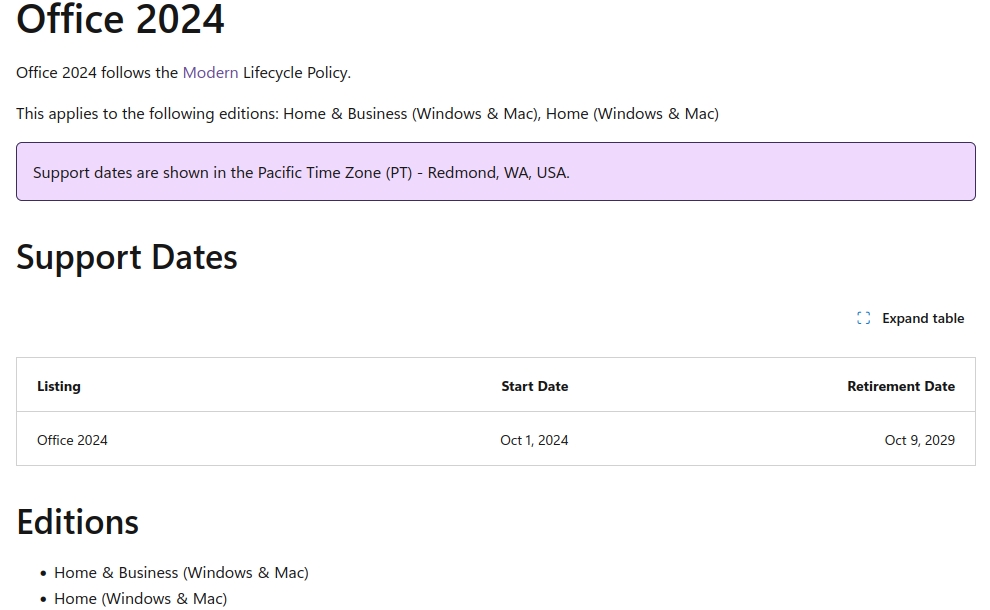
Home users of Office 2016 and Office 2019 can upgrade to Office Home 2024 for $149.99, or Office Home & Business 2024 - $249.99. Both suites are available on Windows and Mac, and will be supported until Oct 9, 2029.
If you want a free alternative for Microsoft Office, you should take a look at LibreOffice. It's open source, works offline, supports Office document formats, and is available across all platforms.

WPS Office Spreadsheets isn’t inherently “fake,” but it’s a legitimate suite with serious security and privacy concerns, especially regarding its Chinese developer, potential malware injections via updates, data collection, and forced installations/file hijacking, leading many users to see it as risky or “fake” in its trustworthiness, though it offers MS Office compatibility and features for free.
Office 2016 was the last Office version that get 10 years of support and Office 2019 was the last Office that get ESU updates. Office 2021 and 2024 will only get 5 years of support and probably there will not be a new Office release because Microsoft will make the 365 only option.
I don’t think there’s anything newer than Office 2007 or 2010 that people genuinely need. 2003 is supposed to be pretty good if you’re not a fan of the ribbon.
Use an older Office, don’t use some weird 3rd party office program with unknown compatibility…!
Agreed. I have been using Office 2010 since it was released. I use Office 2016 on a newer Win10 PC. Both are retail versions. No real issues. Don’t use most of the “extras” anyway. I don’t plan on updating either. If all one does with it is Outlook and Excel and the very occasional Access, no real need.
When they obviously can no longer function locally, I will switch to LibreOffice and Thunderbird.
Microsoft Office is no longer necessary these days, given the many great alternatives available. I personally switched to ONLYOFFICE, which is slightly slower, but still gets the job done. I would prefer that to the necessity of dealing with Microsoft’s enshittification of all their applications. The latest version of ONLYOFFICE even has its own PDF editor.
I find OO wanting (e.g. some non-standard keyboard shortcuts), slow, and if you are used to Excel it is far behind.
A much better free alternative is WPS Office Spreadsheets, which is so close to Excel that it seems reverse engineered. Still, I have not found an office suite that comes close.
You would probably be better serviced by LibreOffice. The feature set is better, the community is more accessible (and globally diverse), it is run democratically, it doesn’t have licensing gotchas, and the performance is quite nice too.
Here using OnlyOffice too.