Microsoft breaks Windows 10 Media Creation Tool days before end of support

Microsoft has confirmed that the Windows 11 Media Creation Tool (version 26100.6584, released Sept 29, 2025) is broken on Windows 10, often closing without error. This failure affects users trying to upgrade to Windows 11 just before the Oct 14, 2025, end-of-support deadline. Workarounds include downloading the ISO directly or using Rufus.
Windows 10 users have just a day left to make a decision regarding the future of their device. Microsoft is ending support for the operating system on Tuesday. Probably the best option at this stage is to subscribe to extended security updates to extend support by a year for consumer devices.
However, some users may prefer to upgrade to Windows 11, especially if their device meets the operating system's requirements.
This can be done in the Settings application via Update & Security usually, but some users may prefer to use the Media Creation Tool instead.
The Media Creation Tool is an official software by Microsoft that can create bootable USB or DVD media to install or upgrade Windows.
Microsoft update broke the Media Creation Tool
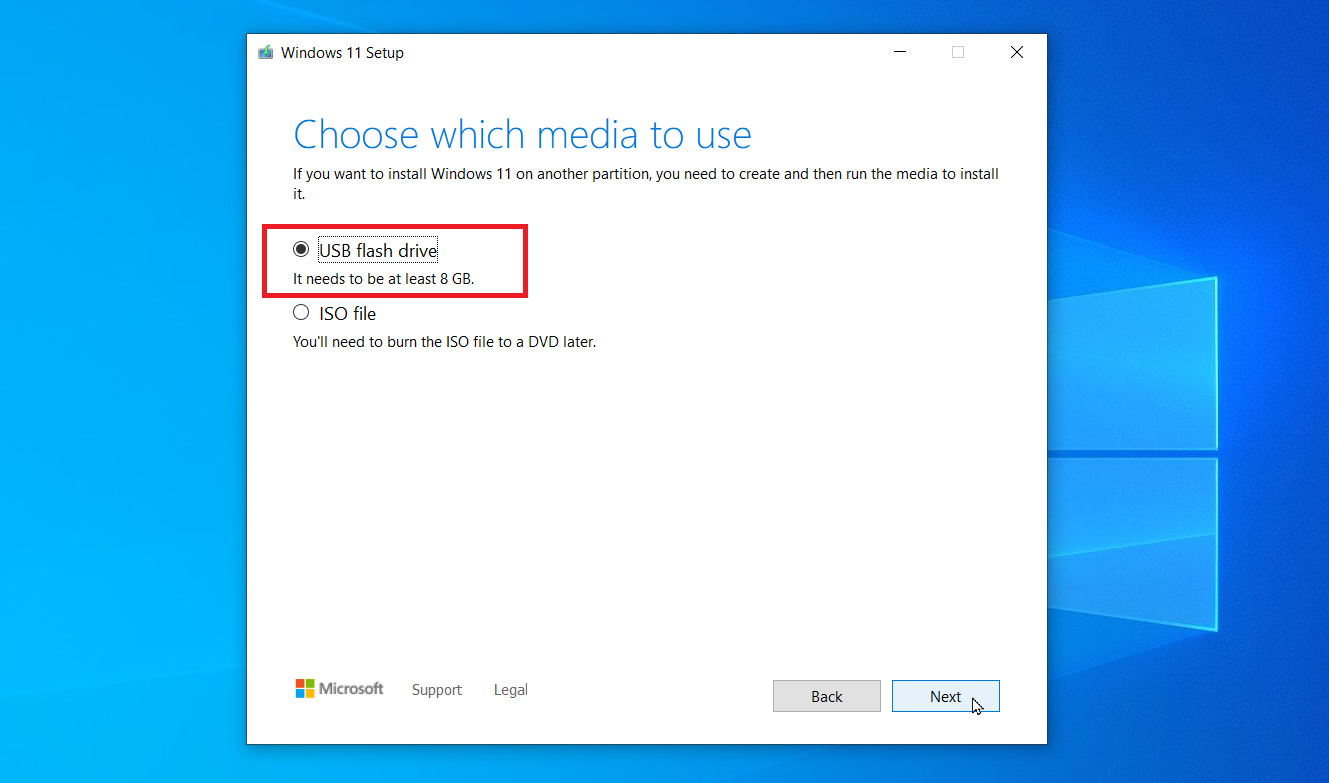
Microsoft confirmed on October 10th that the tool may "not work as expected" when run on Windows 10 devices. The program may "close unexpectedly" and may not even display an error message when doing so.
Microsoft says that this issue affects the very latest version of the tool, which it released on September 29, 2025.
The company is working on a resolution, but it did not provide a timeline. The update "will be released in a future update to the Windows 11 media creation tool" according to the announcement.
Affected users may download a Windows disk image directly from Microsoft at the meantime to upgrade or use it as a workaround, suggests Microsoft. This is not as comfortable, as the ISO needs to be moved to a USB device using another tool or burned to DVD manually in that case.
The better workaround: Rufus
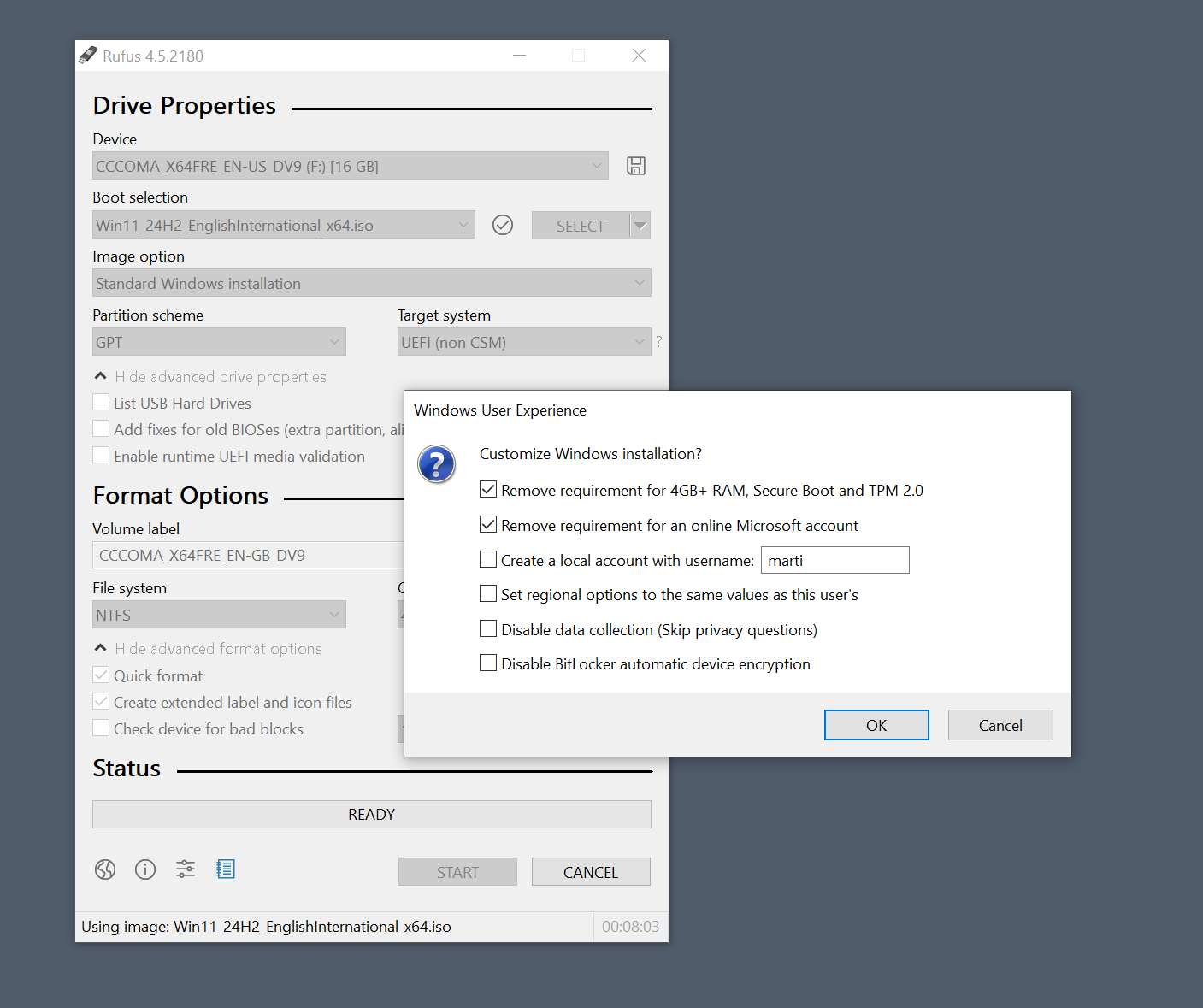
You may want to use the open source tool Rufus instead. It is the better tool anyway. Rufus offers similar functionality as Microsoft's official program. You can use it to create bootable USB media. It supports downloading Windows 10 or Windows 11 from Microsoft, and you can pick the version that you want to download.
That is good news for users who want to upgrade to an earlier version of Windows 11 first and not the very latest that Microsoft released.
Rufus supports extra features, like bypassing certain system requirement checks when installing or upgrading Windows 11. Ideal for upgrading a Windows 10 system that does not meet the requirements.
In any case, I recommend creating a full system backup of the system partition before you start the upgrade.

“Microsoft is ending support for the operating system on Tuesday.”
Not exactly true, is it? ESU extends it for a year and you can get enrolled for the ESU circumventing any of the 3 things MS says are required. Been there, done that.
indeed this is embarrassing for Microsoft for the latest MCT to not work properly under Win10
I’m still running Windows 8.1 without any issues. The only problem is that the latest Firefox version can’t be installed which leaves you reliant on Mozilla to maintain security updates which, in my particular case is 115.28.0 ESR. The same may apply to Windows 10 soon.
To prevent the system from trying to connect to Microsoft every day add “||go.microsoft.com^$document” (without quotes) to UBO > My Filters.
I would not put it past M$ to deliberately and covertly release malware into the environment which would affect only versions of their OS older than 11 and 10 systems which didn’t go with the ESU. Either that or else a last hurrah update that messes up 10.
Stick with Windows 10 for another year if you think your device can go another year. Then consider what to do after that. Windows 10 is certainly capable yet and Windows 11 offers little to afford replacing a perfectly good device just because Microsoft created a cutoff for hardware support in Windows 11. Sticking with what you know, is better then switching to Linux or Mac OS which just creates a learning curve you probably do not want.
Windows suck…get a Mac and call it a day. Got a MacBook Air best decision I ever made.
Unfortunately, Macs aren’t a good option for me because you can’t upgrade the RAM or storage in them. I once had an M1 Mac Mini that I ended up selling when I found out that it didn’t have enough RAM for video editing. I almost resorted to replacing it with the last Intel Mac Mini (which had upgradeable RAM), but decided against it because I knew Apple would drop support for Intel Macs soon, which it looks like they will be as Tahoe is confirmed to be the last macOS version that will run on Intel Macs.
Then you’re stuck with macOS, which is 100 times worse. Windows, on the other hand, offers a wealth of customization options and a vast software library.
If I want to get an overpriced computer, I can build my own with an expensive GPU.
At least with that one, I can play recent games besides using it for more casual stuff.
I intend to use Windows 10 and 0patch together with Malwarebytes premium and not doing stupid stuff to keep a reasonably safe system for the next few years. I’m crossing my fingers and hoping Microsoft comes out with Windows 12… and that it is tolerable.
I have registered for the ESU, after which I will disconnect my Win10 computer from the network and go online with another computer running Linux Mint.
What’s the point in ESU if the machine is off the internet?
And you will lose the ESU activation without connecting at least once every 60 days.
What will you use your Windows 10 computer for if it’s disconnected from the network for? I think even if it’s connected it’s not less secure. This scaremongering that if you don’t have the latest software means your PC will explode and leave a hole in your wall from viruses is absurd to me.
I haven’t had viruses since Windows XP back around 2007-8 when I was irresponsibly downloading suspicious things left and right. Then I used Windows Vista, 7, 8, 10, 11 without antivirus and never had issues. Now I use Linux Mint and have even less reason to worry about viruses.
Most people are ignorant and need M.$ to hold their hand and protect them from malicious actors.
As for disconnected windows 10 devices, I have one in the garage. A nice laptop that doesn’t meet win 11 requirements. I keep the Wi-Fi adapter disabled.
I use it mostly for music but also I use it for auto manuals. I do almost all of my own auto manintenance and repair and need all the specs and the PC is much handier then a book.
Note: I consider Rufus a requirement not a workaround.