Microsoft Click To Do gets a describe image option to analyze content in photos
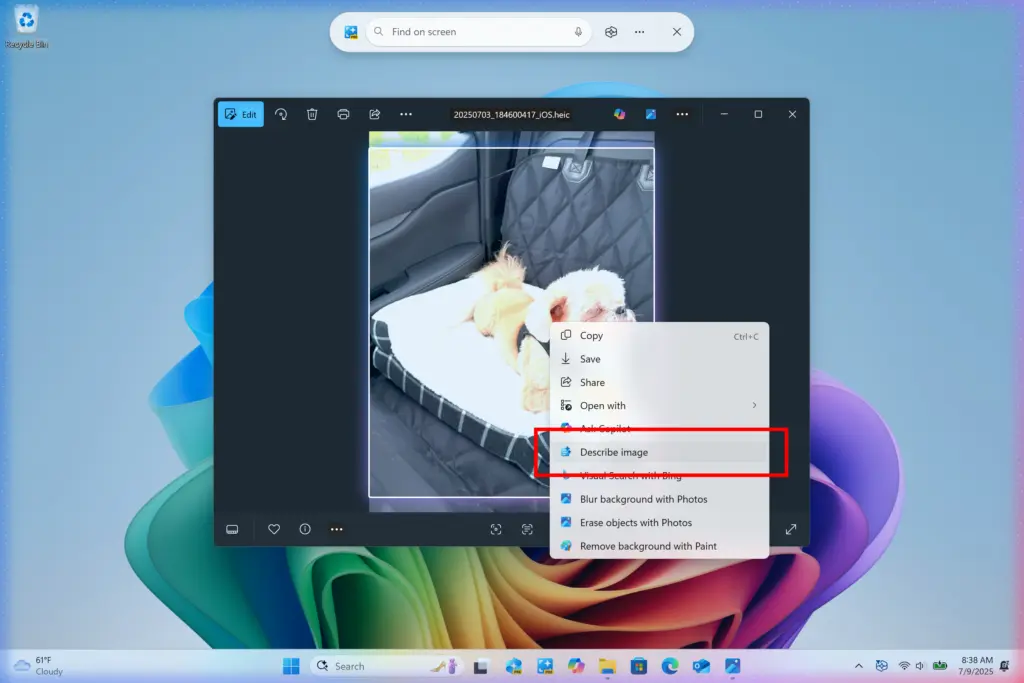
Microsoft is adding a new AI feature in Click To Do, that will describe the content in photos. More AI in Windows 11, here we go again.
You may have heard of Click To Do before, it was introduced in April this year for Copilot+ PCs. Initially, the AI powered features were limited to reading options. But the tool has evolved over time, and can help you extract text from images to the clipboard, search the web, send email, etc. You can read more about it on Microsoft's support article.
Let's look at the newest feature, Describe Image. Microsoft says that users can select the "Describe Image" action from the right-click menu in the Photos app. The AI will describe the image's contents in a couple of sentences. Microsoft points out that this can be useful for getting an overview of visual content such as charts, graphs. Here's a screenshot of the Describe Image feature in action.

When you use the option for the first time, the app will download the required models and set it up for use. So, it is an optional feature. According to the announcement, the descriptions that the app provides are generated locally on your PC, to ensure your privacy. This suggests that it should work offline.
Click To Do is not the only one that can identify content in images, there are many AI services that can do the same, including Google Gemini and Microsoft Copilot Vision. Microsoft says that Click To Do's describe image action is currently available for Windows Insiders on Snapdragon-powered Copilot+ PCs. The feature is coming soon to AMD and Intel-powered Copilot+ PCs.
Click To Do's Describe Image is sort of like Windows Recall to some extent, but if it is restricted to images as opposed to reading the screen continuously, doesn't store the contents, and does not run automatically, I suppose that makes it slightly better than Recall. The bar has been set so low, that anything looks better compared to Recall.
Do you use any AI features in Windows 11?

If we can not look at the simple picture and describe what we see without AI, as humanity we will not last much longer.
There’s all this AI nonsense everywhere lately. I’m happy I still use Windows 7 and don’t have to deal with all the new features that are creepy.
If I ever wind up with Windows 11 (it won’t be by choice, but I unfortunately will new a desktop in the fall), this will go on the ever increasing list of things I need to make sure are never downloaded in the first place.
You have to admit… it’s cool. Learning models can be useful (I use them a lot, just not for text based things).
It’s cool as a toy for somebody like me who studied CS in college. But it is not made to be a toy. Microsoft especially wants you to outsource all your thinking to Windows (Google and Apple want to outsource all your thinking to phones). And that’s not cool.