Windows KB5063060 update is failing to install for some users

Not able to install the KB5063060 update on Windows 11? You're not alone, a few people have reported that the patch is failing to install on their PCs.
Microsoft released the June 2025 Security Updates on June 10, the updates were available via KB5060842.
However, shortly after the update was released, Microsoft released a second update, KB5063060, to patch an issue that affected users who had installed the previous update. PCs that had Easy Anti-Cheat installed would unexpectedly restart when trying to launch games that use the service. It is used in Fortnite. Microsoft had released KB5063060 as an out-of-band update to replace the older one. But, in typical fashion, the latest Windows update is also quite buggy.
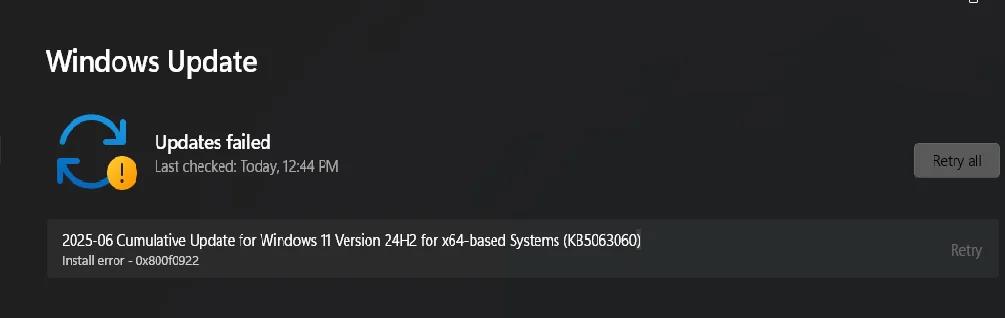
Some users are reporting that Windows 11 was not installing KB5063060 on Windows 11 24H2. It appears that the user's computer boot looped a few times, got back to the lock screen. The Settings app showed that the update had failed to install, with an error code 0x800f0922. The PC was usable, but the update would fail to install. A couple of users said that the update had failed to download, and one user went to the length of reinstalling Windows just to fix this problem. Yikes! That is quite a mess, and Microsoft is yet to acknowledge this as a known issue, let alone fix the problem.
Windows Latest suggests downloading the update directly from the Microsoft Update Catalog to side step the problems, although it does warn that other issues could surface. One user seems to have resolved the problem by enabling SVM mode (Secure Virtual Machine) in the BIOS. That's for AMD CPUs, Intel users will need to enable VMX. Perhaps you can try that.
There are also reports about other games being impacted, issues with the mouse, keyboard, etc. It is unclear how widespread these issues are.
Have you run into similar problems on your PC?

I replied twice, never showed?
Yes, I have that CAB file, but as I recall, that specific KB once determined that it should be there STARTS to install? Not 100% sure of that, hence I stopped MS Updates.
I may check my ‘memory’ on Thursday and a new BACKUP is created on Wed.
There are 2 reports of this on the FEEDBACK HUB, and no response by MS anywhere on this or other fails of the KB.
Ha ha! Love my Windows 7! I never have any of these issues.
Whenever I hear about an unsuccessful microshit update, why is it that it comes as absolutely no surprise.
Peter Newton [London UK] (Linux user since 2004)
I’ve used Windows since 2005 when XP was the latest, back then and up to 7 I don’t remember having errors installing updates, but maybe I’m remembering wrong. Since then with 8, 10 and 11 I noticed having update errors to be a lot more prominent to the point where it’s become so common that it’s hardly news-worthy.
On the other hand, having been using Linux just a little over a year, I don’t recall a single occasion where an update would fail installing or having problems after installing one. I’ve forgotten so much about these problems that when I read about them it feels staggering.
Which is why I find it so hard to imagine that Microsoft a billion dollar company who owns the largest OS in the world still has such problems. The only way I can explain is them being very unprofessional and not testing updates properly before deploying them. Yet people seem complacent about it and don’t seem to care that the OS they pay for and steals their data is in such state. Complacency through ignorance.
Unprofessional you say? I say its the arrogance of corporations. Big and small. Who’s MS’ biggest competitor? Doesn’t have one. You see? They do not care what you think. As long as they get your credit card number.
One thing I learned fast, and many many friends and colleagues have also stated as such, the biggest assholes in a business is the IT staff. 2nd is HR. Am I right or am I right?
Installed fine for me, but I was using the WAU Manager by Carifred. Didn’t even expect an update.
I still can’t remotely understand why people don’t delay these ‘updates’ until they are reasonably certain that they won’t cause way more problems than they purportedly solve. Its not like it is hard to delay them or that there is any kind of clear (or even not so clear) and obvious risk in holding them off for a month or two.
Thank goodness Microsoft tests patches before deploying them. Anything less would be pretty stupid…. right?
Thanks for the info Ashwin. I don’t have Windows 11 24H2 but I have Easy Anti-Cheat. Wasn’t that a problem for 23H2 some time ago? At that time the game wouldn’t play after the update, but the error was fixed later.
We are four months away from the End of Support for Windows 10, and Windows 11 is still not ready to replace it.
Windows 11 was released almost 4 years ago, and still is not on par with what Windows 10 was 4 years into its release.
Yes, for me it installs correctly (or at least it indicates so and requires a reboot).
However, upon rebooting I see the ‘Update in Progress and Do not power off the PC’, and then 100% Complete and the circling dots above it. Left it like that for 20 minuted.
Since I had a C: back-up, I did that and tried again. Same thing. Power off an on a few times and eventually saw the black screed with ‘Opps – something went wrong, Don’t worry, we are going to fix it’ (or something like that?). It too looped the dots for a long time and I gave up, restored the C: again AND BLOCK MS UPDATES for a few weeks.
Wish I knew how to BLOCK that on Update BEFORE it starts installing on MS Update D/L’s it?
To block a specific update
https://www.minitool.com/news/how-to-block-specific-updates-on-windows-10-11.html
Yeah, I have that too, but I ‘think’ it wouldn’t help me? I believe that specific KB once MS Update checked started to D/L automatically and did the Install already? The when all were completed, asked for the reboot (there were 6 or 7 in the update)?
I am NOT sure of that? I might be wrong and I had to PRESS an INSTALL to start it? If so, I’ll be able to use it.
I’ll be checking next Thurs. after the next backup is created.