
MailStore Home 8.0 update brings Outlook 2013 support

When it comes to backing up emails, MailStore Home is that trusted companion that I have been using for a long time. What I really like about the product is that you can backup virtually any email account, be it a local account in a program like Thunderbird or Microsoft Outlook, or an online account like Gmail or Hotmail.
Even better is that it is simple to setup but still powerful enough to do just what you want it to do. Basically, all you need is the username and password of the mail account, and sometimes the mail server information, to get started.
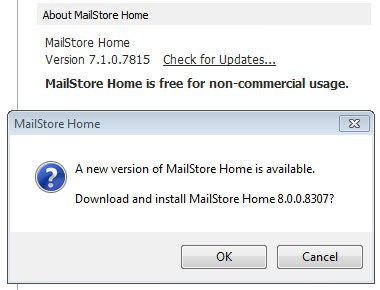
MailStore Home 8.0 has just been released and is now available on the official program homepage or as a direct update from within previous versions of the email backup program. If you have a MailStore version installed on your system, click on the check for updates link at the lower right corner of the screen just beneath the e-mail archive statistics it displays to you.
Check out the following guides to find out what you can use the program for:
- Speed up Thunderbird by backing up, archiving and deleting old messages
- Prepare your laptop before you go on a trip
- Backup Gmail, Hotmail and Yahoo Mail emails
MailStore 8.0 changes
You are probably asking yourself what's hot and new in the new version. Let me give you a quick rundown of the most important changes that the update brings along:
- MailStore Home 8.0 supports Outlook 2013 officially now. The program also supports Office 365 click-to-run virtualization and Exchange Server 2013. Basically, support for mail components of various Office 2013 and 365 versions has been added to the application
- The developers have localized MailStore Home so that it is now available in additional languages. I can't really say which are new and which are not, here is the list: Chinese (Simplified and Traditional), Czech, Dutch, English, French, German, Hungarian, Italian, Japanese, Korean, Polish, Portuguese, Russian, Slovenian, Spanish and Turkish
- When MailStore detects multiple installed versions of Outlook on a system, it uses the latest detected version automatically.
- During the archiving of email addresses, MailStore uses the source mailbox internal date in its duplicate message detection algorithm (IMAP and MAPI)
- Fixed an issue where sent messages were sometimes displayed as received messages in search results.
Verdict
The program gets better with every release. The bug fixes alone justify the update to the new version. If you like to work with localized versions, you may also find your language to be supported now by the program whereas it may not have been in previous versions. It is also a must have install for Office 2013 and Office 365 users.
Advertisement

















Question: does Mailstore also delete an email from the archive when it is deleted in GMail? I am looking for that functionality, as provided by Gmvault sync.
As far as I know, it is not. It is not constantly syncing emails, only when you run the backup process.
Hi Martin – my question was not clear enough. What I want to know is: if one has archived Gmail into Mailstore, then subsequently delete emails in Gmail and re-run the mailstore archive – does Mailstore also delete those emails in it’s archive, or does it keep those original emails?
Btw – thanks for one of the best tech blogs around!
Martin, thanks for the update notice. Totally agree MailStore is great. I have never had one glitch with the program. Transcontinental is right “Amazing’.
Some countries have great people, cars, and software :)
I’ve been using MailStore Home for years, remarkable achievement, always updated, and… the free version remains. Amazing.
Thanks. Just updated.