
ID3 Mass Tagger

There are many excellent tools to tag a music collection. Tools like the superb Mp3 Tag can be used to tag an entire collection in record time.
If you are more a command line junkie who likes to tag music from the command line or build his own scripts to tag the music collection, you may like the command line tool ID3 Mass Tagger even more.
ID3 Mass Tagger can add or edit id3 and id3v2 tags in multiple music files on a computer system. It currently supports the ID3 v1.1, Lyrics 3 v2.0 and ID3v2 formats which limits it somewhat to music formats that support these as well.
The developer's homepage contains a few usage examples and downloads for Windows, Linux, Dos and FreeBSD including the source code of the application. Not all parameters are explained on the homepage though. The Readme document that is included in the download explains them all and should be read after unpacking the files to the local computer.
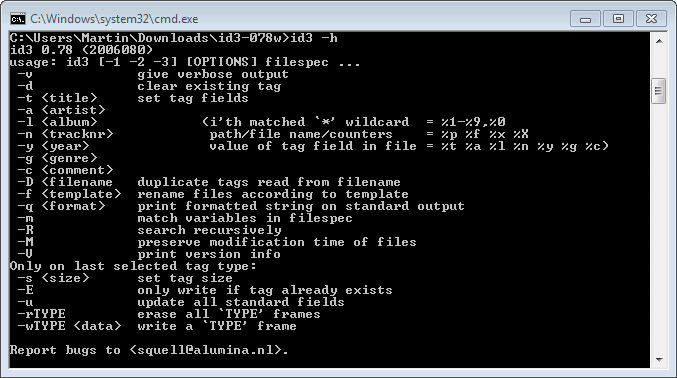
Some basic usage examples are the following:
Strip all id3v1 tags from all mp3 files in a folder.
id3 -d *.mp3
Copy id3v2 tags to id3v1 tags in all files
id3 -2 -1 -u "*.mp3"
Removes embedded images and padding from all mp3 recursively starting at /mydocuments
id3 -2 -rAPIC -s 0 -R "*.mp3" "/my documents"
ID3 Mass Tagger is a powerful command line music tagger. It works best in conjunction with batch files or shortcuts but can also be used separately. Could be useful for someone who is editing lots of music files on a regular basis.
Update: ID3 Mass Tagger has not been updated in the last years, which is an indication that the project is either dead or put on ice for the time being. Alternatives are listed on our music articles listing here on Ghacks.
Please note that we had to replace the homepage link of the program as well. It is no longer available for download there. We have found it hosted on Softpedia, but that is only the Windows version it seems unfortunately.
Advertisement



















The project is available again on Github, see https://squell.github.io/id3. Thanks for the write-up. :)
link to this programm is dead
You are right. I have changed the link. It unfortunately links only to the Windows version download now. Thanks!