Firefox 144.0 is out with new profile management, tab group improvements, and security fixes

Mozilla releases Firefox 144.0 and several Firefox ESR versions today. The new releases introduce new features, improve other features, and fix some security issues as well. As such, most users of the browser may want to upgrade their version of Firefox to the latest as soon as possible.
The big new feature of the release is the long-awaited profile management update. Profiles help users distinguish between different tasks or personas in Firefox, similarly to how Chromium-based browsers offer the functionality. Firefox did support it for ages, but this update should improve the accessibility of the feature.
Firefox 144: the major changes and new features
Profile Management update
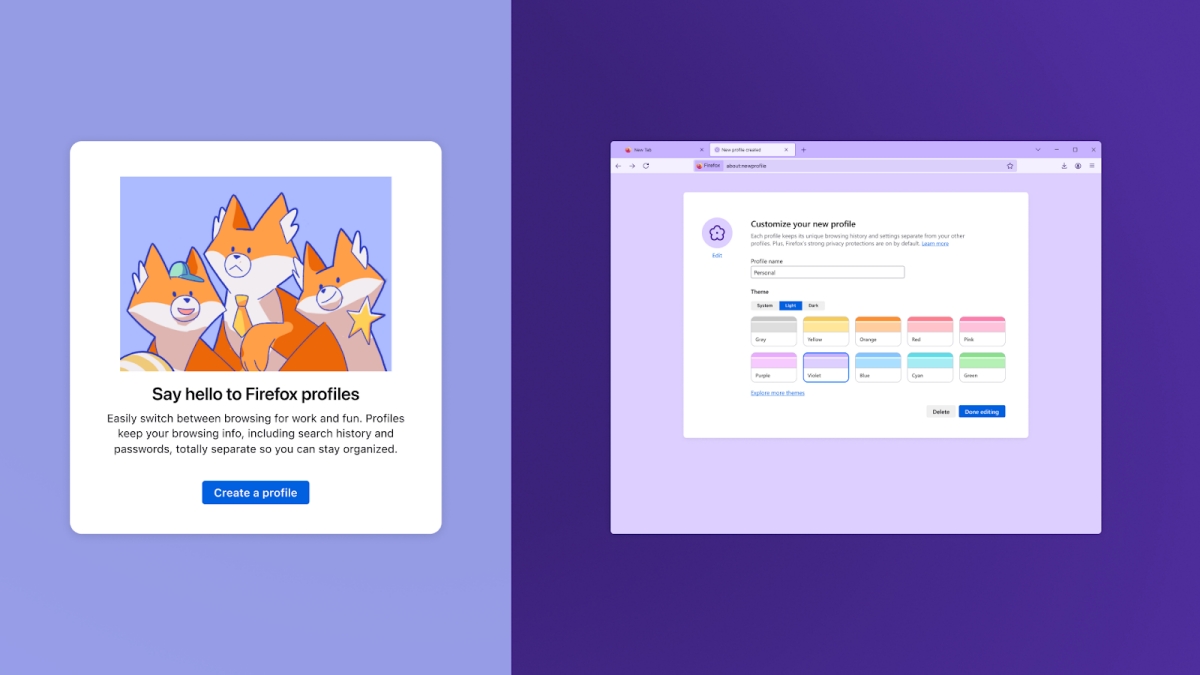
Mozilla has launched improvements to Firefox's built-in profile management functionality. New profiles can now be created easily and you can switch between them when you start Firefox.
The existing functionality remains at the same time. Launch about:profiles to see a list of all profiles and their folders on the system. Here you may also create new profiles, set a new default profile or launch a profile separately.
Veteran users will be pleased to hear that the parameters that launch different profiles in Firefox remain as is as well.
Tab Group improvements

Mozilla continues its work on Firefox's relatively new tab grouping feature. The two main changes are a) that the active tab of a tab group stays visible when you collapse a group and b) that you can now drag another tab onto a collapsed group without it expanding automatically.
Other changes and fixes
- Firefox users may now see a "Search Image with Google Lens" option when they right-click on images in the browser. It offers a quick shortcut to searching Google for information about that particular image.
- Firefox on the desktop includes Perplexity now as a new AI-driven search engine.
- Firefox Translator adds support for the three languages Azerbaijani, Bangla, and Icelandic.
- More than a dozen languages of Firefox Translator have improved translation quality (Arabic, Bulgarian, Catalan, Chinese (Simplified), Czech, Dutch, Estonian, Finnish, French, German, Hungarian, Italian, Japanese, Portuguese, Persian, Spanish, Ukrainian)
- When opening a link on Windows from another app, Firefox will only use its window on the current desktop to open it, or open a new window if needed.
Developer changes
- Support for the deprecated MathML STIXGeneral font has now been removed.
- CSS features for view transitions in single-page applications (SPAs) are now supported.
- The Map.prototype.getOrInsert(), Map.prototype.getOrInsertComputed(), WeakMap.prototype.getOrInsert(), and WeakMap.prototype.getOrInsertComputed() instance methods are now supported.
- The lock() and unlock() methods of the ScreenOrientation interface are now supported for Android and for Windows tablets.
- The View Transition API is now supported for SPAs (single-page applications).
- The CSSStyleProperties interface of the CSS Object Model (CSSOM) is now implemented.
- The moveBefore() method is now supported on the Element, DocumentFragment and Document interfaces.
- Cross-origin <iframe>s now require either user interaction (sticky activation) or explicit permission to redirect the top-level page using window.top.location.
- RTCDataChannel instances are now transferrable objects, and hence can be passed to workers.
- The closing event and the onclosing() event handler are now supported on the RTCDataChannel interface.
- The getUserMedia() and getDisplayMedia() methods of the MediaDevices interface now support the resizeMode constraint.
Enterprise changes
- GenerativeAI policy has been added. This allows administrators to control features that use Generative AI.
- VisualSearchEnabled policy is now available to disable Google Lens.
- Preferences policy supports security.webauthn.always_allow_direct_attestation now.
- Fixed print options showing up in Firefox when printing was disabled.
- Fixed a bug in Windows Kerberos authentication with extended protection that did not work with a SHA384 SSL certificate.
Security updates / fixes
Mozilla fixed a total of 14 different security issues or potential issues in Firefox 144. The aggregate severity rating is high. No mention of exploits in the wild.
Firefox 144.0 download and update

Firefox installations should pick up the update automatically. Desktop users may speed up the installation by selecting Menu > Help > About Firefox.
This should run a check for updates and will download any update that is found automatically.
Manual downloads are also provided on Mozilla's official website for desktop operating systems.
Outlook
Firefox ESR 115 continues to be supported until at least March 2026. This coincides with the release of Firefox 149 and Firefox ESR 140.9. Mozilla may extend support once again, but the decision has not been made yet.
Additional information / resources

better brave is github. firefox is close developed ….
Firefox dropped support for Android versions 5,6 and 7. It now requires minimum Android 8. I saw no mention of this in gHacks. https://blog.mozilla.org/futurereleases/2025/09/15/raising-the-minimum-android-version-for-firefox/
It sounds odd to me Firefox still supports Windows 7 but increases Android version requirement by three versions. There is no ESR version of Firefox Android either. Tor Browser on the other hand is based on Firefox 140 ESR and it will continue to support Android 5, 6 and 7 a little longer.
offline translations is an underrated feature. I wish they would make this separate application and extend it’s features to process general text, documents and OCR and make an app version.
You forgot say.
One of the most notable changes is the move from the older 3DES-CBC encryption scheme to AES-256-CBC for locally stored passwords, which makes Firefox’s built-in Password Manager more secure, protecting saved logins on disk.
I updated from v143 to v144 and saw nothing new related to profiles. I looked at the release notes and found a key phrase about the new profiles’ features:
“…now rolling out gradually.”
Obviously, “gradually” hasn’t reached me yet.
>they added perplexity AI to the search bar
>they added “ask an ai chatbot” to the tab bar context menu
ok how do I disable this nonsense?
Removed “Stories” which just seemed to be duplicates of news media sites I’d already read. This was on my Android phone by the way. Haven’t seen the same thing on Windows versions of FF (yet).
@ Martin, Firefox ESR 115 will continue to be supported until March 2026: https://whattrainisitnow.com/release/?version=esr
Thank you!
Nice and fast translations are going better than expected.
First thing I looked for after updating was how to remove the “Add tab to taskbar” icon in the address bar. I can get along just fine without it.
I did not want it either. Going to about:config and setting ‘browser.taskbarTabs.enabled’ to false gets rid of it.