Microsoft removes BypassNRO and local-only account commands from Windows 11 setup
Microsoft has removed the known shortcuts for creating a local account during Windows 11 setup (OOBE) in its Insider builds. The bypassnro.cmd script went first, in Dev Channel build 26200.5516 in March 2025, and the "local-only commands" such as start ms-cxh:localonly followed in build 26220.6772 in October 2025. Microsoft's stated position: finish setup with an internet connection and a Microsoft account.
This page tracks what Microsoft removed, why it says it did it, which local account routes people still report working, and the supported way to end up on a local account anyway.
What Microsoft removed from Windows 11 OOBE
Microsoft removed two families of local account shortcuts from the Windows 11 out-of-box experience, in two separate Insider builds.
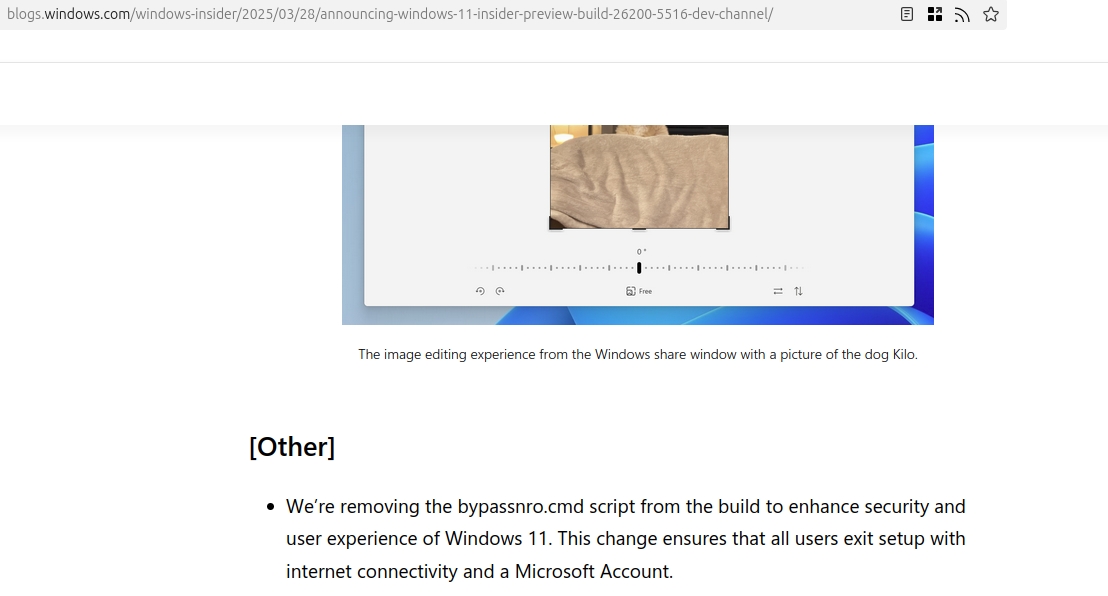
- bypassnro.cmd (March 2025): the release notes for build 26200.5516 say Microsoft is "removing the bypassnro.cmd script from the build to enhance security and user experience of Windows 11." Typing OOBE\BYPASSNRO at the Shift + F10 prompt no longer finds the script on those builds.
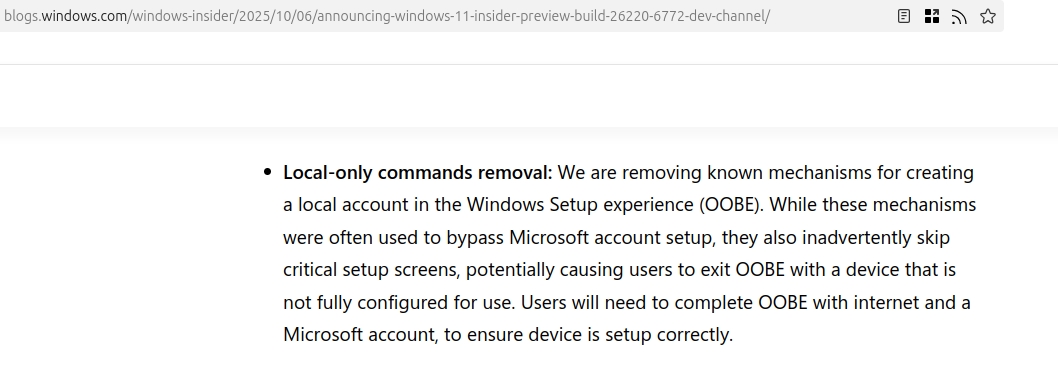
- Local-only commands (October 2025): the notes for build 26220.6772 say Microsoft is "removing known mechanisms for creating a local account in the Windows Setup experience (OOBE)." This targets start ms-cxh:localonly, the command that opened a local account dialog after BypassNRO stopped working.
Both changes landed in the Dev Channel first. Insider changes usually move toward general releases over time, but Microsoft did not attach a date for stable Windows 11 versions, and Insider features are switched on gradually rather than by build number. A higher build number on your PC does not prove a removal applies to it, so the only reliable check is your own installation media.
Why Microsoft says it removed the local account workarounds
Microsoft says the local account shortcuts skip setup screens it considers critical, which leaves devices only partly configured. In the October 2025 notes it writes that the mechanisms "were often used to bypass Microsoft account setup" but "also inadvertently skip critical setup screens," and that users "will need to complete OOBE with internet and a Microsoft account, to ensure device is setup correctly." The March 2025 notes framed the bypassnro.cmd removal as a security and user experience improvement.
Microsoft does not list which screens it means. In practice, OOBE is where Windows asks about privacy settings, backup to OneDrive and offers for Microsoft 365 and Game Pass, so users who skipped the account step also skipped those prompts. That is a big part of why the workarounds were popular: a local account keeps the sign-in on the device, needs no internet during setup and avoids several upsell screens.
Reports at the time also warned that skipping the account step on the new builds could make setup fail and force a restart of OOBE, which is a strong reason not to experiment on a machine you need working.
Which local account methods still work, by method
The routes below are the ones covered in Microsoft's notes and in tests reported by tool developers and tech sites in late 2025. Only domain join (an option built into Windows Setup) and the switch described in the next section are Microsoft paths; the others are unofficial and can stop working with any build, so check your own build before relying on any of them.
| Method | What it does | Status |
|---|---|---|
| OOBE\BYPASSNRO script | Runs bypassnro.cmd to unlock offline setup | Removed in Dev Channel build 26200.5516 (March 2025) |
| start ms-cxh:localonly | Opens a local account dialog from Shift + F10 | Removed in Dev Channel build 26220.6772 (October 2025) |
| BypassNRO registry value | Sets the same flag the script used, then setup must run offline | Reported working in late 2025, including on build 26220.6772 |
| Rufus local account option | Builds install media that skips the account step | Developer confirmed it on 25H2 in late 2025, network disconnected |
| Domain join (Pro and higher) | Set up for work or school, Sign-in options, Domain join instead | Reported working on Pro in late 2025; not available on Windows 11 Home |
The Rufus developer tested a 25H2 install created with the local account option and was prompted to create a local account, but stressed in the Rufus issue tracker that the network must be disconnected, as with Windows 10. He also said he does not track Insider builds, so future releases may change the picture. Step-by-step instructions for these routes are in our guide to setting up Windows 11 without a Microsoft account.
The supported route: sign in once, then switch to a local account
The method Microsoft supports on every edition is to finish OOBE with a Microsoft account and convert the account to a local one afterwards. It needs internet during setup, but it does not depend on any workaround that a future build can remove.
- Complete Windows Setup with your Microsoft account.
- Open Settings with Windows + I and go to Accounts, then Your info.
- Under Account settings, select Sign in with a local account instead.
- Confirm with your PIN or Microsoft account password.
- Enter a user name, password and password hint for the local account.
- Select Sign out and finish, then sign in with the new local account.
Two things to plan for: OneDrive backup and Microsoft Store sign-in stay tied to the Microsoft account, and the user folder name was already chosen during setup. If you care about the folder name, set it in OOBE with the command in the next section before you sign in. The older Microsoft account requirement guide covers the earlier offline tricks for reference.
Set the user folder name in OOBE with SetDefaultUserFolder.cmd
Build 26220.6772 added a supported way to choose the user profile folder name, so it is no longer derived from your Microsoft account email address. Microsoft describes these steps:
- On the Microsoft account sign-in page, press Shift + F10 to open Command Prompt.
- Type cd oobe and press Enter.
- Type SetDefaultUserFolder.cmd followed by a space and the folder name you want, then press Enter.
- Close Command Prompt and continue with the Microsoft account sign-in.
The name can have 16 characters at most. Microsoft says only Unicode characters are supported and special characters are removed. If the name is valid it is applied; if you skip this step, Windows creates the folder name from your Microsoft account email. The cd oobe step switches to the oobe folder inside System32, which is where Windows keeps its setup scripts.
FAQ
What does BypassNRO mean?
BypassNRO is generally read as "bypass network requirement OOBE." It was a script and registry flag that let Windows 11 setup continue without an internet connection, which in turn allowed a local account.
Can I still set up Windows 11 offline?
In late 2025 reports, the BypassNRO registry value, Rufus-made media and domain join on Pro editions still worked with the network disconnected. These are not guaranteed on later builds. Microsoft's stated direction is that setup requires internet and a Microsoft account, so test on your exact build first.
Does this affect Windows 10?
No. The removals are in Windows 11 builds. Windows 10 reached end of support on October 14, 2025; see our guide on extending Windows 10 support by a year.
Related: Windows 11 25H2 update guide, Windows 11 Pro vs Pro N

Windows is essentially dead to me. I’m glad they raised the price of Game Pass so I have more reason not to give them any more money and not use their software.
“There are multiple ways to extend [Win 10] support for a year..” and a simple way to extend for 3 years, via massgrave.dev’s script.
Worrying about the need for an MS account is probably not worthwhile, however. If you are convinced that MS is evil, well, they wrote the whole (closed-source) OS, so there are an infinte number of ways for them to exfil your data with or without an account. Sometimes paranoia is pointless.
For most people that hate this it isn’t about paranoia. It’s about our rights to privacy, it’s about moving the furniture while you’re asleep. Findamentally, nothing that Windows 11 has inflicted on users is needed for security, usablity or practicality. They are all related to “It’s our PC, not yours…get over it” from Microsoft.
And if you’re a business user, it a f*cking nightmere to manage a fleet of PCs, your network, your processes when stuff keeps getting deprecated, changed, or just plain brocken by the “New!”
Basically, f*ck Microsoft, but alas there is no alternative that’s realistic. Oh, and Linux lurkers on the Microsoft news pages…no. Not happening and don’t care.
Satya Nadella and his team of incompetent colleagues are destroying the only Microsoft software that people still use. It’s as if they’re deliberately trying to make people stop using Windows, or at the very least, make them dislike using it.
Microsoft should be fined heavily enough to make them take notice. The initial setup process for any edition must once again give users the option to choose local or online.
Over the years I have been successful in setting up my machines with local accounts. One “trick” after another has been taken away from people who care very much not using a Microsoft account for logging on to their machines. For many of us Linux and Macs have their own issues. My question is if I get a new machine and all “tricks” are gone, is setting up the machine with a Microsoft account and then immediately create another Local administrative account and never logon again with the Microsoft account. Turning off Bitlocker and other things can be done just as easily as with the Local administrative account. I have been doing it for decades.
Am I missing something.
if you don’t fight against this, and make a concerted effort to send a message of disapproval to M$, then you deserve the resultant consequences of your laziness and passive compliance .
Anything that is worth having, must sometimes be fought for, even if it requires a lot of pain, inconvenience, and frustration .
Other than that, enjoy your Orwellian future .
Peter Newton [London UK Linux user since 2004]
@Peter Newton,
Best way to fight it is to stop using Windows and move to another OS. If Microsoft wanted to make Windows uncrackable so pirates can’t use the activated version for free, they would’ve done it before 2010, they haven’t. Instead they made Windows now to be functional even if it’s not activated. They much prefer a larger amount of people to use their OS so they can collect more data. The enforcement of a Microsoft account for Windows 11 is for this reason – so the data is more compartmentalized between different users. It’s like they want the users to do the work for them – like how the disbanded the Windows Testing program in favor of Windows Insiders so they can use the Windows fanboys to do the testing for them, which is why since 2012 Windows is a bug-ridden mess that is never stable. Windows 10 might become stable when it goes out of support next week. Windows 11 is still unstable 4 years after release, because Microsoft keep releasing new updates with more bugs.
I personally don’t find Apple to be a better option, but it’s still not Windows/Microsoft, I personally advise for Linux as something for people to move to.
You can’t really “fight Microsoft” and “send messages of disapproval” to Microsoft if you keep using their OS. The best way for people to show they don’t like current Windows and Microsoft’s policies on it, is to stop using Windows. It’s the most accurate analogy of “voting with your wallet”, when you don’t buy products it’s the worst possible outcome for its creators, not using Windows in favor of something else is the hardest blow one can deal to Microsoft.
10/10 Allwynd I couldn’t agree more, you hit the nail on the head.
I doubt if the state of affairs outlined by you will ever be achieved, market monopolies, user lethargy, to name just two factors, there are many more . This is why I despair when trying to talk logically to existing users, and this is why I wish them well in their dystopian futures.
What do they say about leading horses to water ?
Thanks for the reply,
Peter Newton [London UK Linux user since 2004]
I just unplugged the Ethernet cord during installation in a Virtual Machine.
Bought a new Dell in 2024 so got Win11, but used the bypass. My main annoyance is OneDrive copies the entire user folder to cloud with no recourse. They’ve already proven that’s a risk with the cloud folder wipeout of a few years back. Average user won’t know this or how to make a dummy accent for setup only. Win11 is still a buggy mess and MS have destroyed any usefulness. I still need Windows for audio apps but this is the first time I’ve seriously considered selling my expensive Windows computer and ditching it all together. If I have to reinstall and Rufus is blocked you bet it’s getting sold. (Sadly Linux doesn’t seem to like my Core Ultra 7 155H/Nvidia setup.)
That’s supposed to stop working now – when you have no internet connection, you can’t finish the Windows setup and can’t get to the desktop. AFAIK, the only options are something like Rufus or Flyoobe that allow you to preconfigure a local account before you even write the ISO to an USB stick. That is, until Microsoft find a way to disable that too.
People just need to turn their back on Windows altogether. I’ve tried Windows 11 on a brand new laptop (mid-range) and it takes over a minute to boot up and then everything takes a few seconds to start loading, like browsers or other programs. On my brand new laptop (i7-13620H, SSD), Linux boots below 20 seconds if I use Power Saving and around 10 seconds if I use Performance Mode and after that all the programs I open start immediately. It’s unbelievable how bloated and slow Windows has become in its latest versions even on good hardware. The laptop with Windows 11 that I tried was Ryzen 7 7530 or something, which is by no means slow. I can only imagine how blazing fast it will be with Linux Mint.
Just download the latest 24H2 ISO and also the small 25H2 enablement update, then use Rufus for the local account, stupid requirements bypass and skipping BitLocker. Save the ISO and the enablement MSU and use them to keep everyone you know safe from Microsoft account-cancer for a few more years.
The way MS i going i think i will remove the ability for Microsoft to be installed on my system and jump over to Linux,i refuse to use Online account
If the EU allows MS to force company accounts on users (which simply means in daily practice that they have to sign up to the MS-verse to get their business done) it has proven that it’s best for posturing and grandstanding. This is worse than an Android phone.
Can’t avoid MS account, can’t turn off Spectre mitigations – no upgrade for me. I’m staying on 23H2 forever, it seems.
This is a bigger threat to steam than windows 8 ever was, and im concerned valve sleepwalked into this situation imagining it would suffice to prop up wine/proton for running windows executables on linux (wich users still *have* to install).
If everyone using windows not only HAS to be logged using a MS account but the xbox app also accesses steam games, MS could end up leveraging access through the xbox app to override steam as a store entirely and constantly promote buying through its own store and gamepass subscriptions. Future Xbox-powered handhelds are already a lost cause (theyll still suck though lol), valve should focus on htpcs and desktops now – imitations like fedora-based Bazzite are not good enough or standardize the experience
Nice coping take breath touch some grass.
As your nickname suggests enjoy your fragmented Linux desktop experience, which still hasn’t been standardized. Linux people is not welcoming either they want their distro to be succeeded.
Unlike the person you’re replying to your posts hardly reads like the words of a power user or IT professional, but like those of an underage social media user from a low-status family. You will, perhaps, understand that your output is not taken seriously; and maybe you want to work on your social skills.
Maybe you should work on your social skills, too. It’s not clear. Even though you sound like a “power user” or “IT professional” based on your other comment, you clearly have no idea how the IT department works (such as how they deploy windows to their devices).
Maybe you should take your own advice before judging people. :)