uBlock Origin Lite: What It Is and How to Use It on Safari

uBlock Origin Lite (uBOL) is the Manifest V3 edition of the uBlock Origin ad blocker by Raymond Hill. It blocks ads, trackers and annoyances with rules that the browser applies itself, which uses very little memory and CPU but offers fewer custom options than the original. uBlock Origin Lite is available for Chrome, Edge, Firefox and, since August 2025, Safari on iPhone, iPad and Mac through the App Store.
This guide explains how uBOL differs from uBlock Origin, how to install it on each browser and what its filtering modes do.
What uBlock Origin Lite is
uBlock Origin Lite is a content blocker built for Manifest V3, the extension platform that Chrome and other Chromium browsers require. Instead of filtering every request with its own code, as uBlock Origin does, it hands static rule sets to the browser through the declarativeNetRequest API. The browser then blocks matching requests without the extension running in the background.
It uses the same filter lists as uBlock Origin, including uBlock filters, EasyList, EasyPrivacy and Peter Lowe's list, and regional lists you can enable in its settings.
uBlock Origin Lite vs uBlock Origin
| Feature | uBlock Origin Lite | uBlock Origin |
|---|---|---|
| Extension platform | Manifest V3 | Manifest V2 |
| Browsers | Chrome, Edge, Firefox, Safari | Firefox, and Chromium browsers that still allow Manifest V2 |
| Resource use | Very low, no background filtering | Low |
| Filter list updates | With extension updates | Independently, several times a day |
| Dynamic filtering and request logger | No | Yes |
| Best for | Set-and-forget blocking on any browser | Power users on Firefox |
Chrome disabled Manifest V2 extensions in 2025, so on Chrome uBlock Origin Lite is the version you can install. On Firefox you can choose either; uBlock Origin remains the more powerful option there.
Install uBlock Origin Lite on Safari (iPhone, iPad, Mac)
uBlock Origin Lite for Safari requires iOS 18, iPadOS 18 or macOS 15 and Safari 18.6 or later.
- Install uBlock Origin Lite from the App Store.
- On iPhone and iPad, open Settings > Apps > Safari > Extensions, turn on uBlock Origin Lite and allow it on all websites. On a Mac, open Safari, go to Settings > Extensions, enable it and grant access to all websites.
- Make sure Content Blockers are enabled for the sites you visit; on Safari, uBOL filters nothing without them.

If the Content Blockers setting does not appear in Safari, the uBOL project notes a WebKit bug: installing any other content blocker from the App Store makes the setting appear, after which you can remove that app.
Install uBlock Origin Lite on Chrome, Edge and Firefox
Install uBOL from the Chrome Web Store, Microsoft Edge Add-ons or Firefox Add-ons, and check that the publisher is Raymond Hill. Pin the extension to the toolbar to change the filtering mode per site. When the browser asks, allow uBOL to read and change data on all websites; without that permission it falls back to basic filtering.

Filtering modes explained
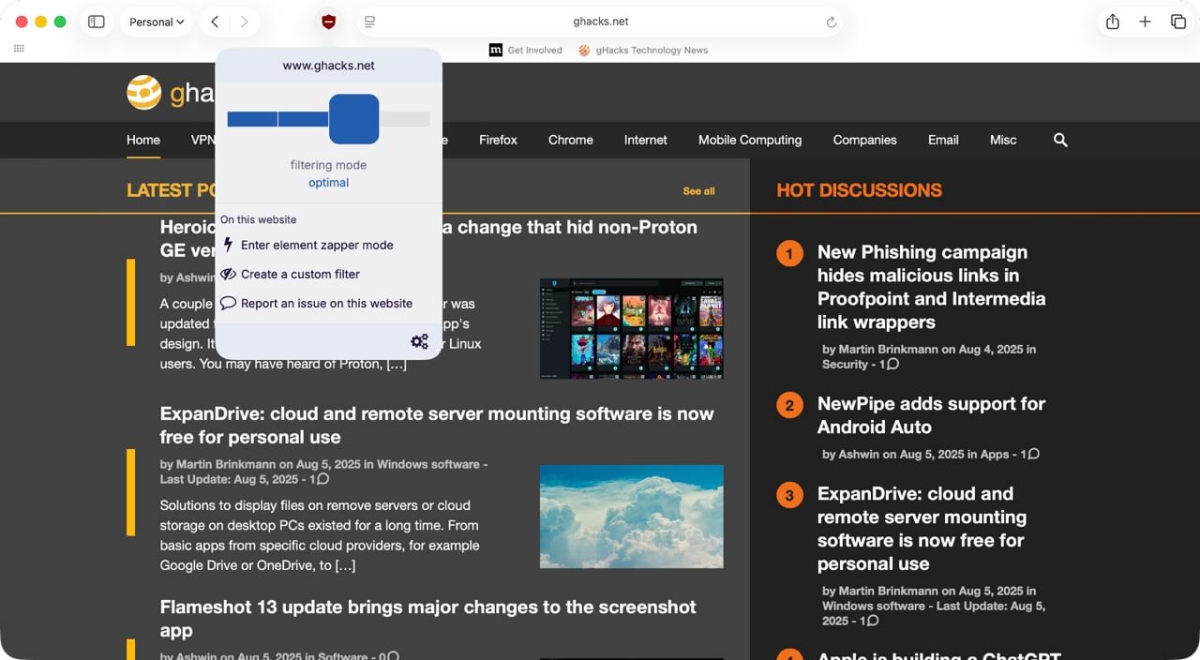
uBlock Origin Lite has four filtering modes, which you can set as default for all sites and change per site from the toolbar popup:
- No filtering: uBOL does nothing on that site, useful for sites that break.
- Basic: blocks network requests to ad and tracking servers, without cosmetic filters or scriptlets. Works without broad site permissions.
- Optimal (default): adds cosmetic filtering and scriptlets on top of basic blocking. Some empty ad placeholders can remain.
- Complete: applies all filters, including those that hide the placeholders optimal mode leaves behind. Most likely to break a site.


What uBlock Origin Lite cannot do
The Manifest V3 design limits what uBOL can do compared with uBlock Origin. It has no dynamic filtering matrix and no request logger for diagnosing blocked requests. Its filter lists update when the extension updates, so new ad techniques can take longer to be blocked. Sites that change their ad delivery often, such as YouTube, can occasionally get through until the next update.
FAQ
Is uBlock Origin Lite as good as uBlock Origin?
For most users, it blocks nearly the same ads and trackers. Power users lose dynamic filtering, the logger and fast list updates.
Does uBlock Origin Lite block YouTube ads?
Usually, in optimal or complete mode. YouTube changes its ad delivery regularly, so blocking can lapse until the next extension update.
Is uBlock Origin Lite free?
Yes. It is free and open source on every platform, without paid tiers or acceptable-ads lists.
Who makes uBlock Origin Lite?
Raymond Hill, also known as gorhill, the developer of uBlock Origin. Install it only from listings published under his name.
Related: how to use chrome://flags, hardware acceleration in Firefox and how to block website notifications in every browser.

Does not block ad on iPhone with embedded browser
WebKit views (aka in-app browser, embedded browser) do not have access to extensions. If you care for your security, avoid in-app browsers. Some apps even inject javascript into in-app browsers to track you (search “InAppBrowser” for a tool to test this). Use a real browser with an ad blocker.
I tried it on my home Mac desktop it works as good as uBlock Origin …no youtube ads what’s so ever
The difference between uBlock Origin and uBlock Lite is a number of filters allowed to be loaded at the same time. On major websites that use only top ad services and trackers, you will not see any difference. But if you go to smaller websites that use less known ad services/trackers, including self-hosting ads, you can possibly see a big difference.
I’ve just tried it briefly on my iPhone, seems fine. Although I’m not yet sure whether I can ditch AdGuard blocker extensions already (turned it off for now).
What would the benefit of uBO Lite be over AdGuard? From what I know uBO Lite has less blocking capabilities, I’ve tried it myself. Is it supposed to be less resource-intensive?
@Allwynd
AdGuard has questionable ownership. It is a Russian offshore company. Nobody knows if they still have connection to old country. I would turn it off if you do any money stuff (banking, credit cards, payments and so on) and filling in extremely private information like any Government ID. I would trust Mullvad VPN for such activities if you feel you need for more protection.
If you like privacy browsers with ad blocking capabilities, use Brave or Mullvad browsers that are available on iPhones. If you activate built-in ad blocking in Brave, it is almost as good as uBlock Origin. Mullvad browser is shipped with uBlock Origin preinstalled.
No one cares. It is not unreasonable to say that most companies have questionable ownership, regardless of where they live. Use the product that works best for you, or else you will drive yourself crazy with paranoia.
@Tony
It depends on what you access on Internet. If I just want to block ads on regular and adult websites, I do not care about company ownership either. But when I put my credit card or banking information online, I do not want questionable company without great references to tunnel my traffic.
I use AdGuard on my tablet myself, but I do not use the tablet for any money related activities or accessing sites where I have to give passwords or IDs.
I don’t know but what I see so far on Safari….uBlock Lite is blocking everything…zero ads. it works much better than the original
Great if you’re pleased with what you get with uBLite, but I think we shouldn’t forget that, as the developer himself describes uBO (the Original), “uBlock Origin is not an “ad blocker”, it’s a wide-spectrum content blocker with CPU and memory efficiency as a primary feature.”
Blocking ads is only part of uBlock’s features, perhaps the most important part for most of us given ads are like a slap in the face, you feel them, but let’s not forget trackers and other behind-the-scene nefarious actors, invisible, more like sticking their tongue when you’re looking elsewhere …