My Last Search reveals what you searched for on the Internet

My Last Search is a free portable program for the Windows operating system that retrieves and displays the search history of popular browsers on the system.
My Last Search may be useful if you want to get a quick overview of searches conducted on a system running Windows, either done by yourself or by other users on the system.
The program supports several popular web browsers including Mozilla Firefox, Opera, Google Chrome and Internet Explorer, and several search engines and other Internet sites.
As far as search engines are concerned, it supports Google, Yahoo and Bing currently. On top of that, it supports widely popular sites such as YouTube, Twitter, or Facebook.
The program retrieves information from web browsers that it recognizes on start. Since this means installed browsers by default, you may want to use command line options to retrieve the search history from portable browsers using the /loadfrom parameter followed by the path to the history folder of a supported browser.
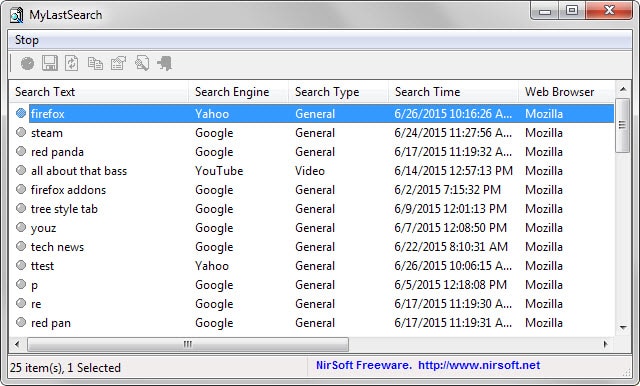
Each search is listed in its own row in the interface which highlights the search term, the search engine or site used to conduct the search, when the search was run, in which browser it was run, how often the search was run and the full url to the query.
A search is provided as well that you can use to find items of interest. Since it matches what you type, you may not only use it to find search terms but also specific search engines, or filter results by date or time.
So how does it work? While that is not revealed in the program or by its author, it is likely that it parses the history files and databases for entries that match the supported search engines and popular sites, so that only those are listed in its interface in the end.
Search results can be re-opened in the default system browser, and the usual export options are provided to save the information to various formats including XML and HTML.
My Last Search supports several other parameters that define mostly the output format. The /sort parameter on the other hand provides you with options to sort the results according to your preferences, for instance by column or search text.
Information are only retrieved if data is available. If the web history is deleted regularly you may not get any results.

How do I see what I’ve searched in incognito mode
Hello,
This is a nice utility and nirsoft is a notable company of long standing. You are well to reference it.
Here is my question about LastSearch: How do you delete the searches on the page, singly or all? Is this a function of the utility itself or do you have to delete all through a “browser.
Thank you
NR
Washington DC
I guess, I’m going to use it on my brother’s computer. I wanted to know which porn sites he is on to every day…..:)
small world. About a week ago, I encountered “all about that bass” while searching youtube “upright bass” videos. catchy tune & the bassist rendition is better than the “original”, IMO. 5M+ views
Oh come now Martin, you know youre real result picture is filled with pron searches. : D
No, not really. Actually, I never search for porn.
Are you sure!!
Yes definitely
I think he got a girlfriend actually :)
My thought exactly especially the P in there haha