
Opera Next, Dev Channel For Opera Browser

It is starting to get crowded on my hard drive, with all the stable, beta and development browser builds stored on it. Opera Software has just announced Opera Next, a development channel for Opera snapshots, similar in functionality to Google Chrome Dev or Canary, or Firefox Aurora.
Opera Next can be run alongside Opera stable on the same computer. The Next builds update automatically whenever a new snapshot build is released by Opera (with options to disable that).
Opera Next can be easily distinguished from Opera stable releases; The menu background color is blue instead of red.

Opera Next will automatically download and install all new builds released by Opera Software. Some users may prefer to only download alpha, beta, release candidate and final builds. For this, they need to disable the Download All Snapshots options in the Opera Configuration by clicking on this link and removing the checkmark from the Download All Snapshots parameter.
The Opera Next builds are completely independent from stable Opera installations, unless you configure them otherwise. You could for instance use Opera Link to synchronize data between both versions.
Opera Next is an entirely separate product to the official Opera browser product, which is the stable product intended for day-to-day use. There is no connection or interaction between them unless you manually configure this; all preferences and settings are saved for each product individually. For example, a bookmark saved in Opera Next will not display in your primary Opera browser. This ensures that your valuable data and settings remain untouched when you try out our latest changes.
The first Opera Next build is an Opera 11.50 alpha build which introduces two new features to the web browser.
Opera Link, Opera's synchronization service, gets password synchronization, a feature that was long requested by the Opera community.
The new password synchronization is not automatically enabled. New Opera Link users who setup synchronization for the first time can enable password synchronization during setup. Existing users need to select Menu > Synchronize Opera > Configure to add Passwords to the synchronized data.
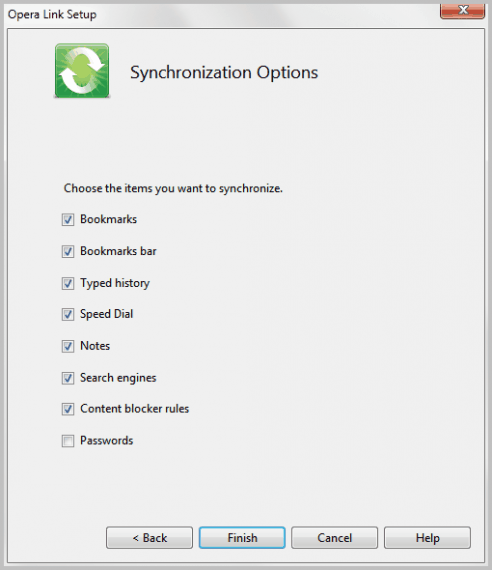
The second feature in the Opera Next release is an extensions engine for Speed Dial. Speed Dial extensions can be used by developers "to make live previews of web pages" or add "other nice decorations" to Speed Dial.
Three sample extensions have been created by Opera, including a live feed and weather report right on the speed dial page.
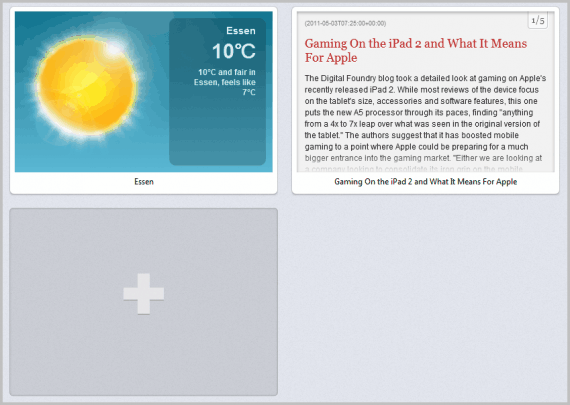
A tutorial is offered at Opera Dev for developers who would like to create Speed Dial extensions.
Interested users can download Opera Next from the Next page over at Opera Software. It is available for all desktop operating systems Opera runs on.
Advertisement











Thanks Martin. That should have occurred to me.
My Opera 11.52 for Mac is currently having a problem with the latest Flash update and the abends get annoying. Maybe I will try Opera Next while waiting for version 12.
Does the downloaded Opera Next include the existing bookmarks from the stable Opera version?
That depends, if you install it separately you may need to import the bookmarks as it is handled than like a second version.