
Unlocker Gets 64-bit Support, Adds Sucky Installation

Windows users sometimes encounter files or folders that cannot be deleted right away.What this means basically is that you get an error message when you try to remove a file from the computer.
Windows usually displays an error message explaining why the file or folder cannot be deleted. The most common error message in this regard is probably the "file in use" error but there are several others that all tell you that the operation cannot be completed at this point in time.
Sometimes, it is easy to resolve. Maybe you have still a program open that you loaded the file in or that created the file. Just close it and you should be able to remove it. Sometimes though, it is not as easy and you may need to use third-party software to resolve the issue.
That's where a program like Unlocker aids the user. It breaks all links that Windows might have to the file or folder so that it can be removed after all. This happens directly usually, and only on reboot at times when the file is locked in a way that it cannot be resolved while Windows is running.
Unlocker was up until now only available as a 32-bit program. The developer updated the program yesterday adding signed 64-bit support to it.
Now 64-bit Windows users can install and use Unlocker just like 32-bit users. Several additional changes and improvements have been made in the release.
The program's behavior has been improved, especially on 32-bit systems where false positive handling was improved so that false positives will no be detected anymore, ever.
Veteran users will notice the addition of promotional features during installation. Unlocker offers the Bing Toolbar, automatically selected during installation to the user.
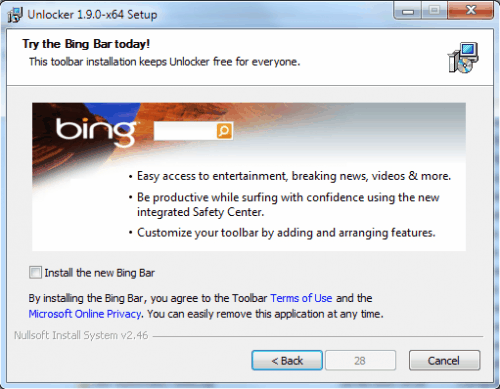
A 30-second timer is displayed if the Bing Toolbar is unselected in the installation menu, not a nice trait of the program.
The program tries to place an eBay shortcut on the desktop as well, which can be unchecked, thankfully without another countdown before the installation proceeds.
Unlocker is still the number one choice for handling locked files and folders in Windows. The installation is a one-time process, the timer on the other hand should better be removed from the installation. Users who make the deliberate choice to skip the Bing Toolbar installation should not be punished by a timer for that.
Unlocker is available at the developer's website.
Advertisement



















The software is free and apparently the author mentioned some heavy costs to support Windows 64 bit, so complaining about 30s seems a bit one sided.
I installed Unlocker and just waited 30 seconds, not a big deal and definitely not worth the ink and paper it is printed on.
LockHunter is a joke, just do yourself a favor and wait 30 seconds.
All I gotta say is this:
Who run Bartertown?
I was using LockHunter, but I prefer to use Unlocker as it works better and it’s not at frozen beta state. And since I can skip toolbar installations, no problem.
Installed it a minute ago. It wants to give me a “QuickStores” toolbar. No timer though.
Just use LockHunter ;)
Alternative: LockHunter.
Does the same thing.
Is available for 64bit.
Does not try to install a toolbar.
http://lockhunter.com/
Totally agree about this, especially the “timer” nonsense – I truly hope this is not a new trend of annoyance we’ll have to put up with in the future. I already said “No” so why do I have to out up with this crap?