
Backup Facebook Accounts
Many online services do not offer the means to backup data locally. Users who want to backup data are usually left with a tedious manual process (like downloading pictures or videos one by one). Data that cannot be downloaded right away is even harder to backup, think of contacts or private messages for example.
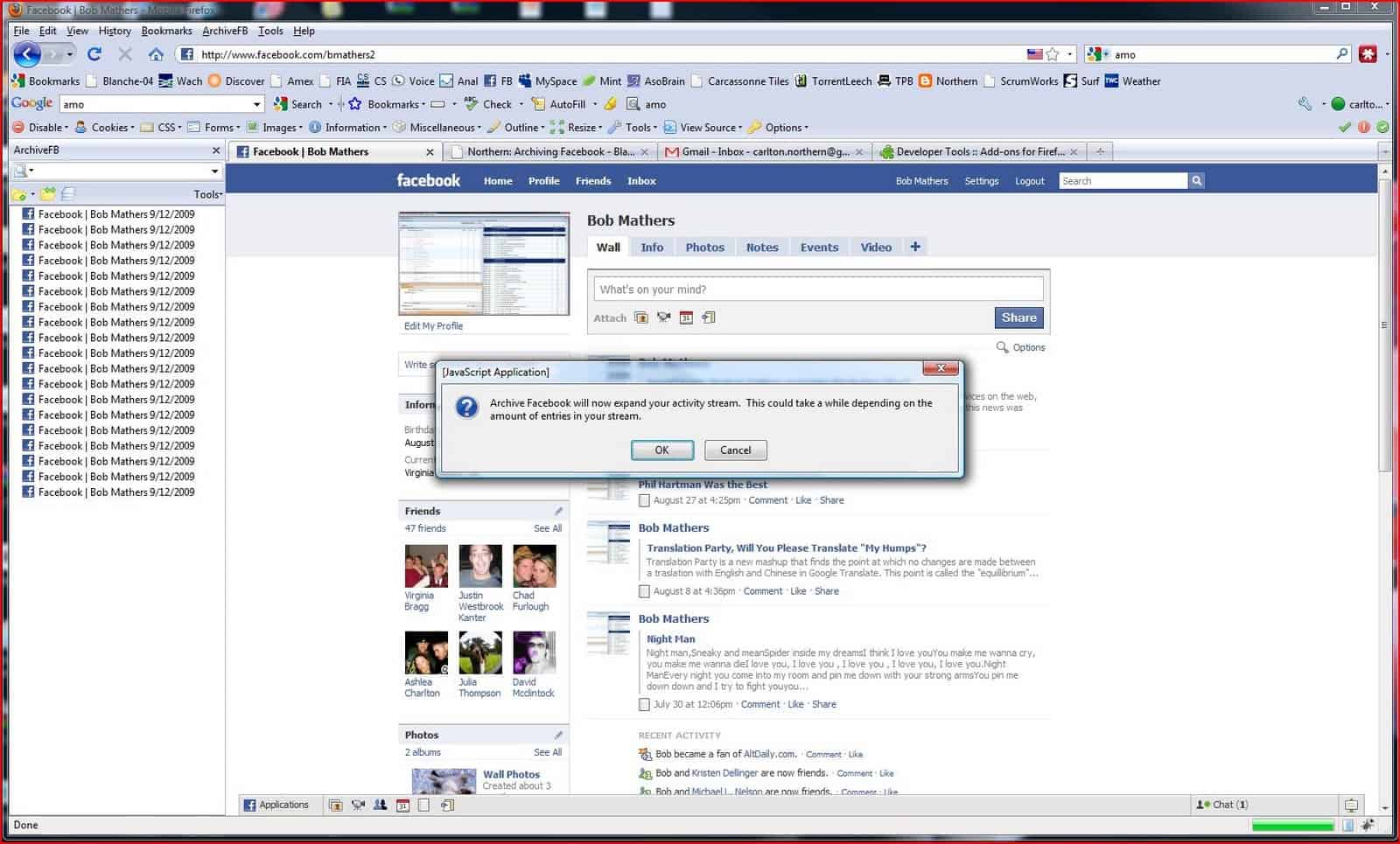
Archive Facebook is an add-on for the Mozilla Firefox web browser. The purpose of the add-on is to provide the tools to backup facebook accounts. The add-on can backup photos, messages, friends list, notes, events, groups, information and the activity stream. And since it is an experimental add-on it is likely that the developers will add new features to it in the future.
Here is how the add-on works:
- An ArchiveFB entry is added to the Firefox Tools menu after installation of the add-on
- Activate ArchiveFV > Archive from the menu after logging into a Facebook account
- The process is automatic and can take minutes or even hours depending on the data in the account
- A Facebook menu option is added to the ArchiveFB menu giving the user the option to view archived accounts
Once the archiving process has completed, you will see an entry in the sidebar that says “Facebook | username date†where username is your Facebook username and date is the current date. Click on the entry. You will see your Facebook profile page appear and at the bottom will be an annotation bar where you can highlight text or make comments on a page for your personal records. Click through your archived Facebook pages to ensure that all pages have been archived. All pages listed in the introduction should be archived. You can tell if a page has been archived by placing your cursor over a link. Look in the bottom left hand corner and Firefox will show the location of the link i.e. if the location starts with “file://â€, it is on your hard drive, if it starts with “http://â€, it is on the web. If it is not on your local hard drive, try to archive your account again. If the second attempt doesn’t work, please notify us and we will attempt to fix the problem.
Facebook users who like to backup their Facebook accounts can download the Firefox add-on from the official Mozilla Firefox website.
Update: Facebook has now integrated a backup feature which means that it is no longer necessary to use third party tools to backup a Facebook account. Facebook users need to click on Account > Account Settings > Download your information to backup their data.
Advertisement
















ho scaricato il beckup dal link che manda facebook solo che nn salva tutta la bacheca ne foto dal primo giorno in cui mi sn iscritta..perchè?è normaale?
grazie infinite per l’aiuto
buckup
Thank you very much for this information …
As someone involved with the original Facebook backup tool, SocialSafe, I definitely applaud any progress made in this area. Helping Facebook users protect their investment in the network whilst freeing their data is an area worthy of attention. I do have one question .. this archive process stores content not produced by the user and seems to scrape the site, I’m curious how you ensure Facebook don’t close or delete users accounts for seemingly breaching Facebook’s user agreement?