
Wireless Network Scanner inSSIDer

The wireless network scanner inSSIDer can be used to quickly scan the area for wireless networks. The software program works well with Windows Vista and Windows XP (even the 64-bit editions) and can quickly display all wireless networks in the vicinity (meaning in reach of the antenna)
Update: The latest version of the program is also compatible with newer versions of Windows. You can also run it on Windows 7 or Windows 8 without issues, provided that you have a wireless network adapter installed on the system.
A network adapter has to be selected to start the scanning. All discovered wireless networks are then added to a table in the same interface which lists information like their MAC address, SSID, channel, security and network speed.
Graphs are shown below the table that visualize the signal strength of the selected wireless networks over time. It is possible to select some or all of the wireless networks and observe their performance.
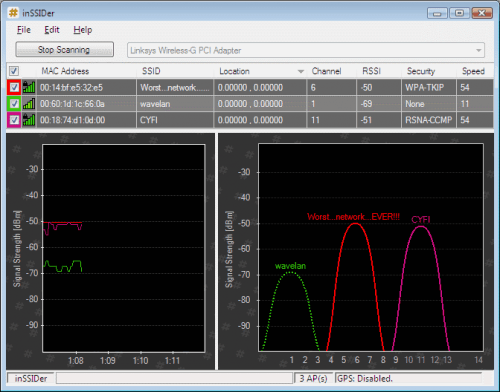
The visualization can help the user troubleshoot the wireless network. It could for example be that all or most of the wireless networks in the area are concentrating on specific channels for the communication. It could then help to switch to one of the transmission channels that are the least used in the area to improve the speed and performance of the wireless network.
This can be useful if you notice that your wireless network is not performing in an optimal fashion, for instance if the bandwidth that you get is less than you should get, or if you notice slow downs, packet loss, or other issues.
InSSIDer is an Open Source software program that might be useful for users who want to troubleshoot, optimize or configure their wireless networks. Beta 1.2 of the program has been released a few days ago and is available for download on the developer's homepage.
The program ships with a couple of interesting features, for instance that it will record the signal speed over time. This can be used for troubleshooting purposes as well, among other things.
It may also provide you with a list of conflicting Access Points (APs), and give you channel recommendations for each radio.
Update: inSSIDer for Windows is no longer free. It is available as a home edition for $19.99 on the developer website. There is an Android application however that is free to use, which you may want to try. Note though that it may not provide you with the same level of details as the Windows version, and that you may also get different results as you are using a different wireless network controller to scan for networks.
Advertisement


















Very simple and interesting program, I used Netstumbler before but this seem more compatible, thanks for the info.
It should be mentioned that inSSIDer requires .NET Framework 2.0 to function (it does).