
Remove personal information from iTunes DRM free songs

The joy that Apple decided to sell DRM free music on their popular iTunes platform was soon overshadowed by two information that came to light shortly thereafter. The first one was that DRM free songs would cost $0.30 more which can't not really be explained unless the company or rights holders believe that they need to be compensated for an increase in trading and therefore loss in profit. The second was discovered after users were actually able to purchase drm free songs at iTunes.
Account information, namely name of buyer and account name, remained as information in the DRM free files. While this should not be a problem for most users, some would have at least preferred to receive information about this before making the purchase.
This can be especially troublesome if one or multiple of your files make their way on to the Internet, either by accident, hacks, or stolen devices. Imagine having your iPod stolen that contains your DRM free music collection, only to find out days later that the thief uploaded part or all of the music to the Internet.
I did find a great way to remove the information right in iTunes. All that needs to be done is convert the song(s) once which will remove the personal information. Please note that you only have to change the preferences (steps 1-5) once. Start at step 6 if you have changed them before. Here are the details:
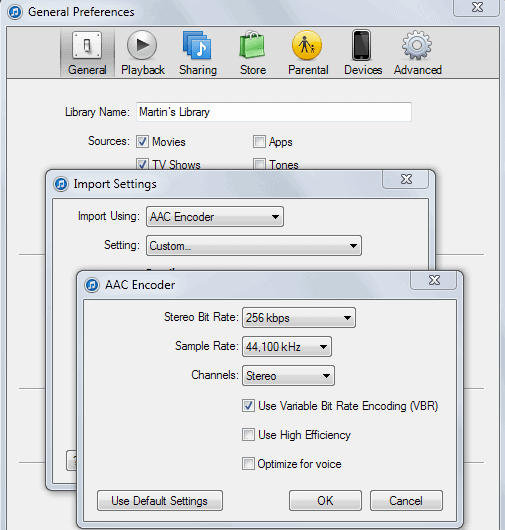
- Click on Edit > Preferences
- Select General > Import Settings from the page.
- Change the setting "Import Using" to AAC Encoder if that is not automatically selected.
- Select Custom for Setting
- Now select 256 Kbps Stereo Bitrate from the menu
Select a song (or songs), right-click it (them) and choose Create AAC version. A second song should appear after some seconds, right click that song and verify that it contains no personal information at all. (by right-clicking the song and select Get Info).
Advertisement






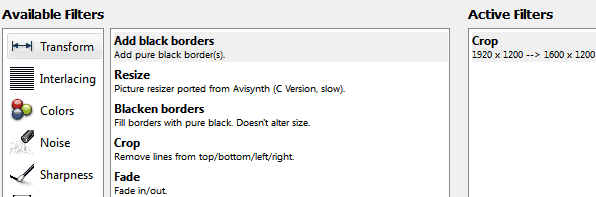











Today easiest way to remove user information from purchased songs is to use AppleIDStrip
https://www.macupdate.com/app/mac/48331/appleidstrip
Another way is to convert the song to a WAV file. It will keep the original quality, no lossy conversion. The converted file size will be larger than the original.
good job ! thanks for sharing. with your guide ,remove drm become a simple thing
Hey does it also works if i convert it to mp3? :)
Will all of my personal info be removed? :) Or should it be to aac?
I like mp3. hehe.
Here’s how to clear your personal information from an iTunes Plus m4a file:
First, you’ll need to clear the Apple ID field (usually just your email address) and purchase date (which is different from the iTunes “Date Added” field)
– Download AtomicParsley [http://atomicparsley.sourceforge.net/] and unzip it.
– Open a Terminal window (it’s in Applications/Utilities)
– Drag the AtomicParsley application’s icon into the Terminal window. Do not hit enter.
– Drag the m4a file into the Terminal window. Do not hit enter.
– Enter the following command. Note that the dashes before “manualAtomRemove” are double dashes, even though they may not be displayed as such here because of HTML encoding.
–manualAtomRemove “moov.udta.meta.ilst.apID” –manualAtomRemove “moov.udta.meta.ilst.purd” -W
– Hit Enter
Now, you still need to remove your name:
– Install HexFiend [http://ridiculousfish.com/hexfiend/]
– Open the file in HexFiend
– Find your name
– Replace those characters with the exact same number of periods.
– Save the file
I would really appreciate if you can tell me the way to edit the email id from the songs purchased from itunes…..thanks in advance
I agree with the previous comment. Converting from a lossy encoding to another lossy encoding will degrade the sound quality. Why not just edit the existing file?
Also iTunes encoders suck!