Windows 11 Notepad is getting Tables, streaming AI results

Microsoft is testing two new features in Windows 11's Notepad. The text editor is getting support for Tables and more AI features.
Notepad has gained a lot of features in the past few years, and while option like tabs, auto-save, spell check have been welcomed by users, some features have been viewed as bloat. In July 2025, the Redmond company added support for Markdown syntax formatting in the text editor app.
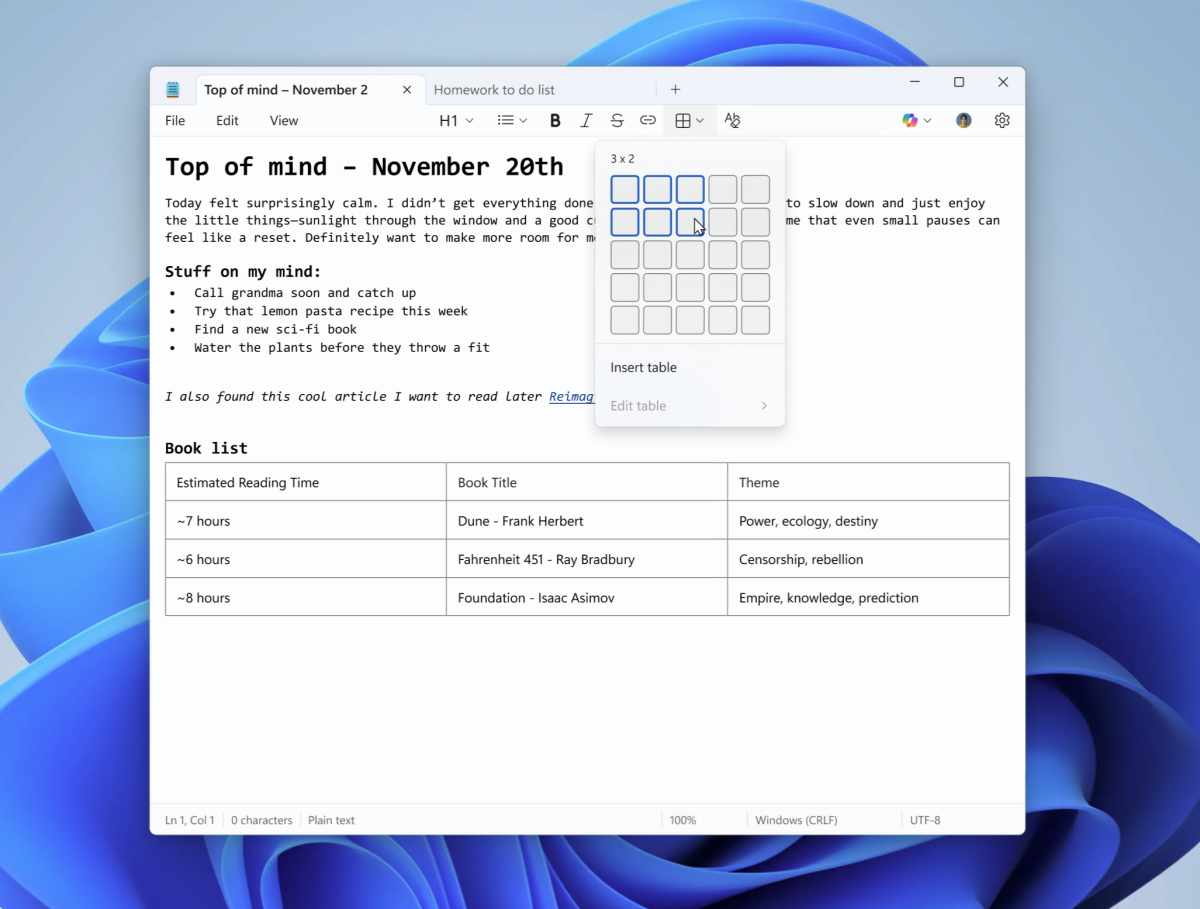
Now, it is bringing support for Tables. Microsoft says that a new option to add Tables is available on the formatting toolbar, it's the grid icon, users can click on it to view a grid and select the number of rows and columns. E.g. The screenshot below shows a 3 by 2 table. That's similar to how you insert Tables in Microsoft Word.
(Image courtesy: Microsoft)
But, you can also add tables using Markdown syntax. Users will be able to edit the table to add or remove rows and columns from the Table menu, or simply by right-clicking on the table.
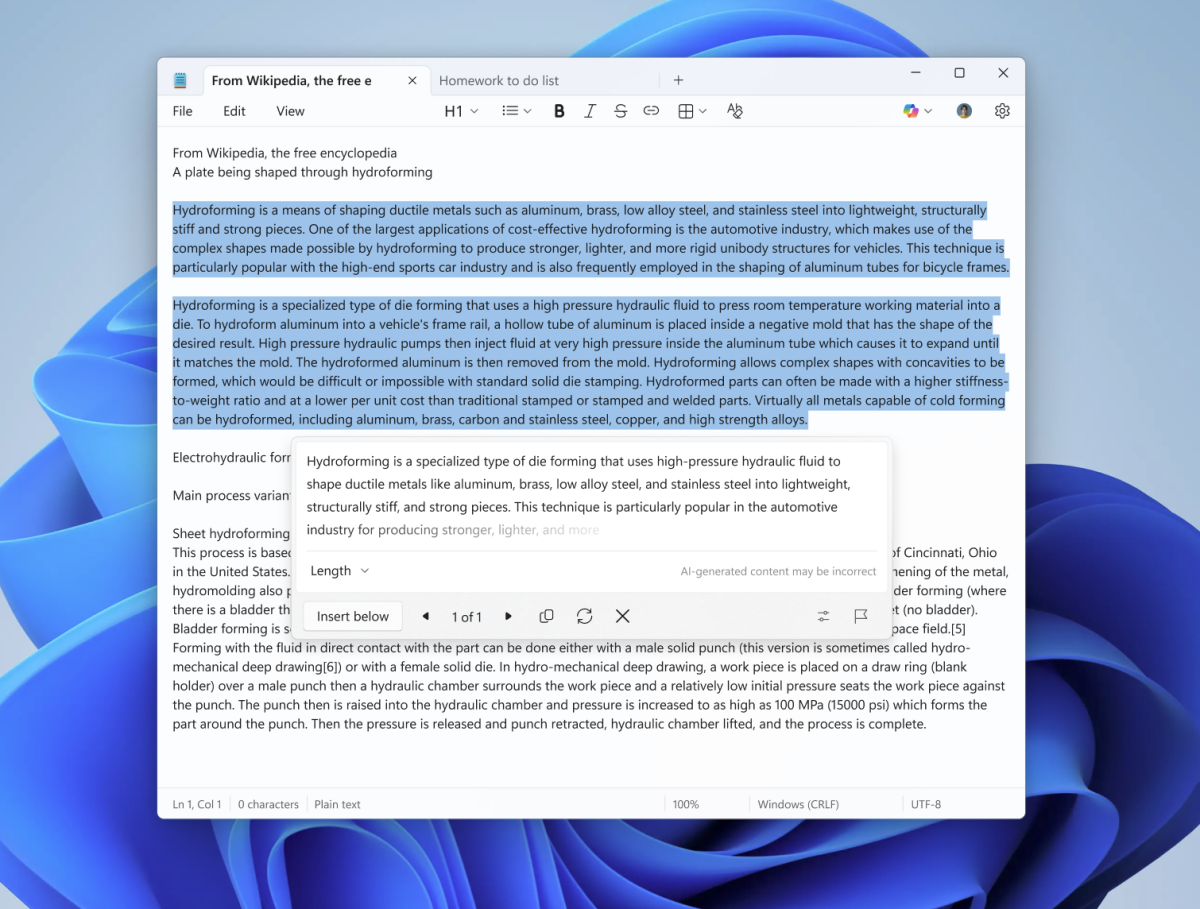
Microsoft says it is improving the AI features in Notepad, i.e. Write, Rewrite and Summarize with streaming result responses. Prior to this update, the text editor waited to generate the full response and then displayed it to the user. The new streaming AI results will appear as the text is generated, so you can preview it or interact with it.
(Image courtesy: Microsoft)
The results are generated locally, but only for the Rewrite feature, and this is limited to Copilot+ PCs. You know what that means, Write and Summarize don't generate the content locally on Copilot+ PCs, and none of the three features work offline on non-Copilot+ computers. Speaking of which, users will need to sign in to their Microsoft account to use Write, Rewrite, and Summarize in Notepad. This likely has to do with rate limits, and the Copilot credits allocated to the account.
Tables and Streaming AI results are available in Notepad version?11.2510.6.0 for Windows Insiders in the Canary and Dev Channels.
What is Microsoft doing? I remember when Notepad used to be a plain text editor. WordPad died for this.

Luckily « edit » is back !
I’m looking forward to the day microsoft announces the preloader for notepad. True innovators! True visionaries!
I salute you.
[Insert movie Zengief pic with sideways thumbs up)
I switched to Notepad4 (Notepad2?2, Notepad2++). I don’t have to deal with this slop from Microsoft.
EmEditor free version is very good. No advanced features, but more features than Notepad or most small free text editors
Need we just say it’s more useless bloat?
At this point this is what all Windows news comes down to:
– Microsoft making Windows more bloated with useless features nobody wants
– Microsofot making Windows more user-unfriendly
“‘Microsoft is raping Windows’ has never been so true with Windows 11.”
If they did not try to force AI updates, I would not have cared. It is their product, they can do whatever they want with it. When people buy new computers, they may choose different OS. If they need Windows anyway, they can run it Virtual Machine app for certain programs. That how business works.
Regrettably, Microsoft if forcing AI to already bought and paid for PCs. Most people do not realize how much tracking is going on with AIs. But most of the people would not care anyway. The real difference begins if Microsoft starts unavoidable popup ads on Windows. I could see well off people migrating to Apple PCs in mass, especially if they already own iPhones.
Tables is a good idea; it can help with organization. The other stuff . . . don’t know. I use AI in WordPress on journal entries. AI offers some decent advice on writing style. Maybe not on par with Grammarly.
Call this Wordpad with copilot…
MS is really not making Win11 any more compelling with these hostile forced updates. People will be sticking to win10 forever like with XP then win7 – or jumping ship to macs.
I bought a Lenovo Copilot+ laptop that was 40% off. Everything Copilot is uninstalled or disabled with the Copilot key remapped back to right Ctrl. It’s pitiful how much effort is needed to undo the bloat of Windows 11. DoNotSpy11 helps.
These “improvements” might have made more sense with Wordpad than Notepad especially with addition of tables. Where Notepad should have remained what it was. So now I use Notepad++. I won’t even open the “new” Notepad. Getting so I don’t even want to turn on my Win11 computer for all the crap MS is throwing in it.
If you did it before, it should not take too much time. Run DoNotSpy11, O&OShutUp11 and BlueHost. You can use saved settings and host lists. If you did it before, it should take 10–15 minutes to copy backups and do it again.
At least there are workarounds that allow you to (search for) “restore classic notepad to windows 11” so you do not have to use M$ Apocryphal Insertion of crap
I put WordPad back on my Windows 11 25H2 computer. It’s easy to do.
Ok so let’s take a break for a minute and think clearly: is it real (all the ‘new AI tech’ shit)?
WTF is Notepad getting AI for?
You mean the text editor that edits .txt files right?
Why the fuck did it become Internet-enabled, AI-powered and is now(?) getting a tables functionality?
This Windows 11 shit is so unreal, like I can’t even believe it when I see it.
Technology is becoming a fuckfest madness of bloat.
For Humanity’s sake, Microsoft should fucking stop this shit immediately.
Maybe I look out of the loop, that’s actually true, since I never stopped using Windows 7 SP1 & Windows 10 LTSB 1607 and never upgraded them (blocked automatic updates).
Now don’t even get started with Picture Editor getting AI, File Explorer getting AI file sorting and Windows Recall etc.
Technology looks so fucking weird nowadays, it’s mostly hype and bloat that nobody asked for.
Just create a working OS without AI and create separate AI programs.
And create a separate Markdown editor instead of raping Notepad.
But no, instead we’re getting crazy-powerful CPUs & GPUs that end up sucking anyway because of this bloated software madness.
‘Microsoft is raping Windows’ has never been so true with Windows 11.