'Your Browser Is Managed by Your Organization' in Chrome: What It Means

Chrome shows "Your browser is managed by your organization" when at least one Chrome policy is set on the computer. On a work or school device, the policies come from your IT department. On a personal PC, they are usually set by software you installed, such as a password manager, antivirus or parental control app, and sometimes by adware. Open chrome://management and chrome://policy to see what is set and by whom before you change anything.
The message alone does not mean someone is watching you; what matters is which policies are set.
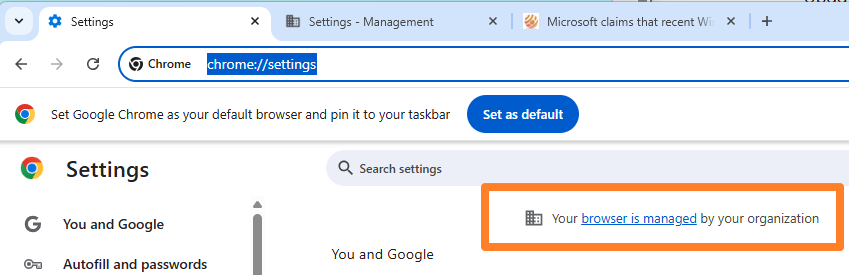
What the message means
Chrome supports enterprise policies, settings that override what the user can change, such as the homepage, the search engine, allowed extensions or update behavior. As soon as any policy is present, Chrome shows the "managed" notice in the menu and at the top of Settings, so that users know the browser is not fully under their control.
Who can set Chrome policies
| Source | Typical sign in chrome://policy | Safe to remove? |
|---|---|---|
| Employer or school | Many policies, cloud management or a domain in chrome://management | No. Ask IT |
| Security, password or parental control software | Extension install policies naming that product's extension | Only if you uninstall that software |
| System tools and tweakers | Policies for updates, telemetry or default browser | Yes, if you no longer want the tweak |
| Adware or browser hijacker | Forced search engine, homepage or unknown extensions | Yes, after removing the adware |
Check what is managed: chrome://management and chrome://policy
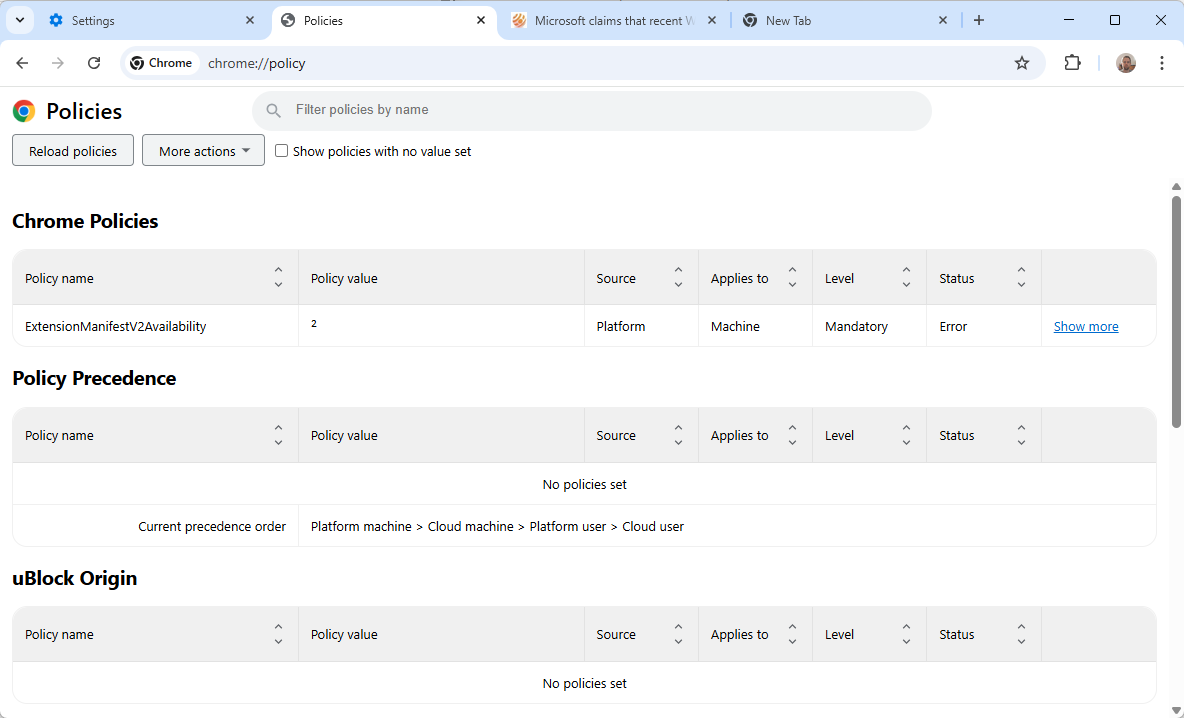
Type chrome://management into the address bar. It shows whether a company or school manages the browser or your profile, and which information it can see. Then open chrome://policy: it lists every active policy with its value and source (Platform for policies set on the computer, Cloud for policies from an organization). Click Reload policies after making changes.
Remove policies on Windows
On a personal Windows PC, Chrome policies are stored in the registry. Remove the software that set them first, then delete leftovers:
- Press Windows + R, type regedit and press Enter.
- Export a backup with File > Export.
- Go to HKEY_LOCAL_MACHINE\SOFTWARE\Policies\Google\Chrome and delete the values you do not want, or the whole Chrome key.
- Check HKEY_CURRENT_USER\SOFTWARE\Policies\Google\Chrome as well.
- Restart Chrome and check chrome://policy again.
If the values return after a restart, a program or scheduled task sets them again; find and remove that program first.
Remove policies on Mac
On a Mac, policies come from configuration profiles or Chrome preference files. Open System Settings > Privacy & Security > Profiles (or General > Device Management) and remove profiles you do not recognize; a profile you cannot remove belongs to your organization. Leftover policies can be listed in Terminal with defaults read com.google.Chrome.
When it is malware, and what to do
A forced search engine you did not choose, a homepage you cannot change or extensions you cannot remove usually point to adware. Uninstall unknown programs in Settings > Apps, run a scan with Windows Security or a second-opinion scanner, then remove leftover policies as described above and reset Chrome under Settings > Reset settings.
Work and school devices: do not remove
On a company or school computer, the policies are intentional and required by your organization. Removing them can break access to work systems and violate the device policy. Ask IT if a setting gets in your way. Chromebooks have a similar message; see our guide on Chromebooks managed by a school administrator.
FAQ
Is my browser being monitored?
Not necessarily. chrome://management lists what an organization can see. On a personal PC with only software policies, nobody is monitoring your browsing through Chrome.
Why did the message appear after installing software?
The program set a Chrome policy, often to install its own extension or change a setting. Uninstalling the program normally removes it.
Does Microsoft Edge show the same message?
Yes. Edge shows "Your browser is managed by your organization" for the same reason; check edge://management and edge://policy.
Related: how to use chrome://flags and how to block website notifications in every browser.

active directory domain joined pc will see this even with no chrome policies/admx actually loaded.
The copy of Firefox supplied as part of the Linux Mint package has a similar organizational management message.
On its “about:policies” page, Firefox reports:
Active Policy Name=DisableAppUpdate; Policy Value=true
My experience is that everything on Linux Mint Cinnamon works well for my purposes. Besides, Linux being what it is, I am free to download a second copy of Firefox, managed by me, not by the Linux Mint people, and configure it as I please. I use the Pale Moon browser much more than Firefox anyway. So, I’m happy with the situation. Lots of freedom.
I recommend Linux Mint Cinnamon to any Windows sufferers if what you do is mainly web browsing and email. Everything you need is there without ever having to learn how to type any commands.
If you are stuck using a Windows-only program which Linux cannot handle, consider using two computers, perhaps with Windows limited or kept from any outside connections.
Why not set up dual boot, instead of running two computers? You can even set up a data partition that both Windows and Linux can utilize, should you need to open files from either OS.
You can add Firefox’s repository to Linux Mint.
https://support.mozilla.org/en-US/kb/install-firefox-linux#w_install-firefox-deb-package-for-debian-based-distributions-recommended
I did that because I wanted to get updates as soon as they are released by Mozilla, not Mint.
I think you meant to write, “If Chrome is run on a work or education computer or laptop, there is a chance that your malicious capitalist overseers have altered certain settings.”
Why capitalist? Overseers, period. I think its terrible for capitalism that anyone assumes any critic regarding privacy would implicitly suggest it is or may be the specificity of capitalism. This said, be it the article’s title or content, exposing, reporting facts and asking the reader his opinion is not even a critic. Strange that some of us interpret what is neither said, written nor even suggested. Capitalist paranoia? Darlings, we love you, what would this world be without BigMac, Coca & Pepsi, GAFAM, just to name a few? We’d be desperate, not knowing what to do, moving around without our smartphones, obliged to engage conversations with strangers, to read books and watch movies on extra-wide cinema screens … I tell ‘ya, hell it’d be.
To answer the article’s question: Be it Chrome or any other, be it American, Russian, Chinese, Japanese, Swiss, German, Dutch, Monegasque (won’t name them all), be the regime of their country democratic, authoritarian, dictatorial, humanist, religious … I’d definitely be annoyed when reading on my screen “your browser is managed by your organization”. Need to say I’ll never (“Never say never”? Why never?), I mean never adopt an OS, a browser managing my digital life in my place. If I need AI stuff (“stuff” because for me this is what it remains for the time being) I, we all know where to get it. Otherwise, out of my way.
Tom H. > “I mean never adopt an OS, a browser managing my digital life in my place.”
Tom, I’m pretty sure you allow Windows 7 to manage your device drivers, your clock updates, your file directories, your task manager, etc., same as I allow Linux Mint Cinnamon to manage all that, and Firefox, for me. What’s remarkable is that Linux Mint Cinnamon Firefox is explicitly labeled as managed, while the many pieces of the operating system are not.
I look to the apparent intentions of the managers, which might be public spirited, or might be malicious and self-aggrandizing. So far, I have a very pleasant feeling about Linux.
George, managing is perhaps no the correct word given there are always functionalities, features which belong to the very native processes of an OS as well as of a browser, indeed as you rightly bounce on this word. I should have written “an OS, a browser deciding in my place, in the place of the user”. Just like in a company: a manager follows the decisions of his hierarchy, he takes decisions according to his hierarchy. Well, I intend to be my PC’s, my browser’s hierarchy, and AI must remain subordinated : it is not the boss, unless the user decides to let him be, or not. That’s the article’s question.
Concerning the OS, if indeed by nature and code some functionalities — most — are performed automatically (which is the very meaning of code), some others may be domesticated, i.e. device’s time update (workarounds available preventing yet another connection to MS servers) or simply disabled (i.e. several Windows Services, also in latest Windows OSs a considerable amount of useless apps, games etc) : this means the user has the authority, sometimes via tweaks and tricks, but has the authority. Imagining all of what remains under the control of the user be passed to an AI frightens me not to say it annoys and revolts me, even if for the time being delegating one’s authority to an AI is still optional, which means the worse could be for after-tomorrow: no user agreement required, and that’s where everything could collapse.