Vivaldi 7.5 launches with tab, ad blocker and other improvements

Vivaldi Technologies has released Vivaldi 7.5 today. The update for the highly customizable Chromium-based browser adds even more customization options to it plus nice-to-have features on top of that.
Most Vivaldi installations should receive the update automatically. Select Vivaldi Menu > Check for Updates to install it right away, if that has not happened already.
Tip: read my review of the Vivaldi browser here.
Tab improvements
The big new feature of the release improves tab handling. You can now right-click on a Tab Stack, that is what Vivaldi calls tab groups, to assign a custom color and name to it.
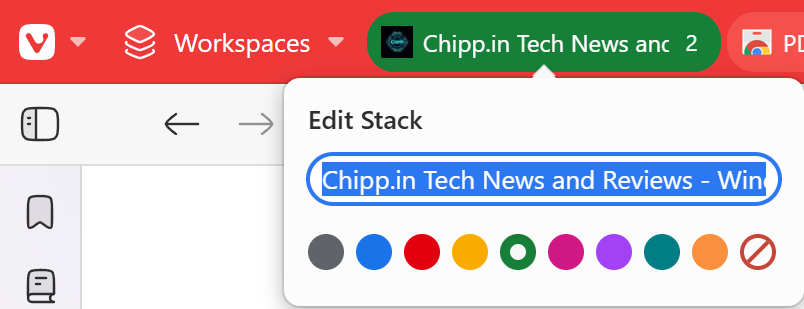
It is a handy option to distinguish them even more from other stacks or individual tabs. As you may know, you create a stack by dragging and dropping one tab on top of another. Very easy and straightforward.
Vivaldi's tab stack feature is probably the most advanced tab grouping option that you find in any desktop browser. It supports all the basics, but you get plenty of options to customize your experience.
Improvements do not end here. When you right-click a tab, you may notice that the context menu looks different. Vivaldi says that it is "faster and more intuitive" now thanks to a bit of reorganization and cleanup that has taken place.
Plenty of under the hood changes
The official release notes list quite a few improvements that went into the release as well. Noteworthy are that the built-in ad blocker received new functionality, that you may now add a custom DNS provider in the browser that does it job only inside the browser, and that the browser's quick commands feature now shows synced tabs as well.
As far as the ad blocker is concerned, here is what is newly supported in the release:
- strict1p - strict first-party requests,
- strict3p - strict third-party requests
- badfilter - used to disable an existing filter
All three are also supported by popular content blockers such as uBlock Origin.
Closing Words
The full changelog lists all changes that went into the new browser version. Vivaldi 7.5 fixes several potential crashes, including crashes when opening a window or reopening a new profile.
Vivaldi engineers continue to improve the usability of browser. It is without doubt one of the browsers that you can customize the most using built-in functionality.
Now You: have you tried Vivaldi recently? Did you like it? Feel free to leave a comment down below.

Vivaldi is not a browser anymore. Worse than expected, worst impossible.
I reported on their forums in summer 2024 that Vivaldi has a problem on Linux with both Cinnamon and XFCE that the toolbar buttons (minimize, maximize, close) don’t align with the topmost edge of the screen and that to use them you have to position the pointer one pixel below the edge of the screen, making it extremely hard to close the browser or minimize it, they said they’ve acknowledged the problem and I even received and official confirmation e-mail after sending a proper ticket, so far, one year later, no resolution on this problem.
Oh well, I will keep using it as a secondary browser regardless.
I gave up creating ticket for Vivaldi. I created some tickets to report different issues and crashes. I even included the dump files as requested.
Besides the email notification when the tickets were created, I never received updates regarding status updates. I did not find a way to search their ticketing system (They use JIRA and it’s only accessible internally for searching).
Still no names next to the extensions icons
Yes, I actually use it every day, as I am a lot online. And V manages to get me through everything, even my unbelievable mess or needs :)
Don’t forget, that (like Chrome), Vivaldi monitors, tracks and submits all gathered data to a central URL and doesn’t do this in an anonymized way, but uses a unique globalD (coupled with your IP).
https://www.ghacks.net/2018/01/30/vivaldi-browser-privacy/
Are you really sure, you wanna run a closed source application with that kind of behavior ?
Sounds somewhat shady and even less trustworthy than Chrome to me.
Yes there ARE of course ways around that, eg redirecting the URL to 127.0.0.1 in etc/hosts or blocking the IP/URL in the firewall .. nonetheless at least I wouldn’t wanna have such a potentially malicious thing on any of my systems.