Firefox 140 ships with Unload Tab feature and new ESR base

Mozilla plans to release Firefox 140.0 to the Stable channel on June 24th, 2025. The new version of Firefox includes several usability improvements and new features, such as a new option to unload tabs to free up memory, improved vertical tab pinned tabs, faster full-page translations, and much more.
All other channels and versions of Firefox will also be updated around the same time. The Firefox ESR (Extended Support Release) versions are updated to 115.25.0, 128.12 ESR and 140.0 ESR respectively. Firefox 140 ESR is a new base for the extended support releases and it will replace 128.x soon. Firefox 115.25.0 ESR is still maintained for earlier operating system versions.
Last but not least, the development channels Firefox Beta, Firefox Developer Edition, and Firefox Nightly also move up a version to Firefox 141 and Firefox 142 respectively.
You can check out my review of Firefox 139 here.
Firefox 140: the major changes and new features
Tab Unload
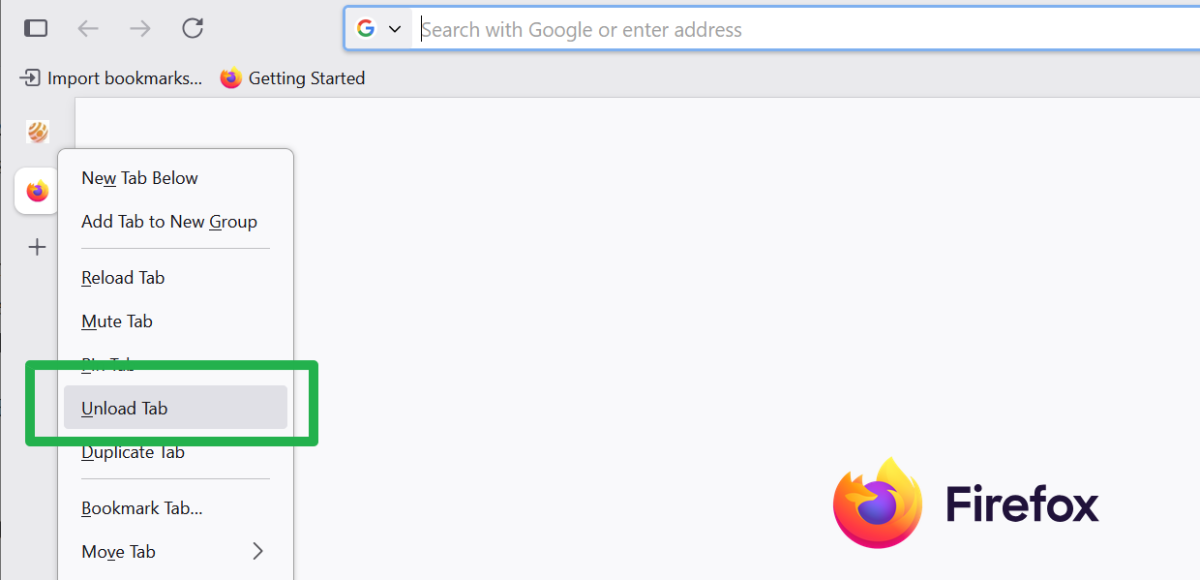
The new feature is designed to free up memory while Firefox is running. Just right-click on any open tab in the Firefox web browser and select the new "unload tab" option from the context menu.
The tab remains visible but Firefox unloads it to free up memory. Unloaded tabs show up with gray icons to indicate that they are sleeping and not active.
The feature can be useful in some situations, for instance when the device is low on memory or when a website is "misbehaving" and consuming way too much memory or CPU.
Simpler to add custom search engines
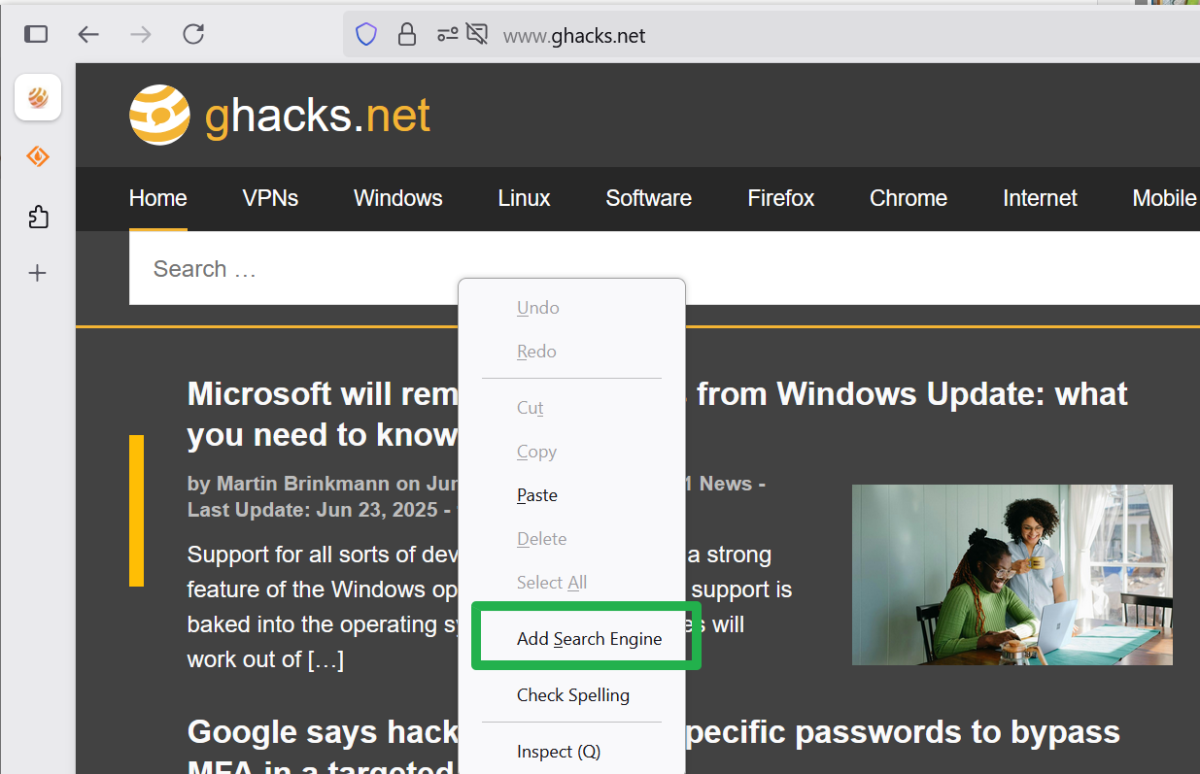
Adding a custom search engine is now much simpler in Firefox. All you have to do is right-click on a search field and select the "add search engine context menu option and then the "add search engine" button in the dialog that pops up. You can add a keyword for faster access to the search engine optionally as well here.
Full-page translations speed up
Firefox supports privacy-friendly local translations for some time now. The translations do not require an Internet connection for translating content. The only time an Internet connection is required when Firefox downloads a language pack for the language that you want it to support.
Firefox 140 introduces a change for translated full-page content. Firefox used to translate the entire page by default immediately, when you selected the option. Now, Firefox will focus on the visible text, which, according to Mozilla, should speed up the translation process significantly.
Other changes and fixes
- You may now remove the Extension icon from the Firefox toolbar. Just right-click on the icon and select the "remove from toolbar" option to do so. This moves the icon to the main Firefox menu, so that the listed extensions and functions remain accessible.
- Arabic builds of the Firefox web browser include an Arabic dictionary now by default which the Firefox spellchecker uses.
- Address auto-fill is now supported and enabled in Austria, Italy, and Poland.
- The Pocket toolbar icon and Pocket integrations on Firefox's New Tab Page have been removed. Mozilla announced the shutdown of Pocket earlier this year.
- Firefox will now escape less-than (<) and greater-than (>) symbols when serializing HTML attributes, making certain mXSS attacks on websites more difficult.
Developer changes
- The CSS Custom Highlight API is now supported.
- The UA styles for <h1> elements nested within sectioning elements have been removed.
- The SVG fetchpriority attribute is now supported for the SVG <feimage>, <image>, and <script> elements.
- The Cookie Store API is now supported.
- Support added for unspecified in cookies.SameSiteStatus. In addition, unspecified is now the default value for sameSite in cookies.set().
- Added platform support for aria-keyshortcuts in Linux, macOS, and Windows.
- Search in the Inspector panel is now improved.
- Added support for the pointerrawupdate event.
- Firefox now applies a uniform user agent (UA) style to <h1> elements, regardless of whether they are used inside <article>, <aside>, <nav>, or <section>.
Enterprise changes
- Firefox disables the option to load add-ons temporarily from now on if you prevent the installation of add-ons using policies. Previously, access to about:debugging was removed entirely.
- The DisableBuiltinPDFViewer policy no longer completely disables PDF.js; it changes the handler to send PDF files to the operating system.
- All Pocket related policies have been deprecated.
Security updates / fixes
Mozilla fixed 13 security related issues in Firefox 140.0. The severity rating is high, but Mozilla makes no mention of exploits in the wild. Still, it is recommended to upgrade Firefox asap to block potential attacks.
Firefox 140.0 download and update

Most non-managed versions of the Firefox web browser are updated automatically. The browsers check automatically for updates and will install new versions. These checks do not happen in real-time and some users may prefer to download and install the updates immediately.
This can be done in desktop versions of the Firefox web browser by selecting Menu > Help > About Firefox.
Manual downloads are also provided on Mozilla's official website.
Outlook
Firefox 141 will be released on July 22, 2025. The same is true for Firefox 140.1 and Firefox 128.13. Linux users can look forward to a big improvement in the release. Firefox will use less memory and no longer require a restart after an update has been applied by a package manager.
Additional information / resources
- Firefox 140 release notes
- Firefox 115.25.0 ESR release notes
- Firefox 128.12.0 ESR release notes
- Firefox 140.0 ESR release notes
- Firefox 140 for Developers
- Firefox 140 for Enterprise
- Firefox Security Advisories
- Firefox Release Schedule
Closing Words
Mozilla continues to add usability improvements to Firefox. Some add features that other browsers have supported for a long time, others, like Firefox's privacy-friendly translation feature, are quite unique and standout features.
Now You: have you tried the new Firefox release already? Let us know in the comment section below.

If you want to remove – from the address bar – the dropdown list with the search engines, set
browser.urlbar.scotchBonnet.enableOverride to False.
Firefox 199.99 coming soon!
Why worry about memory?
Skipping all the math the avg PC has enough memory for over 100 open tabs. A gaming rig like mine has enough for 4 times that.
I can run 4+ km every day. Fat and untrained people can’t. Why worry about that?
Do you have to run 4+ km every day? Do you have to have over 100 open tabs? Certainly not.
See the correlation?
If it is his special interest then yes. Do you see that your interest doesn’t have to correlate with his?
Each to their own, but I can’t afford the “latest and best”, I run an old quad core machine and can’t have even 10 Youtube tabs open, even if I don’t play all at the same time nowadays YT needs hundreds of MB per tab, 4-500 MB is not unusual and just sitting their, in some rare case it has been close to ONE GIGABYTE of memory for one single tab.
Something very dramatically have happened with current browser and web technology only in the past 1-2 years.
It’s almost as if conspiratorial making millions of PC’s useless and have to be upgraded.
Youtube is the problem when it comes to memory. I have the same problem and running one or two open youtube tabs and nothing else. I have to close it and reopen new video. and force memory release too. I see people say even with 32 g ram and newer system complain about how it increases endlessly over time. I don’t see the same thing using Dailymotion. Pity it is so inferior. It is not adblocker as even without using ublockorigin this high ram usage on yt remains a problem.
Tell me now smart people, how can I force ff to release memory from closed tab immediately? Is there a way using about:config? I have tried a few things and nothing helps. Only way I have found is by manually using the about:memory tab.
Why can’t it clear automatically when tab is closed and memory then gets released. Firefox developers do not care, they haven’t listened to users in many years. But then neither do any others.
Might try R3dfox, some say it lesser memory usage, but I don’t see it. But is a good browser and if you have any windows 7 machines around, it plans to support continue to support them in future.
One youtube tab open plus this website and 14 running firefox instances? I tried to limit them using about: config but it does what it wants. And 58 percent memory. Yes I need to buy more memory, only have 8, but why it such a hog? Why don’t they address what a hog firefox really is.
The article states,
> “The Firefox ESR (Extended Support Release) versions are updated to 115.20.0, 128.12 ESR and 140.0 ESR respectively.”
The 115 ESR branch is updated to 115.25.0, not 115.20.0
The article states,
> “The Firefox ESR (Extended Support Release) versions are updated to 115.20.0, 128.12 ESR and 140.0 ESR respectively.”
The 115 ESR branch is updated to 115.25.0, not 115.20.0
>Simpler to add custom search engines
It’s crazy it took them 20 years to implement this. OpenSearch was dropped by many services and you’d have to install shady add-ons to create custom search engines.