How to Check and Change Your Google Account Country
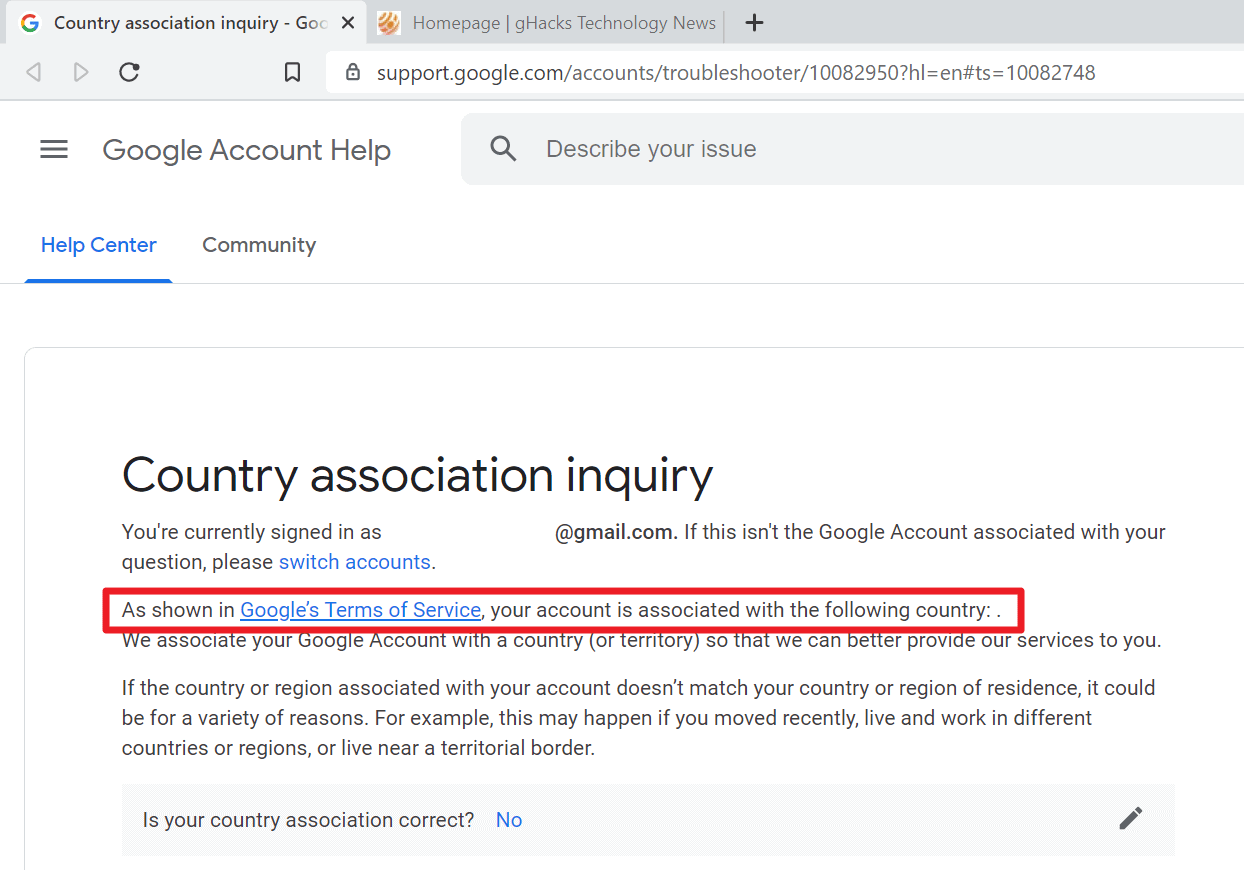
To see which country Google associates with your account, open policies.google.com/terms while signed in and look for Country version near the top of the Terms of Service. If the country is wrong, request a change with Google's country association form. The Google Play country is a separate setting that you change in the Play Store.
Google uses the associated country to decide which Google company provides your services and which version of the Terms of Service applies. It usually matches the country where you use Google most often.
What the associated country is and why Google sets it
The associated country, also called the country or region of your Google Account, determines two things:
- The Google company that provides the services, processes your information and is responsible for complying with privacy laws.
- The version of the Terms of Service that governs your use of Google, which can differ between countries because of local laws.
Google sets the country automatically, mostly based on where you used Google services over the past year. It is not chosen when you create the account and does not always match the country of your phone number. Google notifies you by email when it changes the associated country, usually 30 days before the change takes effect.
How to check your associated country
Checking takes a few seconds on any device:
- Sign in to your Google Account in a browser.
- Open policies.google.com/terms.
- Find the line Country version below the title. The country shown is the one associated with your account.
How to request a change with the country association form
If the associated country is wrong, for example after a move, submit Google's country association form:
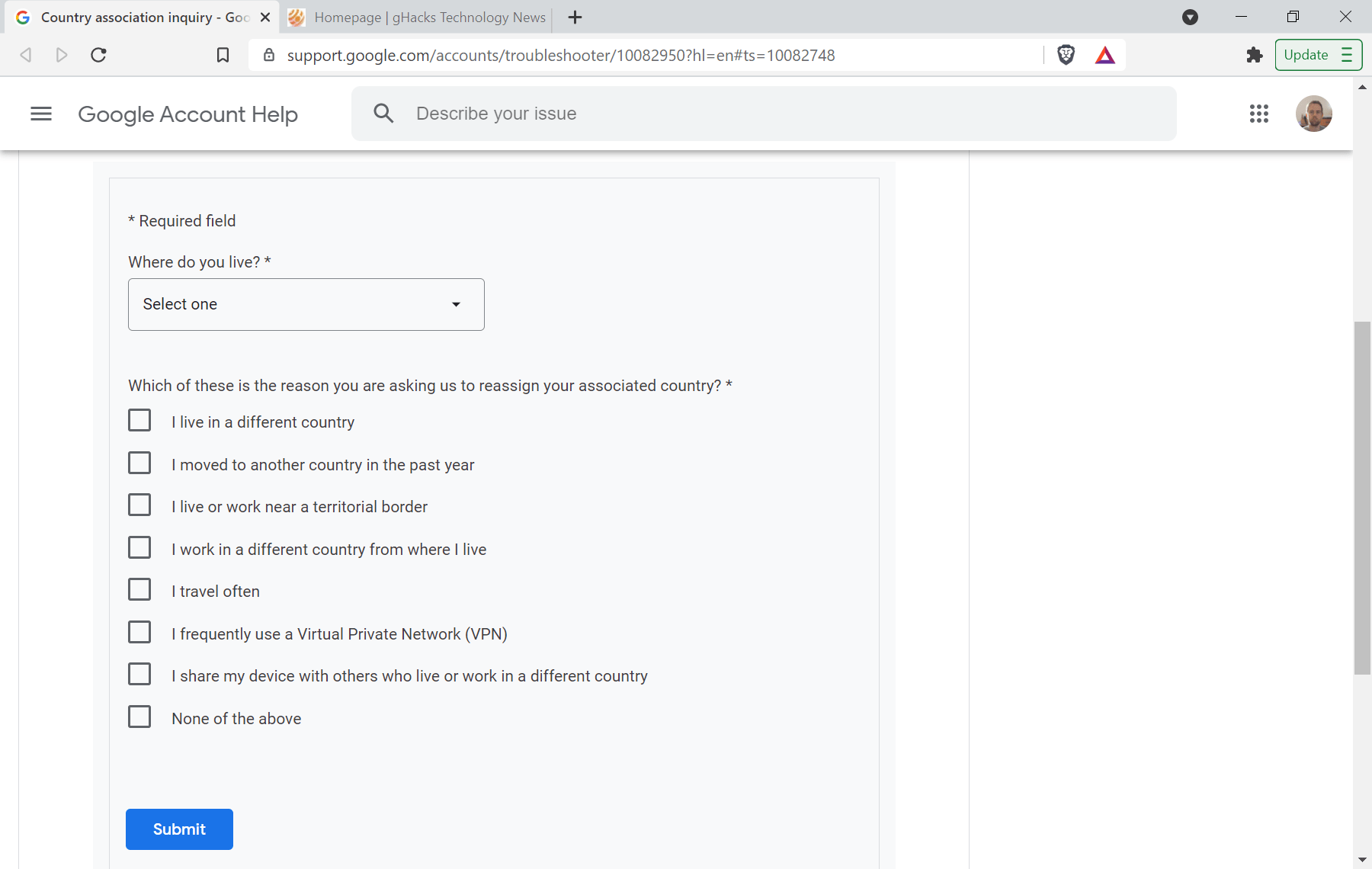
- Open the country association form while signed in to the account.
- Select the country you want to associate with your account.
- Describe why the country should change, for example that you live there now.
- Submit the form. Google reviews the request and replies by email.
Google may decline the request if your account activity does not match the requested country.
Account country vs Google Play country vs payments country
Google has three country settings that people often confuse:
| Setting | Where to change it | What it affects |
|---|---|---|
| Associated country (account) | Country association form | Responsible Google company and Terms of Service version |
| Google Play country | Play Store > Settings > General > Account and device preferences > Country and profiles | Available apps, prices, Play balance and Play Points |
| Payments profile country | pay.google.com (a new profile is created for a new country) | Payment methods, currency and billing address |
How to change your Google Play country
You can change the Google Play country when you are in the new country and have a payment method from it. In the Play Store, tap your profile icon, go to Settings > General > Account and device preferences > Country and profiles, tap the new country and add a payment method. The change can take up to 48 hours.
According to Google Play Help, you must wait at least 90 days between Play country changes. Your Play balance stays tied to the old country, and Play Points and your Points level are lost when you switch. Members of a Google family group cannot change the Play country.
How long a change takes
Google states that changes to the associated country can take some time to process; a notification email usually announces the change in advance. Play country changes take up to 48 hours. Neither change deletes your data, emails or purchases.
FAQ
Does a VPN change my Google account country?
No. Google bases the associated country on long-term usage, not on a single connection. Using a VPN to change it does not work reliably.
Will I lose my purchases if my country changes?
No. Purchased apps stay in your library, but some content may be unavailable in the new country, and the Play balance stays with the old country.
Why did Google change my account country?
Google updates the associated country when your usage shows that you mainly use its services from another country, for example after a move.
How often can I change my Google Play country?
At most once every 90 days, and only when you are in the new country with a local payment method.
Related: how to delete all your Google history, how to auto-delete Google activity and how to use "Take me home" in Google Maps.

I want to change my Google location
Thanks, I guess this is the reason why my Google account is unable for Gemini, my region is wrong.
Please change the link. New link: https://policies.google.com/country-association-form?authuser
soon you will pay your taxes to google not any country!
THANK YOU SO MUCH for this article!! After an hour wasted trying to contact Google about this email, I finally stumbled across this article, and clicked the link. Why Google is doing this or whether or not they will actually “get back to me within a few weeks” or abort the incorrect country change does not affect how thankful I was for the link. It is criminal that Google does not simply include this link in that stupid email they send out, instead of stating that the info can be found in the TOS (it can’t). I am also bookmarking it, as someone else said. Thank you, Martin Brinkmann!!
It worked as recently as Nov 2022 ??
Link is no good anymore. Now it just goes to https://support.google.com/accounts/
I just got the notice my account will now be associated with Finland.
This article contains very specific and useful information regarding associated country of Google account, i did not find elsewhere. Many thanks for Martin Brinkmann!
I’m having a big issue with my account and phone numbers and identity. I don’t know where to turn someone else has taken over my account and has setup all her accounts on my phone and in my name and identity. I love in the United States and have all my life and my account was in Ireland once and the United Kingdom and the Netherlands and I have no association’s with any other country. I don’t work or go to school and I don’t belong to any organization. .I have a YouTube channel and Facebook business page and I never setup any of these accounts. I am being asked to sign in to my account and it’s not my account. If I had a YouTube channel and a business I think I would know. since someone else has taken over and setup all her accounts on my phone. I don’t think I will be signing into this account. because it’s not my fault.
Great article! I tried to buy an app 3 days ago and kept getting the “you have to be in the same country” error message, however it showed the correct country. I gave up as couldn’t fix it. Then 3 days later I see the email from Google that they will change my country within the next 30 days! There should be an easy way to stop this, rather than the above, hope they email me soon!
(Seems the issue is my country was set to null as just showed a “.” Maybe due to me using a VPN)
Google says my country is Canada but it is not I live in United States Pensacola Florida somebody is using the VPN and it’s making me look like my country is Canada but it is not it is the United States I live in Pensacola Florida Google is dumb they don’t know anything of what they’re talking about saying that. My country is corrected ITS Canada it is not I live in Pensacola Florida United States Google’s obviously corrupt when it comes to this kind of stuff.
Would we stop getting those stupid and annoying Google security messages if they knew our location. Just about every very time l sign in they say “we noticed you signed in on a new device” with a link to verify. It’s the same os , browser & network when signing in so what is their problem.
No, they’re phishing. Looking for more personal data. It’s not like their god-like targeted ads or much else they do to users works.
I can’t believe the nonsense I am reading in the comments.
Priceless article, I will bookmark it.
Google associates your account with a country.
They have a payment system (Google Pay) and digital stores.
Prices of products could differ from country to country, countries have different currencies, banks etc.
They allow the change the country 1 time a year.
There are many reasons for it, for example it’s important for people who migrate to another country. New country, new banks, new currency.
I have shocking news for you, people assocate their bank accounts with Google Pay and Apple Pay.
>I have shocking news for you, people assocate their bank accounts with Google Pay and Apple Pay.<
Yeah, it's simpler, buy stuff with no effort. Entering all the info with a tiny touchscreen is "Haaaaarrrrrdddd!"
Then get hounded by usery services that display pics of fuzzy small animals. This is considered fun by many. Sad.
For those who wish to conceal their location from Google, keep in mind that you use Google services under license agreement. That’s a contract.
Google is within their legal rights to know under which country’s laws that agreement is being made. Google is liable for honoring each country’s laws.
If accounts make it impossible for Google to determine location by IP, Google can force a method of MFA that can’t be concealed by tunneling. Simpler, they could deny access to all but the services that don’t require accounts. Those services are already being systematically reduced in scope.
“Google is within their legal rights to know under which country’s laws that agreement is being made”
Legal rights? You mean in the US, am I right to assume?
What Google is legally entitled to do changes depending on where they attempt to ‘do’ whatever it is they are doing. Is that correct or am I way off? Maybe someone with better knowledge than I can confirm.
To find the country associated with your account, using any desktop browser or the Android browser:
Go to google.com
Sign in if needed
Click on your icon
Click Terms of Service
The Country is listed on the secnd line.
>You can open this link to open the Country Association inquiry page on the Google website.
what link?
This one: https://support.google.com/accounts/troubleshooter/10082950?hl=en#ts=10082748
Google claims: “We associate your Google Account with a country (or region) so that we can better provide our services to you.”
I call 100% smelly bug-ridden B.S.
This is obviously some crap written by their nasty lawyers to protect Google’s well-exposed and ugly backside. Google couldn’t give a rat’s ass about any of us. They’ve made that clear by their actions time and time again.
It would be one thing if they were honest about their motives. But once again, Google chooses to shovel some B.S. at us hoping we can eat it and thank them for the experience.
Were they really sitting in a room and thinking “hmmm… let’s make some changes that will be a big hassle and cost a bunch of money just to help out the commonfolk.” I think not. The fact that they think we will believe their obvious B.S. is condensing and insulting.
Didn’t list any for me as well so I changed to United States, even if that might mean no GDPR. I am rarely signed in and the content from my real country offends me when I see it on Youtube. I really am embrassed by my people.
You’re really embarrassed by your people and you chose to impersonate an American? Talk about jumping from the pot straight into the fire.
My language barrier helps a bit i guess, much like with music.
Given that you might be a professional or native speaker you don’t profit from the effect.
While this is off course questionable in terms of privacy and data protection; apparently Google can and will transfer your account to another country (‘s data protection laws) by their own disposal. But there is also a plus side: if you receive this mail stating Google will transfer your account to Malaysia or some other country you never have been to, you might want to check if your account was not compromised by someone from that country. Just to be sure.
Getting their data slaves out of GDPR-land?
“The association is important for customers, as some countries or regions may offer better privacy and legal protections than others.” and, in the above example, “because the privacy laws in Europe are stronger than Asia” to quote the example’s concerned user.
“Google informs you that it may take weeks before you will get a reply after submitting the form, and that there is no guarantee that the country will be changed.” : dubious
One thing seems plausible : the relationship with Google’s FLoC (Federated Learning of Cohorts).
I don’t use any Google services, all Google requests are DNS-blocked here thanks to DeCloudUs, increasing day by day satisfaction of this decision when observing Google’s struggle to elaborate by all means its seizure on us all, together with Amazon, Facebook, Apple and Microsoft.
Melanie Safka’s “Look What They’ve Done to My Song” becomes “Look what they’ve done to our Web”. And sedition is really not my credo, but the WWW is really, already and increasingly the World Wild Web. My hope is that today’s dinosaurs get removed as those of the pas have been, as a metaphor need to say.
Sure, it’s possible to avoid direct contact with these services, fairly easily, really. Even fairly easy to use one or some of their services without incessant hounding. Takes some digging, patience and focus with a mindset many who have experienced an entire life of phone appendaging just don’t have.
Very difficult to destroy ingrained ideas, far too simple to exploit them.
No? Then VPN’s don’t work, proxies don’t work, firewalls don’t work, secure DNS doesn’t work… Same concept, different uses.
@Tom Hawack,
The problem with blocking Google that way is that services which depend on Google Pay to process transactions no longer work.
For example, I use the Japanese LINE app and they have some very comical stickers. You have to buy Coins to purchase these and Google Pay is the entity which processes payments. So blocking Google via DNS is out of the question as much as I would like to do it.
@TelV, I wasn’t aware of a Google Pay issue given I’ve never used that service. This said, blocking Google completely (as well as YouTube by the way), blocking in fact any ‘institutional’ service (those which extend far beyond their own sites) implies a certain number of consequences most of which require a bit of search & determination to find and use work-arounds; these exist but not always.
The DNS resolver I use, above mentioned DeCloudUs, has a very interesting Custom DNS feature (USD 2.33/month) which allows the user to turn on/off services (Google, YouTube, Facebook, Twitter and many more) but also to fine tune with white and blacklists. For instance, and concerning Google, I had to add to the whitelist [translate.googleapis.com] simply because an extension I use (Translate Web Pages) needs it to translate a page, that it does handle deepL but DeepL doesn’t translate whole pages.
What I mean is that the Black & White lists feature is the exact contribution to a highly customizable DNS blocking system. And Google Pay could be as well be added to the whitelist.
I’m experiencing this no-Google, no-YouTube environment (others, such as facebbok and twitter, whatever social service has never been of my concern) and I realize this is more than feasible. Fed up with Google’s increasing inquisition, even with its bloated Web Search which gives the feeling the company considers that service as an encyclopedia when a basic user wants links for his quest not built-in quest tuning, fed up with YouTube, its consent, its bloated pages… we use Invidious instances to access YouTube videos, Google gets excited once in a while about that and tries to block several servers, these recover, others arise. We also have DailyMotion, Vimeo, nice rediscovering them but YouTube has a quasi monopoly so slightly modifyinc access to their videos (Invidious ‘proxies’) doesn’t disturb my morality. I previously had a mountain of scripts and CSSs to control Google and YouTube, all sent to garbage now. Breath, the air is nice and sweet, again.
I mean, really : I’ve had it.
Fortunately talented people arise just in time to avoid the nervous breakdown. Believe me, GAFAM is avoidable and as far as i’m concerned : avoided. Not hard finally.