
Program removal under Windows is often not as thorough as it should be. It happens more often than not that program traces remain on the computer. This can be empty folders, files that the program created after installation or Registry entries. And while that’s usually nothing to worry about, it may have consequences. Among them privacy issues, empty folders that clutter your sight and sometimes even compatibility issues if you try to reinstall a program or install a new version of a program.
Revo Uninstaller is one of the most popular third party programs to clean up leftovers after program uninstallations in Windows. The program runs the default program uninstaller first, before it scans the system for leftovers to make sure that no traces remain on the PC.
The standard version is freeware. Revo Uninstaller Pro has all the features of the standard version plus several more that are especially suitable for tech savvy users and professional work environments.
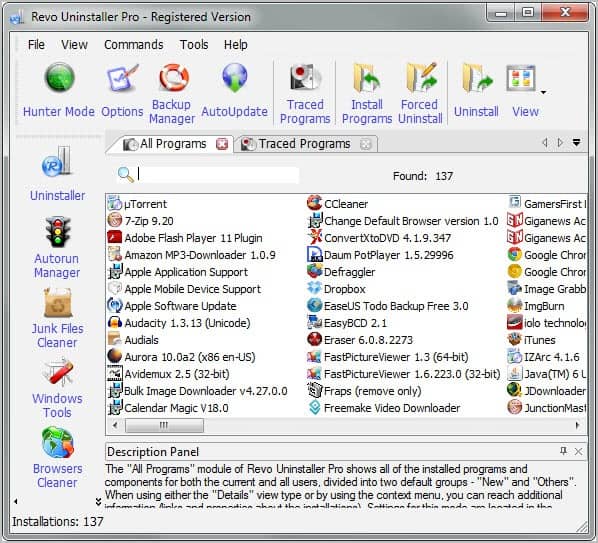
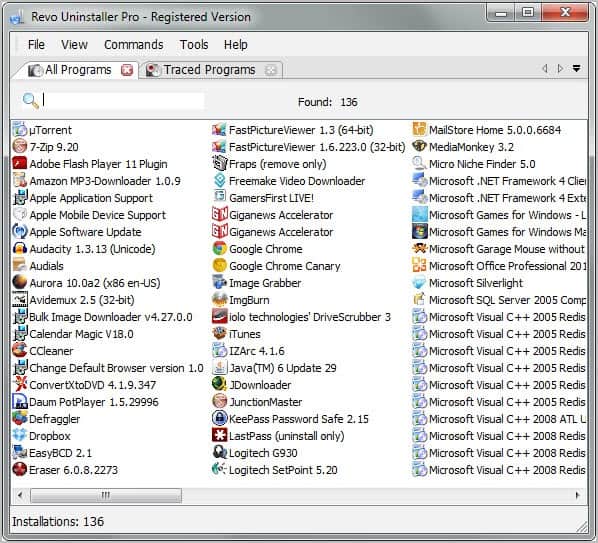
The application displays a list of all installed programs on start up. The list is immediately available and divided into new programs at the top and all programs below that.
All functionality provided by the free version of the program is available in the pro version. The interface displays all program modules of Revo Uninstaller Free more or less in the same place. New options have been added to the interface. This includes a sidebar menu on the left linking to a set of related tools (which are also available in the free version but there only under Tools), additional options in the main menu bar and tabs to display multiple program modules at the same time.
The program uninstaller works nearly identical to that of the free program version. A few differences exist that are worth mentioning. It is first possible to configure and manage program groups in the pro version. You could move all important programs in a work group, or all Internet applications into the Internet group. This can be used to distinguish important apps from ones that can be removed from the system.
The pro version creates a system restore point and a full Registry backup before running the default program uninstaller and its cleanup module. The cleanup module benefits from advanced scanning algorithms that are not integrated in the free version.
What’s more? A forced uninstall feature is available to get rid of program remnants that are not listed (anymore) in the installed program list. That’s useful for instance if you have deleted a program directory accidentally, or when you want to remove partially installed or uninstalled programs.
Another interesting option that is only offered by the pro version of Revo Uninstaller is the ability to monitor program installations. This basically monitors all changes made to the system during program installation. Programs installed this way are listed under traced programs in Revo Uninstaller Pro. The monitoring makes sure that all traces of a program will be removed from the system during uninstallation.
Additional pro-only features include the ability to export or print the list of installed programs, a customizable user interface, visual themes support, command line program support and full 64-bit compatibility.
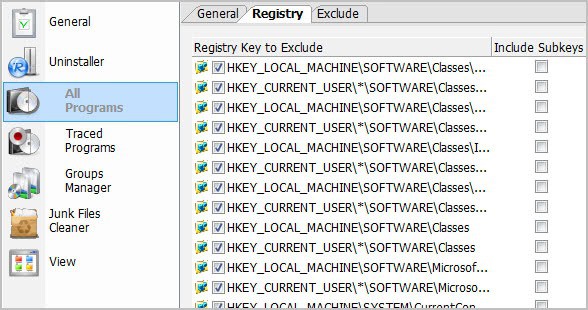
The program options display several interesting preferences. Registry keys, folders and files can for instance be excluded from being analyzed and included by the program during cleanup.
Verdict
Revo Uninstaller Pro tops the free version in many regards. Backups, full 64-bit support, real-time monitoring of program installations, and forced uninstallations are all features that extend the free version’s functionality. The developers could work on the reporting and log accessibility though. An option to create uninstallation reports would come in handy in business and professional environments.
In the end it all comes down whether you are satisfied with the functionality that the excellent free version offers, or if you need one or multiple of the features that the pro version adds on top of that.
Both the free version and a 30-day trial version of the professional program version can be downloaded from the developer website. A portable version is offered there as well.
Giveaway
We have 19 Revo Uninstaller Pro licenses to give away today. Please leave a comment in the next 24 hours to take part in the drawing. Winners will be announced on our Facebook and Google Plus pages.
Enjoyed the article?: Then sign-up for our free newsletter or RSS feed to kick off your day with the latest technology news and tips, or share the article with your friends and contacts on Facebook or Twitter.Related Articles:
Revo Uninstaller Program UninstallerRevo Uninstaller 1.5
IObit Uninstaller 2.0, Windows Program Uninstaller
Software Uninstaller KUninstall
A better software uninstaller


As I install/uninstall a lot of programs in order to find the best ones for my needs, this would be very helpful is keeping my computer clean and functioning well. Throwing my hat into the ring for a license. Thank you.
I’ve had good use out of the standard version, but those extra perks of the pro software would be nice…
Looks promising software. Have used few free one of these for uninstalling programs in the past
revo was one of my favourite, count me in. Thank you
I used Revo Uninstaller back in the 32-bit days and loved it! I surely would like to try a 64-bit version.
Thanks for the chance to win a free version!
Count me in! ;)
Revo Uninstaller Pro and Total Uninstall are my favourite uninstallers:D
Hi,
Im currently using “Your Uninstaller 7″ and it will be sweet to compare it againt Revo Pro. On the sheet it looks as Revo tops the competition, but there is nothing like a head-2-head to declare a winner; that is as far as im concerned.
So, will the dice roll my way this time ?
Thanks for the offer.
Revo portable is my default uninstaller.Would love a pro licence.
Count me in to these giveaway
Thanks for this interesting post ^^
I always loved Revo Uninstaller and the Pro version will be a bonus if I can lay my hands on it
I have been using the free version for quite a while. Pro looks really good
I am using the Free version from 2 years now and the experience is satisfactory. Though I am really impressed by Pro version’s features.
Woooow,my favorite uninstaller.It would be nice to win the pro version.Thank you.
Even the free version remains a top pick to uninstall apps.
I’ve been using the free version of Revo Uninstaller through several versions, and have always been very impressed. Its accuracy in selecting Registry keys and files to remove, without including those belonging to or shared with another program is, by far the best I’ve found–except for Total Uninstall when removing monitored installations. Within the last 2 months, I’ve tried Comodo Program Manager, Advanced Uninstaller Free, Ashampoo Magical Uninstall, Your Uninstaller, and Z-Soft Uninstaller. Some of those include installation monitoring, but it is very inaccurate. Even without monitoring, Revo was far superior. I’d be very excited to try to Pro version, both to see how much monitoring improves the uninstall results, and to try the forced uninstall feature. To the extent that it works, that feature would cut down on the laborious manual Registry surgery that is the only alternative for programs no longer listed in Add/Remove Programs (or the equivalent applets in later Windows versions).
Revo is the best easy use program I’ve found for removing ‘stuff” that doesn’t want to be removed.
I am using the free version of REVO and I really would like to use the commercial version. Thank for this great giveaway. Good luck to everyone.
Thanks for giveaway.
Very nice app. I really would like to win a license. Count me in.
HELP! HELP! HELP! What’s happening? who is crying? who needs a helping hand? ” it’s me!” someone answered . Truly saying I was somewhat confused and scared, because I thought that nobody was in my room. “Who are you?” I asked. ” I am your Windows, and I need help, please, help me!” Very strange fairy-tale , I am sure , everybody say these words. But I think nothing strange is in this. Everybody likes and, of course, needs to install many new programs. But after using them , everybody needs to uninstall them. And it is a very difficult thing, because after uninstallation many junk and unneeded files leave themselves in Windows registry. Poor windows! It has not got a tongue, and it can’t say it. But its actions are clearly visible. The system is getting more and more slow! And Windows needs your help. But how can we help it. I think, you know , my answer will be very simple- Good uninstallation program. Revo Uninstaller Pro is really a great program for this operation. It uninstalls unneeded programs very well. Nothing is left after using Revo. It has many unique features which a real help for windows, because its registry is clean and therefore happy. Of course, Every user is happy too.
http://www.facebook.com/permalink.php?story_fbid=177487422348285&id=100000509041253
https://twitter.com/#!/william_of_pale/status/145449087980937216
https://plus.google.com/103738131454128170313/posts/TckYtpwaoXD
This is a awesome program for uninstalling software on computers, have been using the free version and would love to get my hand on the pro version.
Hi, thanks for this great giveaway, please include me.
Currently using its free version and I really like it.
One of the essential software that keep my PC well organised! A pro version would be so cool. Thanks for the giveaway.
Pls count me in
Having tried out many uninstallers,both free and payable, I have always found REVO ( Free version) to be best and I would be really pleased to have the Pro version.
I use it very often, it worths the money it costs
Thanks for giveaway. Count me in :)
count me in!
Have been using Revo free for years and love it. The PRO version would be icing on the cake. Please count me in! Thank you.
PS: Don’t use Facebook or Google though so how do I get to know who the winners are?

















