
How To Fix Internet Explorer Did Not Finish Installing Error

Microsoft has released the final version of Internet Explorer 9 yesterday, and most interested users won't have any problems installing the web browser, or updating their previous Internet Explorer version. Some users on the other hand may receive error messages such as Internet Explorer did not finish installing when they run the Internet Explorer 9 setup file.
The core reason for this error message is that a beta, preview build or release candidate build of Internet Explorer 9 is installed on the system, which prevents the installation of the final version.
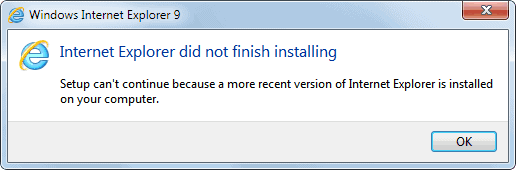
Internet Explorer Did Not Finish Installing
Setup can' continue because a more recent version of Internet Explorer is installed on your computer.
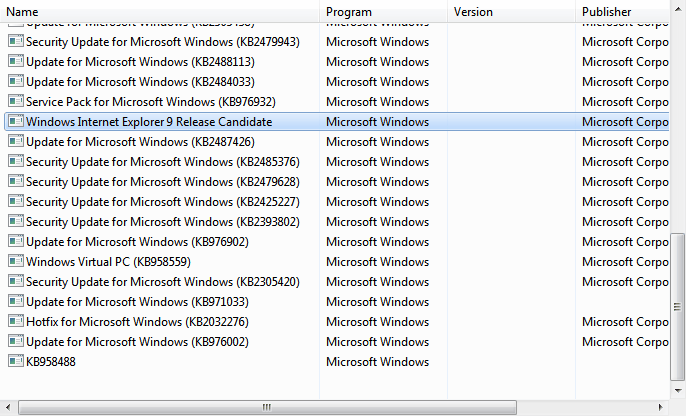
The error message does not appear if Internet Explorer 8 or IE7 are installed on the system. In this case, an upgrade is possible without problems. Users who receive the error message should look under Uninstall a Program in the control Panel to see if an earlier build of Internet Explorer is listed there. You need to make sure to look both in the third party software listing and in Installed Updates. On my test system, Internet Explorer preview builds were installed under the third party listing while the release candidate was installed under Installed Updates.
A restart of Windows is required before the uninstallation of Internet Explorer completes. Check out How To Uninstall Windows Internet Explorer 9 for additional uninstallation information and troubleshooting.
Some users may still run into troubles, especially if the uninstallation could not complete successfully. This was the case on a Windows 7 Professional 64-bit test system which displayed error messages when the uninstallation continued after a system restart.
The very same error message (did not finish installing) appeared again when I tried to run the Internet Explorer 9 setup, regardless whether I tried to install the 32-bit or 64-bit edition of Microsoft's web browser, or the offline setup files.
I found a Microsoft Knowledge Base entry that suggested to run the setup with administrative privileges. A right-click on IE9-Windows7-x64-enu.exe and the selection of Run as Administrator was all that was needed to resolve the error. The Internet Explorer 9 setup showed no further error messages and I was able to install the browser after all.
The Knowledge Base troubleshooting guide has additional tips if this one does not resolve the issue on your computer.
Advertisement












my Internet explorer is not working.how do I reinstall it? I’m using windows 7.
Micro CRAP{ Fucking garbage fuckers. FUCK MS and all the little fags working there. Fuck Billy Goat Fucking Gater.
FUCK FUCK FUCK Microsoft worst fucking company to ever existed Burn you mother fuckers burn and die mother fuckers.
I want to install the Internet Explorer 11 on my laptop. I downloaded the installation files from the microsoft website. But when I try to install it says, “..,more recent version of IE is installed on your computer”. If installed it should show up in the programs but it does not show up. Though it does not show up in the programs there is a file with the name Inter Explorer in C drive Program Files.
Great post!
Go to RUN
appwiz.cpl
Turn Windows Features on or off (Yes) (Left Pane)
If IE 7,8,9 browser option is already checked, then uncheck it & click OK (if not already checked then check it & click OK)
After that restart your Machine.
When It come up again you’ve to follow the same procedure
follow the same procedure as mentioned above
Go to RUN
appwiz.cpl
Turn Windows Features on or off (Yes) (Left Pane)
Select 3rd option from TOP (that is IE X) (X=version)
If previously you’ve unchecked it, then now it’s time to check it again, else vice versa.
Restart your machine
Now, This problem should be resolved.
do you want me to have ie9 or not ? if you do and your livelyhood depends people installing it then you install it. i’ve tried and can’t. you have my permission have at it.
Thanks for this post, i will try that.
I did all these steps but does not work for me, however finally i got the solution for that and i got rid of this problem.and now i would like share this to all.
please open this below solution i hope that would be work for you. because it has worked for me.
Solved
http://www.techsupportall.com/how-do-i-fix-internet-explorer-did-not-finish-installing/
Many thanks to http://www.Techsupportall.com
You have to download the full install package from here http://www.windows.microsoft.com/en-US/internet-explorer/downloads/ie-9/worldwide-languages
not the version that downloads IE9 onto your computer. Then when you have that install it in safe mode. Works.
Fuck microbsoft and it’s internet explorer :-D
I tried everyway to update to IE 9 but I had no result.
tried all given solutions….
I have win7-64 bit os and getting same error while installing ie9…
Why am I unable to get feed reloads on Internet Explorer 9 or firefox 11 from wayn.com?
Pretty great post. I simply stumbled upon your blog and wanted to say that I have truly loved surfing around your blog posts. In any case I’ll be subscribing in your feed and I’m hoping you write again soon!
I gave up on installing Internet Explorer 9 for Windows 7. I do not have time to spare finding out why it keeps saying it can’t install version 9 when I already have a version installed on my system, and I do not. I ended up installing Mozilla Firefox and I love it. Microsoft could learn a few things from them.
Many friends are worry about explore error now here is solution of this problem is
http://www.techyv.com/questions/while-performing-update-internet-explorer-i-get-%E2%80%9Cerror-code-0x8024000b%E2%80%9D
I have windows vista and IE 9 just will not install, any ideas?
I have been trawling the web for days now trying to resolve this problem and getting nowhere. I want to do a clean reinstall of IE9 or at least be able to roll back to IE8 as every time I launch IE9 it crashes – no explanation for that issue so I figured at least I can go back to IE8. Not possible, every time I go via the Windows Update to uninstall IE9 and then reboot it reports an that it is unable to finish the update and no changes have been made so I am stuck with an IE9 that will not function. I have downloaded the IE9 installation package but it will not run as it says there is a previous version of IE installed – I know, that is the problem and I cannot get rid of it. It must look somewhere for a flag saying that IE9 is installed. How can I get round this? I have W7 Ultimate 64 bit. I use Live essentials as anti virus software and have nothing out of the ordinary installed. I can use Chrome or Safari without any problem
Try this Andy: Start -> Control Panel (view by small icons top right) -> Internet Options -> Advanced -> ‘Restore Advanced Settings’ -> ‘Apply’ -> ‘Reset’ -> ok and reboot. See if you can open I.E. from ‘All Programs’ listing
hen scrolling a window in Youtube the vid
Just found a translation error on IE9 in spanish (32Bit, Win7), the problem is that the download manager says “a las XX,X KB/s” instead of “a XX,X KB/s” so it’s like saying “at the XX,X KB/s”, it’s frustrating to see an error in such an important and obvious place.
Also when scrolling a window in Youtube the video I’m watching freezes (just the video).
How long does it take to install?
For me its seems to be stuck at around 10% in both cases, with IE9 preview/beta builds installed and later when installed with reboot.
Installation took less than a minute on my system.
I don’t know what was happening on mine though.
After removing IE9 builds,
then updated IE8 with certain cumulative updates, disabling MSE and stuff, after that i got “close program” option and it moved faster.
Installation process ought to be simple, not a pain in the ass,
Everyone is not tech-savvy, MS still doesn’t learn.
Hi Martin,
I installed IE9 without any glitches.
I would like to know if there is an offline installer for IE9 available. Many of my friends who don’t have a regular internet connection will like to have it.
Regards
Aravind, this page lists the offline installers for all operating systems and languages: http://windows.microsoft.com/en-US/internet-explorer/downloads/ie-9/worldwide-languages
The same error showed up on my computer but for a different reason. I usually tweak my system which includes disabling services. IE9 did not install until I enabled and started the Windows Installer, Windows Modules Installer, and Windows Updates services. It installed quickly and restarted the system, after which I disabled the services again. Now I am typing this in IE9 and enjoying it!
Great tip, thanks for posting Andrew.
i cannot install ie11 pl help did not help to fix my problem
“most interested users won’t have any problems installing the web browser, or updating their previous Internet Explorer version”
Most interested users can’t install IE9 at all as it runs only on Win7 (vista is no more)