
Windows Vista Codec Pack

Windows Vista Codec Pack is a all in one codec pack for Windows Vista users who suffer from their system's inability to play a variety of popular audio and video formats. It remains a mystery to many why Microsoft decided to ship Windows Vista without the required codecs to play popular media formats.
Note: This is only true for the built-in programs. If you are using programs like VLC Media Player, you can play all important media files out of the box.
I'm normally not a friend of codec packs because they tend to install many codecs that are not needed and may cause compatibility problems because of this. Windows Vista lacks several essential codecs on the other hand that make codec packs a suitable alternative to installing all missing codecs individually on the system.
What's great about the Vista Codec Package is that you can customize what is getting installed. That is right, unlike other codec packages you can select to install all or only some of the codecs offered.
Most possible conflicts have already been dealt with and the settings have already been altered for best results. The Windows Vista codec package does not ship with a media player which means that no file associations are being made. Just fire up your favorite media player, I recommend VLC or Mplayer, who automatically will use the codecs that are installed on your system.
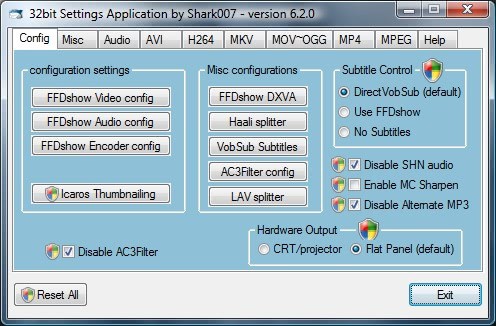
Windows Vista Codec
All the important codecs are in the package, including xvid, windows media video 9, ffdshow, ogg and ac-3Â acm. The codec package can be installed on Windows Vista and Windows XP systems, and runs on 32-bit and 64-bit versions of the operating systems.
Installing the codec pack can have direct impacts on system performance, stability and multimedia output. It is therefore recommended to install only the codecs that you are missing.
Alternatives
A viable alternative is to install a media player that comes with so called binary codecs which can only be used in this program and cannot be accessed by other applications. This has the immense advantage that those codecs cannot "pollute" the system and cause stability and performance issues which windows vista codec packs can.
Advertisement



















I download whole audio albums which work and are playable, yet when I try to import this media to my Movie-Maker it won’t let me and says codecs are missing, I use Vista,
Help Please!
yeah, where is the download button?
where do i get the download?
OMG thank u so much… I spend days trying to convert my camcorder .mod files into movie maker compatible avi or wmw files… without succes. after that cute litte package i can use the mod files directly. it took me 2 mins HAHAHAHAHAHAHAHA thx guys
I wish you would not pontificate about browsers and your religious affiliation with Firefox. I love IE and will continue to use it. Stick to your knitting.
MPlayer does not need any codecs! It comes with them built in. Runs very well on Windows.
http://www.mplayerhq.hu/
I bought a new computer with the Windows vista and I can’t use Windows movie maker to publish a video that I filming by a camera, the files are .avi.
I tried a LOT of different codecs install to my computer and I still don’t figured it out
I do can import the avi file to WMM, but the WMM isn’t able to save a short movie at all.
To googling : codec for windows vista
isn’t a solution…
so what I am would to do?
Downloaded this still cannotr get any video files to display.
It works!!!!! tank you so much
Check here:
http://www.codecs.com/download/Vista_Codec_Package.htm
where do i down load
I have MANY instrutional videos that would not run on my new computer (Vista). I downloaded the Vista codec pack above and now everything works great.
Thanks!