Windows Media Player on Windows 11: New App vs Legacy Version
Windows 11 has two Windows Media Players. The new Media Player app, listed as "Windows Media Player" in the Microsoft Store, is the default player and handles modern formats and 4K video. Windows Media Player Legacy, the classic Windows Media Player 12, is still available as an optional feature in Settings. Both are free from Microsoft, through the Microsoft Store and Optional features.
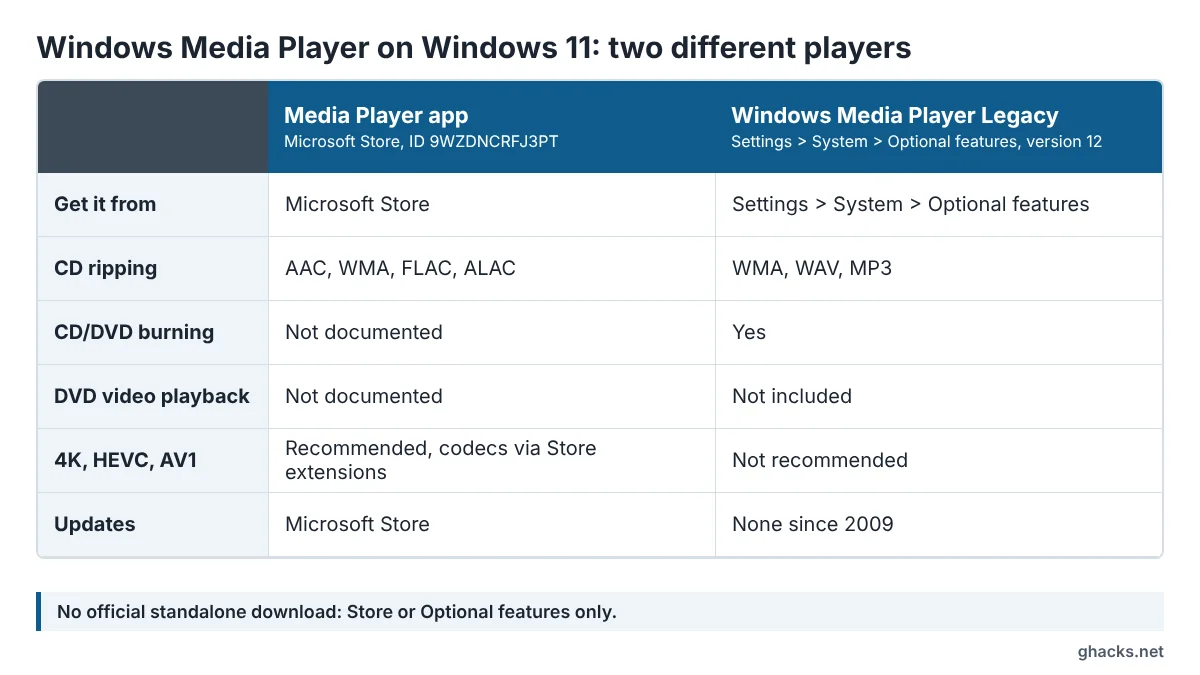
This page explains how to tell the two apart, what each one can and cannot do, how to install either one, why some files will not play, and which player fits which job. Menu paths follow Microsoft Support, checked 19 November 2026.
Is Windows Media Player still available on Windows 11?
Yes, Windows Media Player is still available on Windows 11, in two forms. Microsoft released a new Media Player app to Windows 11 Insiders on 16 November 2021, rolled it out to all Windows 11 users in early 2022, and used it to replace Groove Music. The app later took the name "Windows Media Player" in its Microsoft Store listing, which is why searches for "Windows Media Player for Windows 11" now lead to the new app.
The classic player was renamed Windows Media Player Legacy. It is still version 12, the release that shipped with Windows 7 in 2009, and it has not received a feature update since. Microsoft's Windows Media Player Legacy support page describes it as an optional feature of Windows 10 and Windows 11 that is offered "in some editions", and recommends the Media Player app for modern video features such as 4K.
In short: the new app is the player Microsoft develops, Legacy is the player Microsoft keeps for compatibility, and neither one is a separate download from a website.
Which Windows Media Player do I have?
You can identify your Windows Media Player by where Windows lists it: the new app appears under installed apps, while Legacy appears under Optional features. Use the checks below; one matching row is enough.
| Check | New Media Player app | Windows Media Player Legacy |
|---|---|---|
| Where Windows manages it | Settings > Apps > Installed apps | Settings > System > Optional features |
| Where it comes from | Microsoft Store (ID 9WZDNCRFJ3PT) | Windows feature package |
| Name in the product | Media Player (Store: Windows Media Player) | Windows Media Player Legacy, version 12 |
| Program and updates | Store app, updated through the Microsoft Store | Classic desktop program (wmplayer.exe), no feature updates since 2009 |
A quick visual tell: the Legacy player has the Windows 7 era Player Library with Rip CD and Burn controls, while the new app uses the current Windows 11 design. Checked against Microsoft Support and the Microsoft Store listing on 19 November 2026; not tested on our hardware.
New Media Player app vs Windows Media Player Legacy
The new Media Player app is the better choice for modern video and everyday playback, and Windows Media Player Legacy is the only one of the two with documented CD burning. The table compares what Microsoft documents for each player.
| Feature | New Media Player app | Windows Media Player Legacy |
|---|---|---|
| Music and video library | Yes, scans PC folders automatically | Yes, Player Library |
| Playlists | Yes | Yes |
| CD ripping | Yes, AAC, WMA, FLAC, ALAC (since July 2022) | Yes, WMA, WAV, MP3 |
| CD and DVD burning | Not documented by Microsoft | Yes, audio CD or data CD/DVD |
| DVD video playback | Not documented by Microsoft | No, "DVD playback isn't included" |
| Modern video (4K, HEVC, AV1) | Recommended by Microsoft, codecs via Store | Not recommended for modern video |
| Visualizations and skins | Not documented | Yes (Alchemy, Bars and Waves, Battery; two skins) |
| Update path | Microsoft Store | None beyond Windows servicing |
CD ripping and burning
Both players rip audio CDs, but only Windows Media Player Legacy has a documented burn feature. In Legacy, Microsoft's burn and rip guide uses the Burn tab, Burn options (Audio CD or Data CD or DVD), a burn list built by drag and drop, and Start burn. The new app added CD ripping to AAC, WMA, FLAC and ALAC in a July 2022 update, according to the Windows Insider announcement; that announcement does not mention burning.
DVD playback
Neither player plays commercial DVD video out of the box. Microsoft states that DVD playback is not included in Windows Media Player Legacy on Windows 10 or 11, and the MPEG-2 and Dolby Digital decoders that DVD video needs were removed from Windows 8 onward for licensing reasons. For DVDs, use a third-party player with its own decoders.
Library and Groove migration
The new app inherited Groove Music's role. Microsoft said when it introduced the app that Groove libraries and playlists "will automatically migrate", and that the classic player would stay available in Windows Tools.
How to get the new Windows Media Player app
The new Windows Media Player app is preinstalled on current Windows 11 systems and can be reinstalled free from the Microsoft Store. If it is missing or broken:
- Open the Microsoft Store.
- Search for "Windows Media Player" and check that the publisher is Microsoft and the listing matches ID 9WZDNCRFJ3PT.
- Select Get or Install, or Update if the app is already present.
- Open it from Start.
Store updates keep the app current, so there is no separate "Windows Media Player update" download. To set it as the default, open Settings > Apps > Default apps, select Media Player and assign the file types you want.
Windows 10 note
The same app reached Windows 10 in early 2023, where it replaced Groove Music through an update. Windows 10 users therefore also have both players: the new app and Windows Media Player Legacy.
How to install Windows Media Player Legacy on Windows 11
Windows Media Player Legacy is installed from Optional features in Settings, not from the Store or a website. Per Microsoft Support, checked 19 November 2026:
- Select Start > Settings.
- Go to System > Optional features.
- Next to "Add an optional feature", select View features.
- Search for "Windows Media Player Legacy".
- Tick the box, select Next, then Add.
- Restart the PC if Windows asks for it, then open Windows Media Player Legacy from Start.
If the feature is missing
If Windows Media Player Legacy does not appear in the list, the most common cause is a Windows 11 N edition. N editions ship without Windows Media Player and the related media technologies, which the Media Feature Pack for Windows N restores. Install the pack from Optional features (View features, then Media Feature Pack), restart, and add Windows Media Player Legacy afterwards. Older guides such as our page on the Media Feature Pack for N editions of Windows 8 describe the same principle. Not sure which edition you run? The differences are covered in Windows Pro vs Pro N.
Admins can also enable the feature from an elevated Terminal with DISM. Run DISM /Online /Get-Capabilities, look for the entry that contains WindowsMediaPlayer, and add it with DISM /Online /Add-Capability /CapabilityName: followed by the exact name shown. Using the listed name avoids errors caused by guessed feature names.
Can I download Windows Media Player from a website?
No, there is no official standalone Windows Media Player download for Windows 11. Microsoft distributes the new app through the Microsoft Store and Windows Media Player Legacy through Optional features. Sites that offer a "Windows Media Player download" installer are third-party repackages: they can bundle adware, are not updated by Microsoft, and add nothing that the two official routes do not already provide.
The rule is simple: if the file does not come from the Microsoft Store or from Settings, do not run it.
Why a file will not play: codecs on Windows 11
A file usually fails in Windows Media Player because its codec is not built into Windows. According to Microsoft's codec list, Windows includes MP3, MP2, AAC, M4A, FLAC, ALAC, WAV, WMA, 3GP, 3G2 and AMR audio, and MPEG-4 (H.264), H.263, VC-1, WMV, DV, VP8 and Motion JPEG video. Everything else needs a Store extension.
| Format that will not play | Fix from Microsoft |
|---|---|
| OGG, OGV and other Ogg formats | Web Media Extensions |
| HEVC (H.265) | HEVC Video Extension |
| AV1 | AV1 Video Extension |
| VP9 | VP9 Video Extension |
| MPEG-2 video | MPEG-2 Video Extension |
| AC-3 (Dolby Digital) audio on 24H2 and later | Not included unless the PC maker preinstalled it or it was kept through an upgrade |
Ogg and OGV files
OGV is video in an Ogg container. Install Web Media Extensions, which Microsoft lists for Ogg formats, then restart the player.
HEVC and AV1
HEVC and AV1 decoders come as Store extensions. The new Media Player app is the player Microsoft recommends for this kind of modern, high-resolution video.
AC-3 after 24H2
Microsoft no longer includes the AC-3 (Dolby Digital) codec starting with Windows 11 version 24H2, which affects many older videos and DVD rips. Background on the change is in our report on how Windows 11 24H2 drops the AC-3 Dolby Digital codec. If your PC lacks it, a player with its own built-in decoders is the practical fix.
Which player should you use?
Use the new Media Player app for everyday music and video, and add Windows Media Player Legacy only for the jobs it alone covers. Pick by task:
- Play local music and video, including 4K, HEVC or AV1 with the matching extension: new Media Player app.
- Rip CDs to FLAC or ALAC: new Media Player app.
- Rip CDs to MP3 or WAV, or burn an audio CD: Windows Media Player Legacy.
- Keep an old library, WPL playlists, skins or visualizations: Windows Media Player Legacy.
- Play DVDs, AC-3 audio on 24H2 or unusual formats without hunting for extensions: a third-party player with built-in decoders, such as VLC. Our guide to GPU accelerated decoding in VLC covers its performance settings.
Running both Microsoft players side by side is fine: they install separately, and the default apps setting decides which one opens a file on double-click.
FAQ
Is Windows Media Player free on Windows 11?
Yes. Both the new Media Player app and Windows Media Player Legacy are free from Microsoft. Check each codec extension's Store listing for its price before you install it.
What version is Windows Media Player Legacy?
Windows Media Player Legacy is version 12, first released with Windows 7 in 2009. Microsoft keeps it available but does not add new features.
Will Microsoft remove Windows Media Player Legacy?
Microsoft has not announced a removal date. It currently ships as an optional feature in some Windows 11 editions, so check Optional features before relying on it.
Can Windows Media Player play MKV files on Windows 11?
The new Media Player app can play MKV files when the codecs inside the container are supported by Windows or an installed extension. MKV is not on Microsoft's file type list for Windows Media Player 12, so use the new app or VLC.
Does Windows Media Player show song visualizations?
Windows Media Player Legacy still includes three visualizations: Alchemy, Bars and Waves, and Battery. Microsoft does not document visualizations for the new Media Player app.
Why does Windows Media Player Legacy not appear in Optional features?
Windows 11 N editions need the Media Feature Pack first, and Microsoft says Legacy is offered only in some editions. Install the pack, restart, and search the feature list again.
Sources
Checked against Microsoft Support, the Microsoft Store, the Windows Insider Blog and Wikipedia on 19 November 2026; not tested on our hardware.
- Microsoft Support: Windows Media Player Legacy
- Windows Insider Blog: New Media Player for Windows 11
- Wikipedia: Windows Media Player (2022)
Related: restore WordPad on Windows 11, make VLC remember the playback position