uBlock Origin vs AdGuard: Which Ad Blocker Wins After Manifest V3?
uBlock Origin is the better pick on Firefox: it is free, open source and keeps its full filtering engine there. On Chrome, uBlock Origin has been gone from the Chrome Web Store since August 31, 2026, so the real choice is uBlock Origin Lite against AdGuard's Manifest V3 extension. uBO Lite is lighter and simpler, AdGuard offers more controls, and only AdGuard's apps and DNS block ads outside the browser.
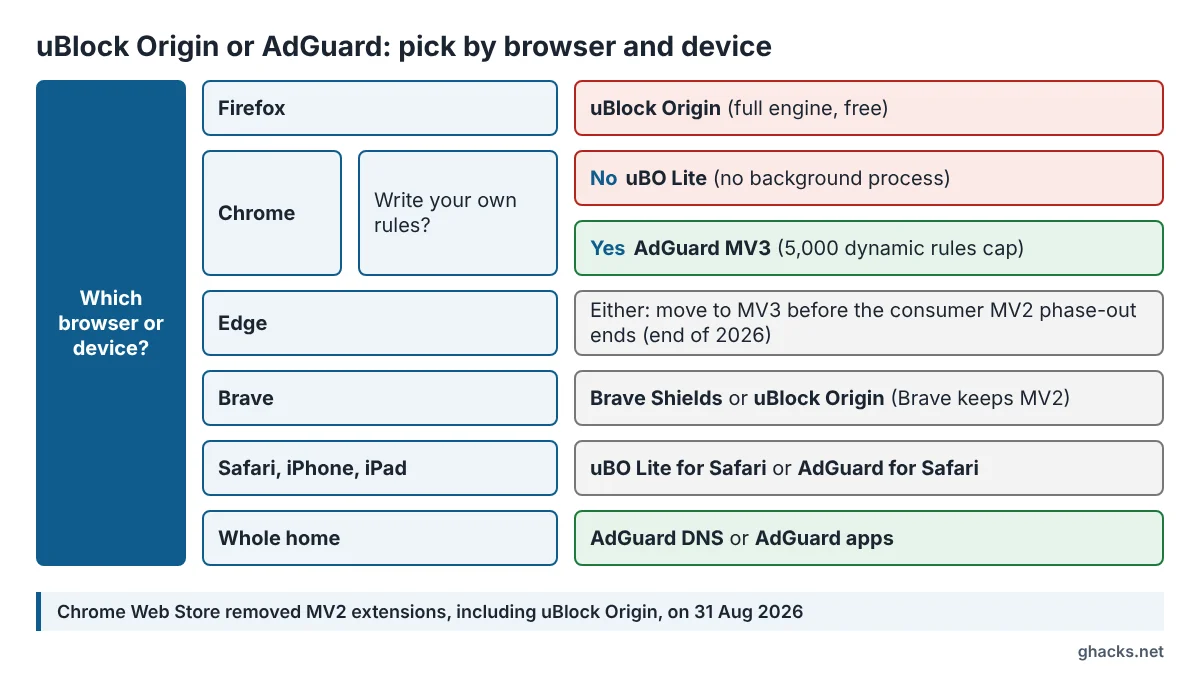
This page compares both ad blockers per browser and device, with the Manifest V3 limits each vendor documents, a platform grid and a decision matrix. uBlock Origin has a long history on Firefox, where it became the most popular Firefox add-on, while AdGuard grew from a Windows app into a family of apps, extensions and a DNS service. The comparison contains no affiliate links.
Checked against the uBlock Origin and uBO Lite GitHub documentation, the AdGuard Knowledge Base, AdGuard's product pages and Brave's documentation on 19 November 2026; not tested on our hardware.
Quick verdict by setup
uBlock Origin wins wherever it can still run its full version, and AdGuard wins wherever you need blocking beyond one browser. The table gives one pick per common setup.
| Setup | Pick | Why |
|---|---|---|
| Firefox (desktop or Android) | uBlock Origin | Full engine with dynamic filtering and live filter list updates, free |
| Chrome, set and forget | uBlock Origin Lite | No permanent background process, sensible defaults, free |
| Chrome, many custom rules | AdGuard MV3 extension | User rules, filtering log, Quick Fixes filter between releases |
| Edge | Either, plan for MV3 | MV2 support ends for consumers by the end of 2026 |
| Brave | Brave Shields, or uBlock Origin | Brave keeps supporting uBO and AdGuard MV2 |
| Safari, iPhone, iPad | uBO Lite or AdGuard for Safari | Both offer Safari versions; AdGuard also has an iOS app |
| Every device and app at home | AdGuard apps or AdGuard DNS | Filter outside the browser, which no extension can do |
uBlock Origin vs AdGuard at a glance
uBlock Origin and AdGuard both block ads and trackers with largely the same core lists, EasyList and EasyPrivacy; they differ in who builds them, where they run and how much they cost. uBlock Origin is a volunteer project by Raymond Hill (gorhill), licensed under GPL-3.0, and its README describes it as free, open source and "for users by users", with no donations sought. AdGuard is a commercial company: its browser extensions are free, while its standalone apps for Windows, Mac, Android and iOS are sold under licenses.
| Attribute | uBlock Origin and uBO Lite | AdGuard |
|---|---|---|
| Developer | Volunteer project, GPL-3.0 | Commercial company |
| Chrome | uBO Lite only (MV3) | MV3 extension, primary Chrome version |
| Firefox | Full uBlock Origin (desktop and Android) | Extension, MV2 still works |
| Beyond the browser | None | Apps for Windows, Mac, Android, iOS; AdGuard DNS |
| Custom rules | Yes (uBO); custom filters in uBO Lite | User rules, capped in MV3 |
| Cost | Free | Extensions free, apps paid |
Can you still use uBlock Origin on Chrome?
No, uBlock Origin is no longer installable on Chrome: Google removed all remaining Manifest V2 extensions from the Chrome Web Store on August 31, 2026, a date the uBlock Origin README links to in Google's own timeline. According to AlternativeTo's report, copies already installed on Chrome 138 or earlier can stay, but they receive no store updates and cannot be reinstalled once removed. AdGuard's old MV2 extension was removed in the same purge.
Chrome users have three ways forward, which ghacks covered when Google first started disabling uBlock Origin in Chrome:
- Install uBlock Origin Lite, the official MV3 sibling from the same project.
- Install the AdGuard browser extension, which has used MV3 on Chrome since September 2024.
- Switch to Firefox for the full uBlock Origin, or to Brave, which keeps MV2 support for uBO and AdGuard.
What changed with Manifest V3
Manifest V3 replaces the old blocking API with declarativeNetRequest: the extension hands the browser a fixed set of rules, and the browser does the blocking. That makes extensions lighter, but it caps the number of rules and means built-in filter lists change only when a new extension version passes store review. Both uBO Lite and AdGuard live with these limits.
Edge, Opera and Brave
Edge still runs MV2 extensions for now. AdGuard's summary of Microsoft's plan says warnings began in August 2026 in Edge Canary, Dev and Beta, the consumer phase-out is expected to finish by the end of 2026, and managed enterprise installs get time into early 2027. AdGuard's Edge listing is still MV2, and the company says its MV3 build will reach the Edge store before the phase-out hits regular users; until then, Edge users can install the Chrome Web Store version. For uBO on Edge, see the update that switched uBlock Origin for Edge to uBO Lite. AdGuard lists Opera as moving to MV3 as well. Brave has committed to continued support for uBlock Origin, AdGuard, NoScript and uMatrix as MV2 extensions, and its built-in Shields block ads and trackers without any extension.
uBlock Origin Lite vs AdGuard MV3 on Chrome
uBO Lite is the lighter, install-and-forget choice; AdGuard's MV3 extension is the more configurable one. uBO Lite filters declaratively and, per its README, uses no CPU or memory of its own while blocking, because its service worker wakes only when you open the popup or options. AdGuard offers more settings, a filtering log and user rules, but runs inside tighter documented caps. The table lists what each vendor documents.
| Capability | uBO Lite | AdGuard MV3 |
|---|---|---|
| Default lists | uBO filters, EasyList, EasyPrivacy, Peter Lowe's list | AdGuard's own filters, up to 50 enabled at once |
| Built-in list updates | Only with extension updates | Only with extension updates; Quick Fixes filter in between |
| Custom lists by URL | External list subscriptions added in 2026 | Yes, update independently of releases |
| User rule cap | Browser DNR limits (30,000 guaranteed, 330,000 shared) | 5,000 dynamic rules, including 1,000 regex |
| Generic cosmetic filtering | Only in Complete mode | Handled by its filters, no separate mode |
| Element hiding tool | Create a custom filter tool in the popup | Element-blocking tool |
| Filtering log | Not part of the documented feature set | Yes, shows an assumed rule, not the exact match |
| Cookie self-destruct | No | Removed in MV3 |
Filtering modes in uBO Lite
uBO Lite sets filtering strength per site with a slider in its popup. Optimal mode runs the default rulesets, about 17,000 DNR rules according to the FAQ, and Complete mode adds generic cosmetic filtering for sites where leftover ad frames remain. Moving the slider fully to the left turns uBO Lite off for that site. uBO Lite asks for broad host permissions by default to filter everywhere, but it can run with reduced permissions if you prefer.
What AdGuard lost in MV3
AdGuard's Knowledge Base lists the trade-offs plainly. Stealth mode became Tracking protection and lost first-party and third-party cookie self-destruction, because cookie lifetimes cannot be set with declarative rules. Auto-update and manual update checks for filters are gone, so the Quick Fixes filter should stay on. Phishing and malware protection moved into the Security filters in the Filters tab. If you exceed 5,000 dynamic rules, AdGuard applies allowlist entries first, then user rules, then custom filters, and silently drops the rest.
uBlock Origin vs AdGuard on Firefox
On Firefox, uBlock Origin is the stronger choice for most users: its README says it "works best" on Firefox, where it keeps dynamic filtering, per-site switches, CNAME uncloaking and filter lists that update without a new release. AdGuard's extension also runs on Firefox, and its MV2 version still works there, so it is a capable alternative, but it adds little for someone already running uBO. The real Firefox advantage is uBO's precision tools, from per-site switches to the element picker that lets you remove any element from a page permanently. uBO also installs on Firefox for Android, which gives Android users the full engine without a system-wide app.
Safari, iOS and Android
AdGuard covers more mobile surfaces than the uBlock Origin family, while uBO Lite and Firefox fill the main gaps.
Safari and iOS
uBO Lite is available for Safari through the App Store, a release ghacks covered when uBO Lite arrived on iOS, iPadOS and macOS. AdGuard offers a free AdGuard for Safari extension and a separate AdGuard for iOS app. On Apple devices, both work within Safari's content blocker model, so neither reaches the depth of uBO on Firefox.
Android
On Android, the choice is between uBlock Origin inside Firefox for Android, which protects only that browser, and AdGuard for Android, which filters traffic system-wide, including other browsers and apps. AdGuard DNS is the lightest option and needs no app at all.
AdGuard apps and AdGuard DNS: blocking beyond the browser
AdGuard's apps for Windows, Mac and Android filter traffic system-wide, so browser extension rules such as Manifest V3 do not limit them; AdGuard DNS blocks ad and tracker domains for every device that uses it. uBlock Origin has no equivalent outside the browser. AdGuard DNS has a free Starter plan and paid Personal and Team plans, and ghacks has a detailed look at AdGuard DNS and how it filters.
| Layer | Blocks | Cannot do |
|---|---|---|
| Browser extension | Ad requests, trackers, page elements in one browser | Protect other browsers or apps |
| AdGuard app | Ads and trackers across browsers and apps on one device | Protect devices without the app |
| AdGuard DNS | Ad and tracker domains on every device using it | Hide page elements or ads served from the site's own domain |
Can you run uBlock Origin and AdGuard together?
Yes for DNS plus an extension, no for two extensions. DNS filtering works below the browser, so pairing AdGuard DNS with uBlock Origin or uBO Lite simply removes some domains before the extension sees them. Two content blocker extensions in one browser are a different matter: the uBO Lite FAQ advises against using other content blockers alongside it, because overlapping rules make breakage harder to diagnose and fix.
Cost: free vs paid
uBlock Origin, uBO Lite and the AdGuard browser extensions cost nothing; AdGuard charges for its standalone apps and its paid DNS plans. AdGuard's app licenses come as a Personal license for 3 devices or a Family license for 9 devices, each billed yearly or as a one-time lifetime purchase; check AdGuard's license page for current prices in your region. If you only need ads blocked in a browser, every option on this page is free.
Which should you choose?
Choose uBlock Origin if you use Firefox, uBO Lite if you use Chrome and want zero maintenance, and AdGuard if you want rules, logs or protection across several devices.
- Firefox users: uBlock Origin. It is the only option on this page with the full engine and live list updates.
- Chrome users who never open settings: uBO Lite in Optimal mode, switched to Complete on sites that still show ad frames.
- Chrome users who write rules: AdGuard MV3, while you stay under 5,000 dynamic rules.
- Edge users: keep your current blocker until the phase-out warning appears, then move to uBO Lite or AdGuard MV3.
- Households with phones, tablets and TVs: AdGuard DNS for the network, plus uBO or uBO Lite in the browsers.
- Zero budget: uBlock Origin on Firefox, or uBO Lite on Chromium browsers.
FAQ
Is uBlock Origin better than AdGuard?
On Firefox, yes for most users, because uBlock Origin keeps its full engine there. On Chrome, uBlock Origin is no longer available, and the choice is between uBO Lite for simplicity and AdGuard for control.
Is AdGuard free?
The AdGuard browser extensions, including AdGuard for Safari, are free and need no registration. The standalone apps for Windows, Mac, Android and iOS require a paid license, and AdGuard DNS has a free Starter plan next to paid plans.
Is uBlock Origin Lite as good as uBlock Origin?
No. Its own FAQ calls uBO Lite a lighter blocker for install-and-forget users rather than an MV3 port of uBlock Origin, and it lacks dynamic filtering, CNAME uncloaking and several filter options.
Does AdGuard's MV3 extension still update its filters?
Its built-in filters update only when a new extension version is published. The Quick Fixes filter uses dynamic rules to fix new ads and broken sites between releases, and custom lists added by URL update on their own.
Related: best Firefox add-ons, how Brave's content blocker works, enable secure DNS in Chrome, Edge and Firefox